kirrwed
Inspiring
August 25, 2012
Answered

Width Tool disabled/doesn't work - why not?

  • August 25, 2012
  • 5 replies
  • 46376 views

I have a simple shape that doesn't work with the width tool. I have other shapes in my doc that work fine, even ones with gradient fills. What is wrong with this one shape?

Here is the image.

http://www.mediafire.com/?q3dosbmlfnstfcf

    Correct answer saibint16521341

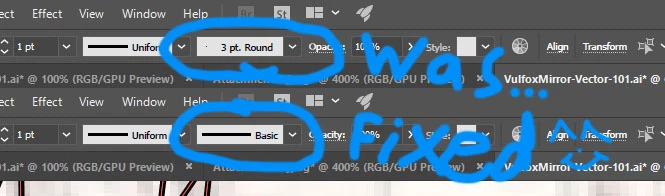
    I figured out that if the line's "Brush Definition" is converted to "basic," I could then use the Width Tool no problem.

    5 replies

    Inspiring
    March 25, 2021

    Incorrect answer. The question is "HOWTO ALIGN A VARIABLE WIDTH STROKE".  The basic profile and align are available, but not at the same time as a custom, variable width profile. I have the same kinds of shapes (not grouped, not mere paths) and sometimes the strokes are alignable, other times the variable width box is greyed out if aligned to outside. The align button is greyed out if the vairable width profile is selected.

    Monika Gause
    Community Expert
    Community Expert
    March 25, 2021

    Please post screenshots.


    That is not an incorrect answer, it only obviously doesn't apply to your problem.

    saibint16521341
    saibint16521341Correct answer
    Participant
    February 5, 2018

    I figured out that if the line's "Brush Definition" is converted to "basic," I could then use the Width Tool no problem.

    rickyv87419461
    Participating Frequently
    April 12, 2019

    Can I ask how you brought up that drop down menu w the basic option in it? mine only shows the ”uniform” drop down menu

    Monika Gause
    Community Expert
    Community Expert
    April 12, 2019

      schrieb

    Can I ask how you brought up that drop down menu w the basic option in it? mine only shows the ”uniform” drop down menu

    Please show us a screenshot.

    jourydellaert
    Participant
    September 28, 2017

    I also have the same issue... and what I found out recently is that I can't seem to adjust the width of a stroke when it's a brush.

    For example, if you draw a circle with the pen-tool, you will be able to adjust the width but when you draw a circle with the brush-tool, you can't adjust the width. So it might be interesting to draw shape with the pen-tool from now on.

    Maybe this solves your issue

    Monika Gause
    Community Expert
    Community Expert
    September 28, 2017

    jourydellaert  schrieb

    I also have the same issue... and what I found out recently is that I can't seem to adjust the width of a stroke when it's a brush.

    For example, if you draw a circle with the pen-tool, you will be able to adjust the width but when you draw a circle with the brush-tool, you can't adjust the width. So it might be interesting to draw shape with the pen-tool from now on.

    The question has already been solved in #3 (5 years ago)

    Your issue is different. By drawing with the brush tool you automatically assigned a calligraphy brush. You can easily remove that stroke. But instead of using the brush tool you could simple use the pencil tool and it wouldn't happen.

    jourydellaert
    Participant
    September 28, 2017

    My apologies Monika, I didn’t look any further into this issue, I thought it was similar...

    thanks for the advice btw but when I draw with a tablet, I can’t draw freely with the Pentool right? I’ll have to click and drag to make arcs and lines. Or is there a way to do this?

    kirrwed
    kirrwedAuthor
    Inspiring
    August 25, 2012

    Okay, so it seems to be working once I aligned stroke to center instead of to inside. Now that I've used the width tool on it, align stroke to "inside" and "outside" are disabled. I'm guessing that's the problem. I welcome anyone to confirm that theory since I'm not that versed in the newer Illustrators yet.

    tromboniator
    Community Expert
    Community Expert
    August 25, 2012

    With the Width Tool you can move any part of the stroke to either side of the path at will, so "inside" and "outside" don't mean much. If you need part of a stroke to go farther "inside than the existing path, you can add points and move that part of the path.

    You can't apply a stroke to the "inside" or "outside" of an open path, either.

    I hope this makes sense - my eyelids are drooping.

    Peter

    rcraighead
    Legend
    August 25, 2012

    Silly question, but have you assigned a stroke to the shape?

    kirrwed
    kirrwedAuthor
    Inspiring
    August 25, 2012

    Yes. It's a 1 pt stroke, dark brown.