


June 13, 2018
Answered

Width tool problem

  • June 13, 2018
  • 1 reply
  • 1744 views

Hi, first of all I have to thank you for your intention to help me, and apologize for my low level of English.

Since yesterday I have a problem that I cannot solve. Making two arms symmetrically, I used the width tool. Once I finished them, I wanted to expand the appearance to make them manipulate both arms and what you see in the picture happened, everything got a little out of control. The manipulable points are gone and I need them. It's like the arm stopped being a stroke, became a shape.
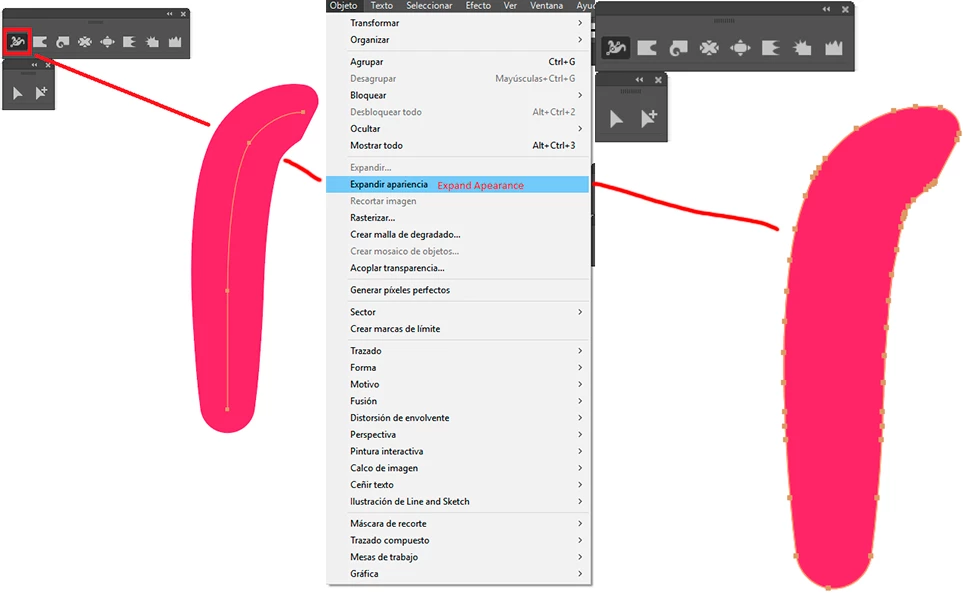
And no, this is not the problem. I solved this by duplicating the arm I could manipulate and manually placing it where I wanted to. The problem is when passing the file to After Effects. Although the layer of the arm in illustratior appears with its joints, in After Effects it appears in the same way as my previous problem.
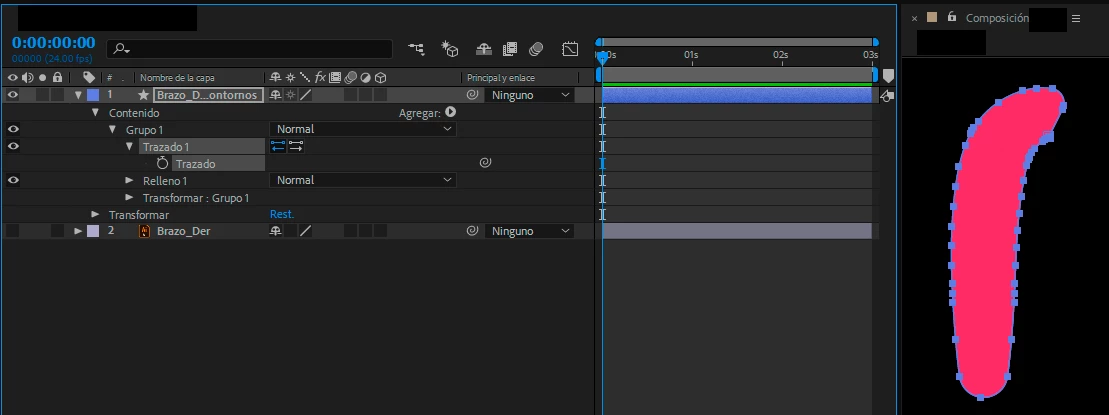
I'm not sure what solution to give to this, but I need to be able to use my arm as a normal stroke. Maybe not using the width tool is a solution, but I don't want to go through there until I know there's no other option. I hope someone who sees this can help me. If I don't make myself clear, please be free to ask whatever you want. Thank you!

This topic has been closed for replies.
Correct answer Myra Ferguson

After Effects won't recognize a variable width profile from Illustrator (whether it's a preset or a custom one created with the Width Tool). Here's a video with an approach that help for drawing your stroke inside After Effects CreativeCOW

1 reply

Myra Ferguson
Community Expert
Myra FergusonCommunity ExpertCorrect answer
Community Expert
June 13, 2018

After Effects won't recognize a variable width profile from Illustrator (whether it's a preset or a custom one created with the Width Tool). Here's a video with an approach that help for drawing your stroke inside After Effects CreativeCOW

June 13, 2018

Wow... I was afraid of that. Thank you very much for the clarification.

Thanks for the tutorial you recommend, but it doesn't work for me to move a character's arm. Also, there are properties in that version that are no longer available in this year's version.

With today's tools, how can I draw a trace from After Effects and give it width in some of its parts, without losing the vectors? I don't know if you understand me-

I hope you can help me.

Myra Ferguson
Community Expert
Community Expert
June 13, 2018

Are you set on using After Effects? If so, I can move this thread to the After Effects forum. An alternative would be to use Animate CC. You can make paths with strokes of variable widths and animate them in Animate.