

Kernzy
Inspiring
June 18, 2024
Answered

Window interrupting Automation

  • June 18, 2024
  • 2 replies
  • 444 views

Hey y'all!


I'm looking to create a process that utilize external methods like Node.JS to monitor folders and execute scripts in Illustrator. Below was my first test and I ran into a roadblock almost instantly. Just using Python, I ran into the popup below.
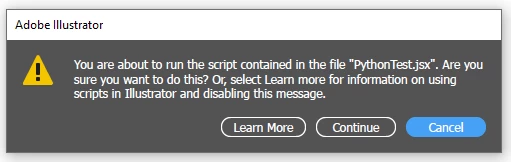


I tried to silence the popup using 'app.userInteractionLevel = UserInteractionLevel.DONTDISPLAYALERTS;' and that does not seem to be helping. Anyone have any ideas on how to bypass this window?

Python:


import subprocess
subprocess.run(['C:\\Program Files\\Adobe\\Adobe Illustrator 2024\\Support Files\\Contents\\Windows\\Illustrator.exe', 'C:\\Program Files\\Adobe\\Adobe Illustrator 2024\\Presets\\en_US\\Scripts\\PythonTest.jsx'])


Extendscript:


app.userInteractionLevel = UserInteractionLevel.DONTDISPLAYALERTS;
alert('Hello world');
app.userInteractionLevel = UserInteractionLevel.DISPLAYALERTS;


This topic has been closed for replies.
Correct answer jduncan

You need to set the below preference before running the script for each machine...

app.preferences.setBooleanPreference("ShowExternalJSXWarning", false);


I tested it on a Mac with the below scripts and works just fine.

# test.py

import subprocess

prog = "/Applications/Adobe Illustrator 2024/Adobe Illustrator.app"
jsx_file = "/Users/jbd/Desktop/test.jsx"

subprocess.run(["open", "-a", prog, jsx_file])


// test.jsx

alert("hello from jsx!")


2 replies

jduncan
Community Expert
jduncanCommunity ExpertCorrect answer
Community Expert
June 18, 2024

You need to set the below preference before running the script for each machine...

app.preferences.setBooleanPreference("ShowExternalJSXWarning", false);


I tested it on a Mac with the below scripts and works just fine.

# test.py

import subprocess

prog = "/Applications/Adobe Illustrator 2024/Adobe Illustrator.app"
jsx_file = "/Users/jbd/Desktop/test.jsx"

subprocess.run(["open", "-a", prog, jsx_file])


// test.jsx

alert("hello from jsx!")


Inspiring
June 18, 2024