

Known Participant
April 11, 2022
Resuelto

Workflow: Is there a faster way to change the color of a layer on multiple images randomly

  • April 11, 2022
  • 2 respuestas
  • 3595 visualizaciones

That may or may not have made sense in terms of a title, but let me explain. I am working on a project that has a component of which that deals with HEX color. Let's say I have 100 images. The vector I am using has only 2 layers. One of those layers I need to change the color to a random HEX color, and put it on a gradient background. I initially thought maybe a photoshop action but it has an issue with the random nature of the color. I also search and found scripts that will randomly change the color of multiple pieces of an image (like dots, shapes etc,) but nothing that comes close to what I am trying to accomplish. There is a possibility I am thinking beyond the capabilities of the software at this point, but I figured I would try one last avenue to see if anyone had any other ideas I haven't googled yet. My apoligies if I am not asking this question the right way. Basically I need a script of workflow that completes this for over 100 images. Thank you.
Este tema ha sido cerrado para respuestas.
Mejor respuesta de Kurt Gold

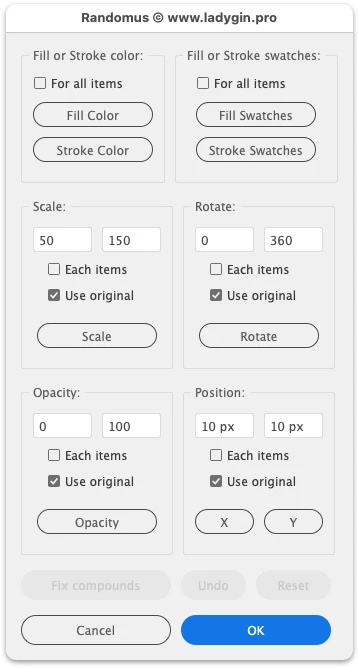
There is a beautiful script called "Randomus", provided by Alexander Ladygin. Among other things it may do exactly what you are looking for.


See: Randomus


2 respuestas

Kurt Gold
Community Expert
Kurt GoldCommunity ExpertRespuesta
Community Expert
April 12, 2022

There is a beautiful script called "Randomus", provided by Alexander Ladygin. Among other things it may do exactly what you are looking for.


See: Randomus


Known Participant
April 12, 2022

Thank you I'll have to check that out. I saw it in my initial research but assumed it was for something other than what it is I am trying to do. Reading the docs there may be a way to configure it to my liking. Appreciate the resource my friend

R Ninja
Kurt Gold
Community Expert
Community Expert
April 12, 2022

You may want to trust me. Alexander's script will do what you are going to do.


You may have to experiment a bit with it.


CarlosCanto
Community Expert
Community Expert
April 11, 2022

can you share a sample file?

Known Participant
April 11, 2022

Each on of these images has two layers. The mouth/eyes (1), and the body (2). Instead of going through hundreds of them I am looking of way to randomly generate a unique HEX color for the entire batch. Just changing the body (2) to a random HEX. 

R Ninja
femkeblanco
Legend
April 11, 2022

It sounds doable, but there are ambiguities. (1) You presumably mean vector graphics, not "images". Are these 100 vector graphics in one file or 100 files? (2) You presumably mean path, not "layer". To clarify this, and to see the anatomy of your vector graphic, can you show your fully expanded Layers panel (this is the reason a sample file was ask for)? And (3) about colors: Do you want the script to select a random color form a pre-defined swatch? Or do you want the script to generate a completely random RGB color?