dennisjonon
Participating Frequently
June 21, 2017
Answered

Would this be special type of stroke?

  • June 21, 2017
  • 1 reply
  • 510 views

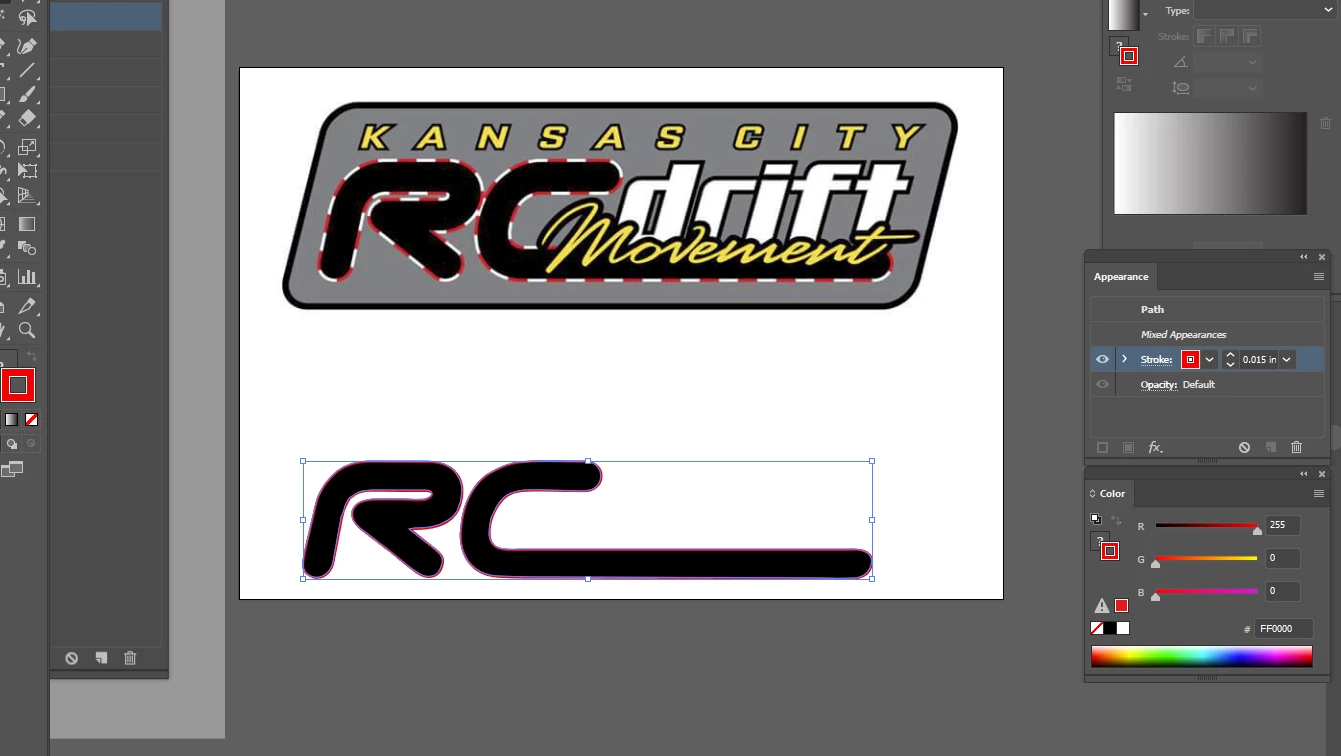
Hey all, I need to get a stroke, or whatever it may be, to get the R and the C of this logo outline finished.  I can not figure out how I would make that RC Car/GoCart/Formula track outline look-a-like.  If anyone could help me that would be awesome!

Below is the picture, i am making it into vector for the owner...

Thank you!

D

    This topic has been closed for replies.
    Correct answer Kris Hunt

    heres the otther pic


    The problem is that you've got two shapes with different appearance attributes selected. You could solve this in a couple different ways. First, select both shapes. Then, either:

    1. Select Clear Appearance from the Appearances panel menu, or

    2. Hit Command-8 to make them a single compound path.

    Either way, you'll end up with a single appearance as a starting point. You can then add as many strokes and fills as you like.

    1 reply

    Doug A Roberts
    Community Expert
    Community Expert
    June 21, 2017

    only somewhat special. in the appearance palette, have a path with two strokes, one of them dashed:

    dennisjonon
    Participating Frequently
    June 21, 2017

    I still cannot figure it out coming from a different design program.  Here's a link to the picture i am replicating...

    I hope this is better help.

    Thank you.

    Kris Hunt
    Legend
    June 21, 2017

    1. Select your path and give it a red stroke

    2. Look at your Appearance palette. It has a single, red stroke applied to it.

    3. Add a new stroke to the path by clicking the Add New Stroke button in the lower left corner.

    4. Style the new stroke however you want (e.g., white, dashed)