
Participant
June 5, 2024
Answered

Wrong total width and height when multiple objects selected

  • June 5, 2024
  • 1 reply
  • 371 views

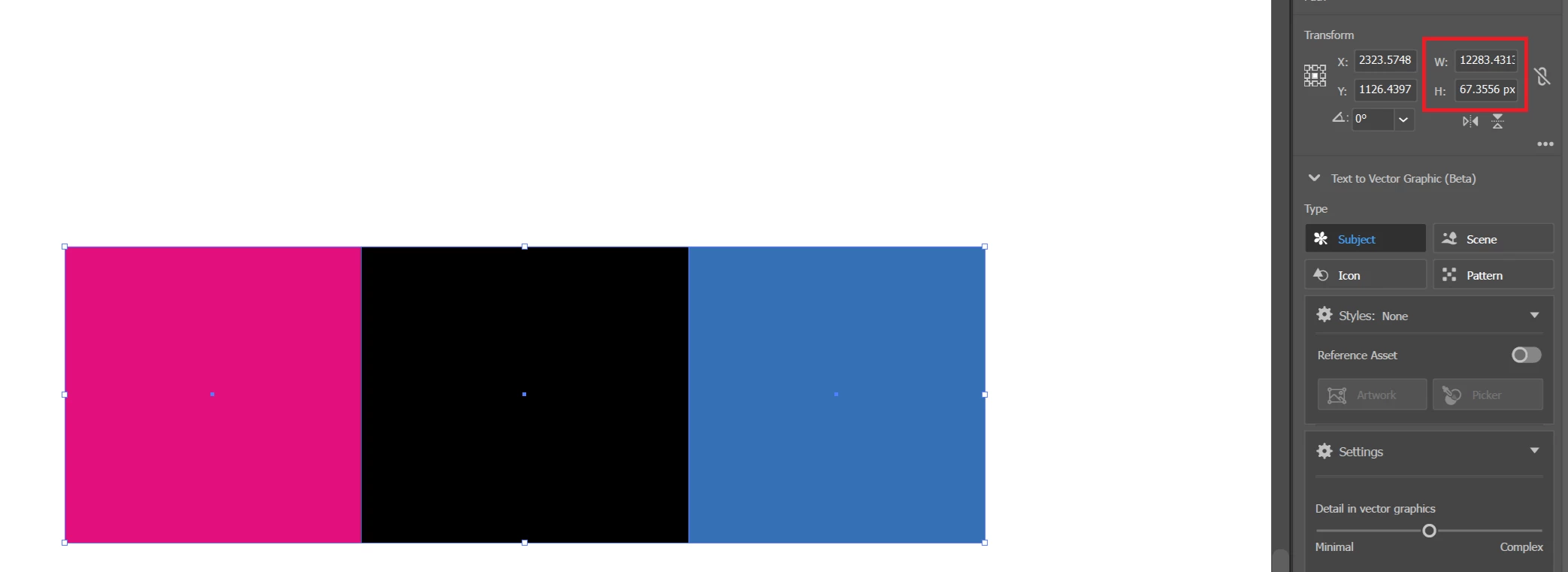
In the following screenshot, there are 3 squares each of dimension 50px x 50px.
When I select the 3 objects, in the transform pane, it shows totally wrong width of 12283.4313px and height of 67.3556px.
The correct dimensions should be 150px width & 50px height when the 3 are selected.

Is this a bug? or there's something I can do to fix this?

I'm using Adobe Illustrator 24.4.1.
 

This topic has been closed for replies.
Correct answer omareg94

The problem is that there was a non-visible guide that I was selecting with the 3 objects and I didn't notice.

The issue is now solved by not selecting these guides.

1 reply

Ton Frederiks
Community Expert
Community Expert
June 5, 2024

Did you try to restart your machine? Or reset preferences?

https://helpx.adobe.com/illustrator/using/setting-preferences.html


omareg94AuthorCorrect answer
Participant
June 5, 2024

The problem is that there was a non-visible guide that I was selecting with the 3 objects and I didn't notice.

The issue is now solved by not selecting these guides.

Ton Frederiks
Community Expert
Community Expert
June 5, 2024

Thanks for reporting the resolution.