Known Participant
December 2, 2013
Question

WYSIWYG Vector outliner script

  • December 2, 2013
  • 3 replies
  • 1236 views

I have spent a fair amount of time with Illustrator over the years manually expanding appearances, outlining strokes, combining paths, etc. to get two-color art expanded into flat, outlined vectors. Doing this once for one piece of artwork isn't that big of a deal, but doing it for many pieces of artwork is bad in two ways: (1) it takes a long time, and (2) it makes the artwork uneditable unless I save a duplicate, which becomes a pain to track mentally. I'd like to keep an illustrator file of ~100 artboards fully editable, and then simply run a script to do the following any time I need to save out pngs from artboards, or otherwise export the art. For example:
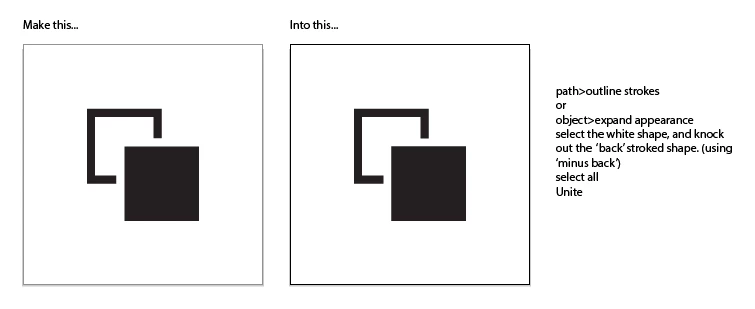
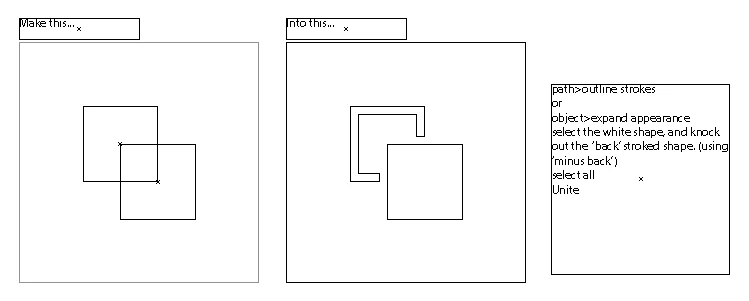
If the images are hard to understand, I'm simply trying to take art that is black and white in appearance, and make black shapes out of the black parts. The script would create a separate .ai file so my original doesn't get expanded. Anyone seen anything like this? If not, any ideas about how to get there? I have little to no scripting experience.

Petros_

This topic has been closed for replies.

3 replies

fruityth1ng
Inspiring
December 7, 2013

My first question would be "Why?" - but my first answer would be:

Have a look at invisible strokes. They can be used to "knock out" things in the back, if you group them and set the *group*'s transparency to "knockout group" (You can save this to a style and apply that).

I wrote a thing on dribbble explaining how to use this for a single path inner shadow effect: http://dribbble.com/shots/878685-Illustrator-single-style-live-inner-shadow?list=users

Good luck!

pixxxelschubser
Community Expert
Community Expert
December 2, 2013

Not everything is possible with scripting. But you still have a few options.

- save as with output flattening in pre AI9 format (and reopen this new file)

- or depending on the structure of your files: create an action on which does what you want and call the action via script

Petros_Author
Known Participant
December 2, 2013

Hmm, can a script see whether two objects are overlapping? I guess even if it could it would still need to make a decision about when to use an action for uniting objects and when to use an action for subtracting objects. Above my paygrade, but thanks for the sounding board!

Inspiring
December 2, 2013

Hi Petros

The result you want to reach, from the origin you have, cannot be accomplished via script. The "Pathfinders" operations, like minus back, cannot be written via JavaScript.

Best Regards

Gustavo.

Petros_Author
Known Participant
December 2, 2013

Bummer! It's a pretty mindless process — expanding graphics — which made me think it would be a good thing for a computer to handle on it's own. Wonder why those functions aren't accessible via script?

Inspiring
December 2, 2013

Just there´s no methods or properties avaliable to work with pathfinders. Yes, there´s the ability to combine 2 paths into a Compound Path, but this is not your case.

Best Regards

Gustavo.