


nex253
Participant
April 18, 2026
Question

文字输入有问题

  • April 18, 2026
  • 2 replies
  • 59 views

我最近将illustrator和photoshop都升级到了最新版,但是在illustrator的文本图层输入文本时,每当我在第一个字符后面或者前面加入空格,光标便会往后延伸一大截,延伸出的这段距离便无法删除,我不得不直接删除整个文本图层重新开始编辑文本,我甚至不敢再往第一个字符前后敲空格,这又会让问题再次出现

我的photoshop也有这个问题,但它更严重,这直接造成整个软件无响应卡死。

我该怎么做才能解决这个问题?
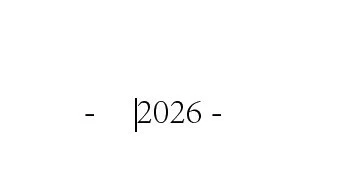
光标左边的空格无法删除,这直接造成我的应用程序卡死


    2 replies

    nex253
    nex253Author
    Participant
    April 20, 2026

    In addition, I found that it's not just the "-" symbol. When I input "*" and "+", the same problem occurs

    Anubhav M
    Community Manager
    Community Manager
    April 20, 2026

    Hello ​@nex253 


    I’m sorry to hear about your experience. Would you mind confirming the exact version of the OS/Illustrator installed, sharing a brief screen recording of the problem, and checking if the problem is replicable in Safe Mode (Windows / macOS) so we can better assist you?

    Also, try reverting to an earlier version of Illustrator (https://helpx.adobe.com/download-install/apps/download-install-apps/creative-cloud-apps/install-previous-versions-creative-cloud-apps.html) and share your observations.
     

    Looking forward to hearing from you.
    Anubhav

    nex253
    nex253Author
    Participant
    April 20, 2026

    Thank you for your reply. I am using Windows 10 22H2 as my operating system, Illustrator version V30.3, and Photoshop version V27.5. After attempting to revert the Illustrator version to V30.0, the issue persisted. I am not sure if it is a problem with my computer. How can I resolve it? I have uploaded a screen recording as an attachment.

    nex253
    nex253Author
    Participant
    April 20, 2026
