




Question
Beta Build 30.3.0.22 Release Notes
Hello,
The latest Beta Build 30.3.0.22 is now available in CCD. We have below fixes in this build:
- Turntable:
Turntable Just Got a Major Upgrade :
- We’ve supercharged the Turntable experience to give you more control, better quality, and a smoother workflow.Pristine Output Quality: We’ve overhauled the rendering engine. Expect sharper, cleaner results that require less manual cleanup.
- Smart Color Snapping: Generated views now automatically snap to your existing palette, ensuring perfect consistency with your original artwork.
- Now Supporting Images: Turntable isn't just for vectors anymore. You can now apply rotation magic to raster images directly on the canvas.
- Explore with "Insert Next": Stuck on a perspective? Use the new Insert Next feature to rapidly visualize and generate alternative angles instantly.
- Total Editability: Need to tweak the details? Simply Ungroup the Turntable asset to convert it into static, fully editable paths and shapes.
2. Atboard color enhancement
We have enabled global and spot color for artbaod background color.
3. Prompt based search using natural language
We are introducing Prompt based search in this beta release - an easier, more intuitive way to discover fonts inside the Discover More tab. This understands descriptive, natural language queries and returns relevant fonts that match your creative intent in the Related fonts section.Key Points:
- Available in the Discover More tab - Prompt based search works exclusively in the Discover More tab.
- Matching fonts continues to show results from exact/name-based searches.
- Related fonts now display results based on meaning and intent of the prompt.
- Natural Language & Intent Based Search
Search using descriptive natural language phrases like “suggest some retro fonts”, “suggest fonts for wedding invite”, “show fonts with a bubble like effect” or “handwritten fonts for children playbook”.
Get search results for phrases associated with a mood, intent, or aesthetic, not just font names, helping you discover suitable fonts even when you don’t know the exact font name.
Get search results for phrases associated with a mood, intent, or aesthetic, not just font names, helping you discover suitable fonts even when you don’t know the exact font name.
- Quick Feedback with Thumbs Up / Down
Rate the usefulness of the prompt based search results directly in the panel, using thumbs up or thumbs down. This gives us instant, in-context feedback to improve accuracy in future releases.
- Global Script Support
Search results work across multiple Language and writing systems including Latin, CJK, Indic, Arabic/RTL, improving discoverability for global users.
4. Library Search Enhancements
You can now search for Font Libraries by exact name directly in the search bar within the Libraries tab. This makes it easier to quickly locate and switch to specific Libraries you have created or synced, especially when managing multiple font groups.
5. Fixed UV issue : Illustrator 2026 copy-paste breaks gradient vectors when pasting into InDesign
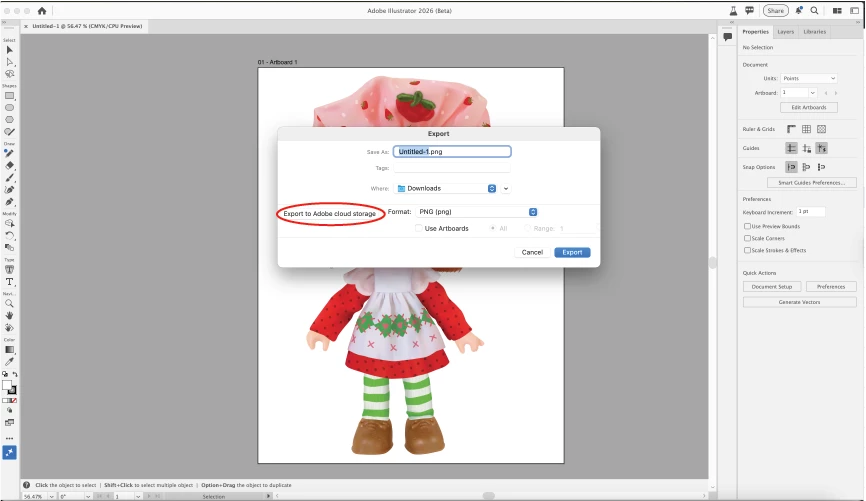
6. Export to Cloud - We have also added Export To Cloud feature to export your assets from Illustrator to the Adobe Cloud. For now, this is only available in File > Export > Export As workflow. Screenshot of Export As dialog attached for reference.
7. Partner Models - You can now access Partner Models in Generative Shape Fill feature, in the latest Beta. To access this:
- Relaunch your latest Beta application.
- Create/add a shape and access generative shape fill via the Context HUD/GSF Modal from properties panel.
- Choose the Partner Model (GPT 4o, Nano banana) from the model drop down, and hit generate.
Do give this a try and share your feedback with us.
8. We also fixed the Text issues faced.
 AdChoices