



Turntable Gets a Major Upgrade in Illustrator Beta - 30.1.65 and above!
Hello everyone,
Get ready for a smarter, faster, and more intuitive creative experience with Turntable!
We’ve overhauled the feature with powerful new UI enhancements and significant under-the-hood quality improvements to streamline your workflow and elevate your results.
The updates are now live in Illustrator Beta (build 30.1.65 or later)!
Revamped UI & Streamlined Workflow
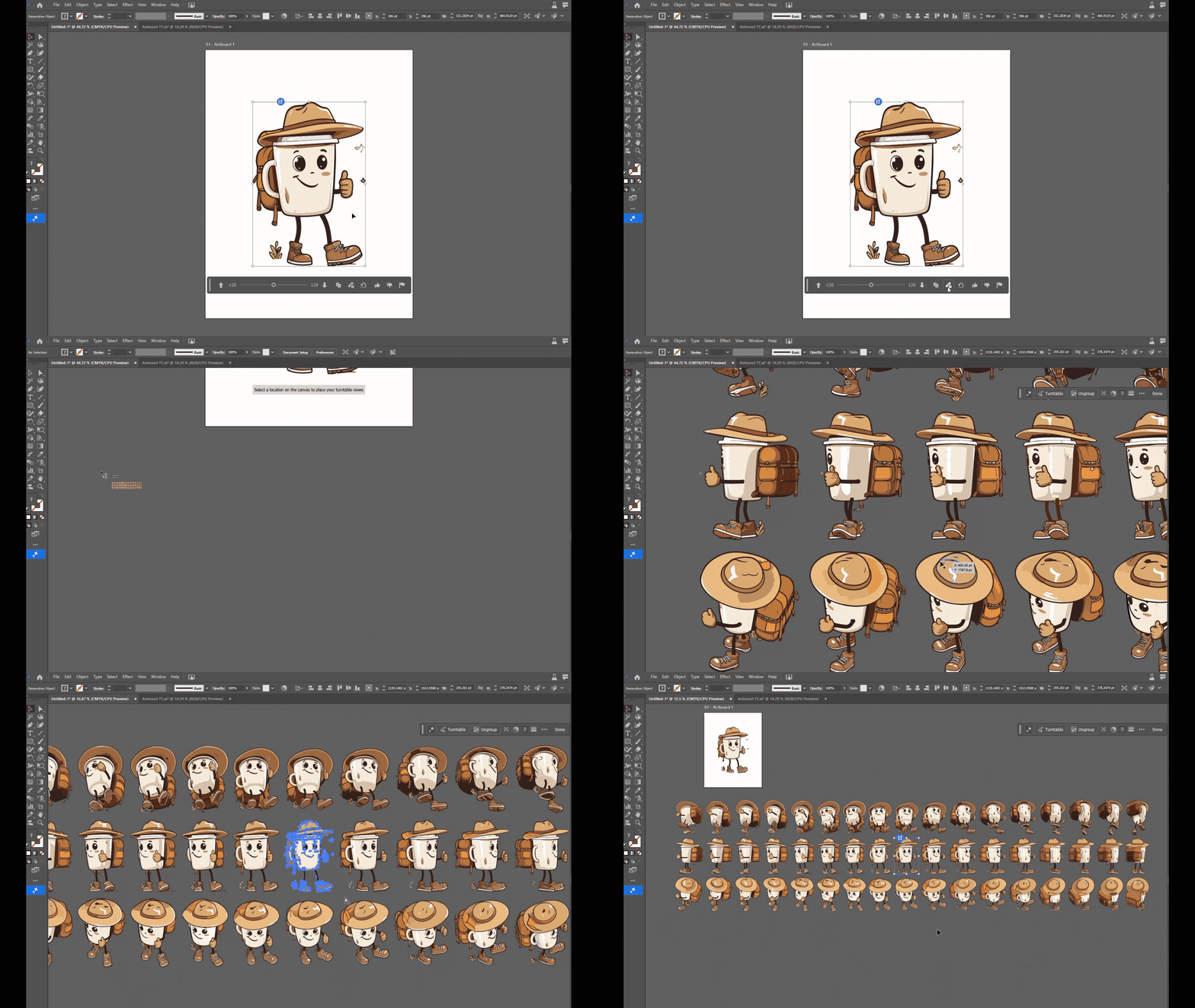
- Improved Discoverability: Turntable now lives right in the contextual task bar. Plus, we’ve added a consolidated Generative AI button — your one-stop hub for all AI-powered features.

- Effortless Selection: No need to group objects anymore! Simply select your art and apply Turntable instantly.
- Smarter Layers & Quick Access: The new generative object improves the Layers panel structure, helping you easily identify and re-access Turntable with one click from the contextual task bar.
- Instant Variations: Preview all generated variations directly in the Properties panel to quickly compare and choose your favorite.
- Cleaner, Faster Experience: We’ve updated the visuals for better clarity and removed the skeleton highlight for a smoother workflow.
- New “Insert All” Button: Add every variation to your project at once — no extra steps needed!
Under-the-Hood Quality Boost
We’ve fine-tuned the engine to produce higher-quality results that stay true to your original artwork:
- Color Snapping: Results now retain colors closer to your source artwork with fewer duplicate shades.
- Perfected Background Removal: Fixed cases where backgrounds weren’t fully cleared.
- Superior Curve Fitting: Enjoy cleaner outlines, fewer anchor points, and more uniform stroke thickness.
- Enhanced Processing: Expect better color and path patching across the board for a more polished final result.
We’d love to hear from you!
Explore this fun feature and speak to us to be a part of the feature's future! Block time with us using the link provided below.
Try out the new Turntable in Illustrator Beta (v30) and tell us what you think:
-
Does the new workflow feel smoother and easier?
-
Are the outputs meeting your expectations in terms of quality and fidelity?
-
What else would make Turntable even more useful for your creative needs?
Your insights help us shape what’s next.
👇 Drop your feedback in the comments below! Feel free to create a new post if you have any issues related to the release or need more tips!
Please refer to the previous update details of Turntable at: https://community.adobe.com/t5/illustrator-beta-discussions/turntable-is-now-available-in-illustrator-beta/m-p/15480595

Have questions? Click 'Reply' below to ask.
Click 'Follow' below to bookmark this post for easy reference.


 AdChoices