
kaid54901490
Participant
Nov 18, 2024 2:06 AM UTC
Answered

Can't type Concrete in Substance Sampler

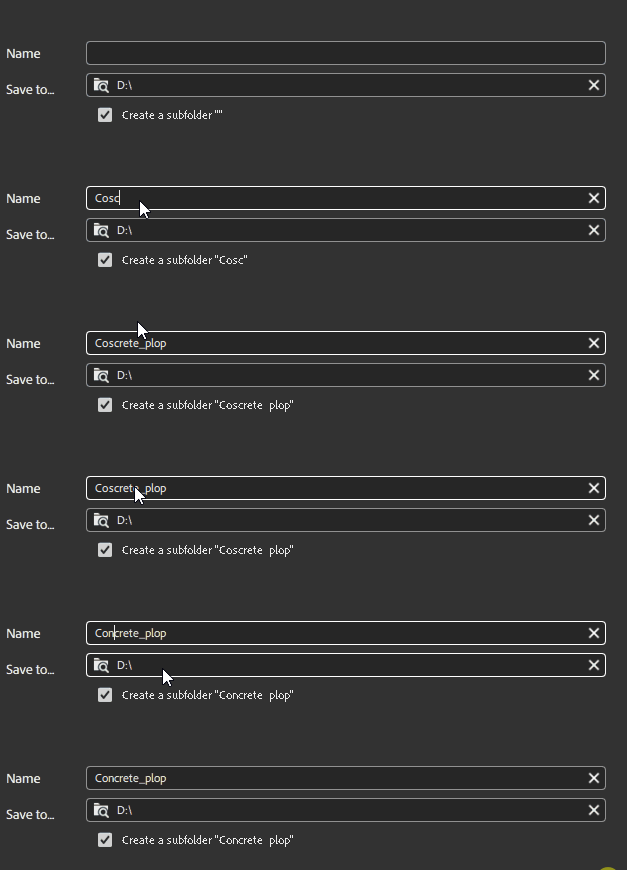
I don't understand this, but if I try to type, and only type, the word "concrete" into the material name in Substance Sampler, it will only type Cocrete. It will not let me type an "n". I can type in "Can" or "Cancrete" But if type in "can", and I delete the a, then it won't let me type an o. This is weird. Why.

This topic is closed to new replies. Start a new post to keep the conversation going.
Guillaume_Substance3D
Guillaume_Substance3DCorrect answer
Community Manager
Nov 25, 2024 3:23 PM UTC

Hello,

Sorry for the inconvenience. This is currently a behavior to avoid forbidden Windows name such as CON COM LPT.

We are aware about the issue. The current workaround should work.


6 replies

Guillaume_Substance3D
Community Manager
Guillaume_Substance3DCommunity ManagerCorrect answer
Community Manager
Nov 25, 2024 3:23 PM UTC

Hello,

Sorry for the inconvenience. This is currently a behavior to avoid forbidden Windows name such as CON COM LPT.

We are aware about the issue. The current workaround should work.


Translate
kaid54901490
Participant
Nov 26, 2024 2:23 AM UTC

Thank you for the information, it is appreciated. I suppose I'll have to use this workaround for the time being. Thanks, Windows!

Translate
Alexandre Becquet
Community Expert
Community Expert
Nov 25, 2024 2:51 PM UTC

Hello, it's look like an issue with your keyboard! But in case, if you add a base material you just need to choose the in presets.
If you share a screenshot or small video to show us, it's better to us to understand the issue 😉 


Translate
Ares Hovhannesyan
Community Expert
Community Expert
Nov 19, 2024 5:22 PM UTC

Where you type it? Saving, filter search?

Translate
kaid54901490
Participant
Nov 26, 2024 2:22 AM UTC

In the top left, to name the material in substance painter itself.

Translate
kglad
Community Expert
Community Expert
Nov 18, 2024 2:09 AM UTC

in the future, to find the best place to post your message, use the list here, https://community.adobe.com/

p.s. i don't think the adobe website, and forums in particular, are easy to navigate, so don't spend a lot of time searching that forum list. do your best and we'll move the post (like this one has already been moved) if it helps you get responses.


<"moved from cc desktop bugs">
Translate