Known Participant
December 7, 2021
Answered

Embroidery troubleshoot for Sampler

  • December 7, 2021
  • 2 replies
  • 3902 views

Hello, 

I imported a PNG file in Substance Sampler,  that was created as a vector file in Illustrator. 

The file was added as an image to bitmap, with a base material in the layer. When I add the embroidery layer, the image shows up, but as a grey shape. The threads or the color is not showing up. 

Does anyone know why this is happening? Attached is a screenshot of the grey shape, but it's supposed to be red/white/blue and with thread. I also attached the PNG file that I exported from Illustrator. 


Thank you 

This topic has been closed for replies.
Correct answer LoryAline

Hi @LoryAline 

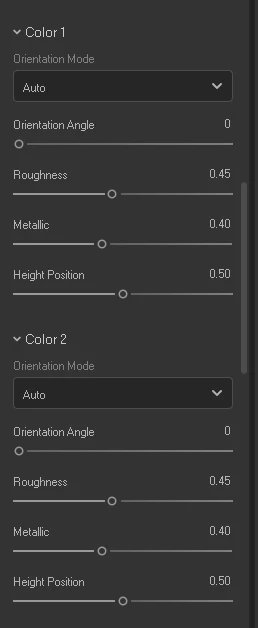
I can't seem to see any colors for colors 1,2,etc. 

But attached is the logfile. Thank you! 


From your log I see that 3D Sampler struggle to acces the asset.
I see you linked a folder from one drive directly (that shouldn't create issues), but 3D Sampler tries to acces assets in a *.zip folder. Wich explains the struggle to read the image.
You might extract the image from the zip to avoid any reading issues.

Also! An update for 3D Sampler is now available (3.1.1) and fixes some bug and performances issue, I invite you to update your software! 

Keep me update!

Regards,

2 replies

Ares Hovhannesyan
Community Expert
Community Expert
December 8, 2021
Minna5C44Author
Known Participant
December 9, 2021

Hi @Ares Hovhannesyan 

Thanks for the link. Yes, I also did the tutorial that is online for using the embroidery filter. 

I imported this same image in another computer and it worked fine, but I'm wondering if I'm doing something different in this computer, or if it's the computer itself. Do you have any thoughts what this issue could be? 


Ares Hovhannesyan
Community Expert
Community Expert
December 9, 2021

It strange that the same image not works fine on different computers. Are the both comps use the same OS?

You can try to reinstall Sampler and see does it helps.

LoryAline
Community Manager
Community Manager
December 8, 2021

Hi,
Make sure the propertie "Color mode" is set on Color Image so the embroidery take the colors of the input image.

If this doesn't correct the issue please share the properties of your embroidery.

Thank you.

Minna5C44Author
Known Participant
December 9, 2021

Hi @LoryAline 

Thanks for your reply! 

It is on color image but it is still grey. 

The layers include base material, png, and the embroidery filter. 

Below are the screenshots of the properties. I tried this on a different computer, and it worked just fine, so I think it has to do with the properties or my laptop, but what do you think? 


LoryAline
Community Manager
Community Manager
December 9, 2021

Can you also check the color 1,2, etc properties. It should have the colors of the image. 
If the colors are correct then it might be an issue with the graphic card, in any case Send us a Log file so we can investigate further and find a solution.

follow those steps to export a logfile:
https://substance3d.adobe.com/documentation/sadoc/exporting-the-log-file-188974570.html

Regards,