bernhardrieder
Known Participant
October 2, 2023
Answered

How To Control Color Variants?

  • October 2, 2023
  • 1 reply
  • 345 views

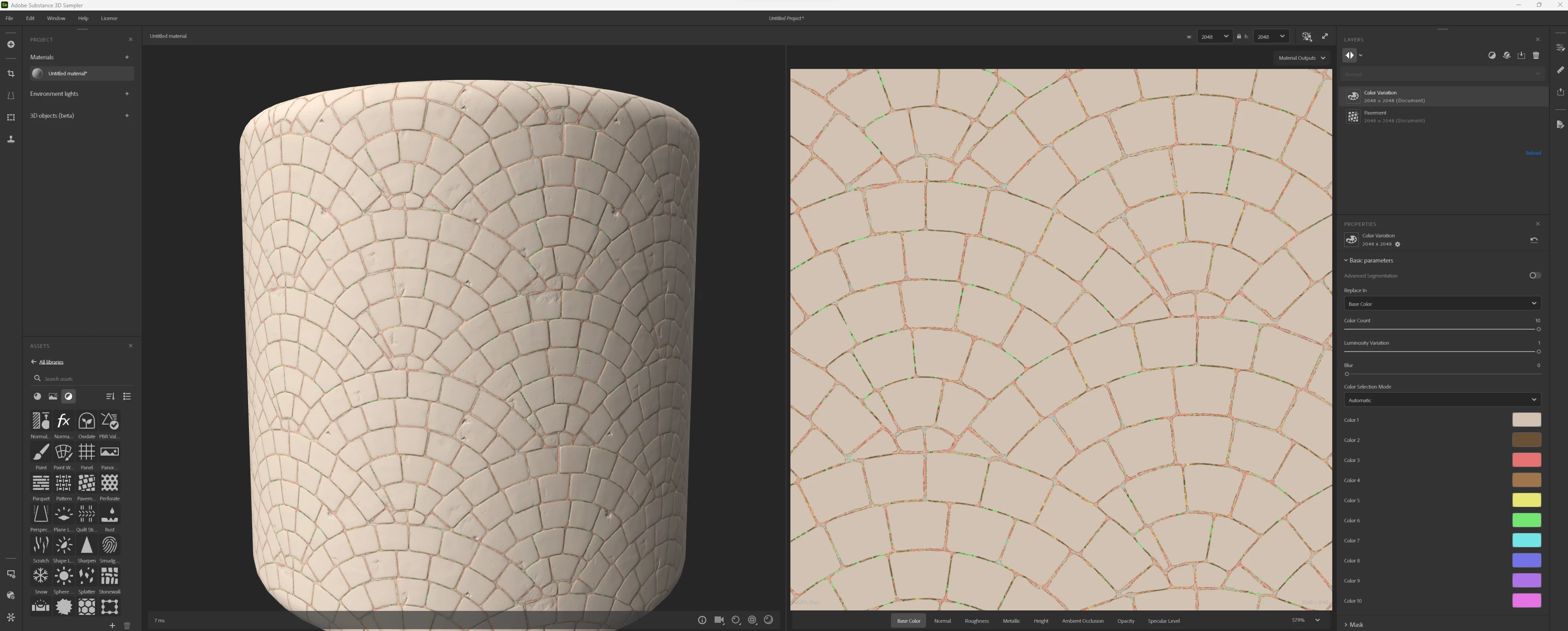
simple file is attached.
New Project, just adding Pavment and ColorVariant.

How can you get more color variants on the stone surface itself, and not just within the grout?

 

This topic has been closed for replies.
Correct answer Cyril Dellenbach

Hi @bernhardrieder,


The Color Variation is replacing already existing colors for new ones. The Pavement generator turns the current material into a pavement pattern.


But if you simply drag and drop the Pavement generator without material, you'll have a neutral pavement pattern, without much colors to replace.


Try adding a material layer underneath the Pavement generator (e.g. Rock), the result should be much more convincing, and easy to work with.


Best regards,


1 reply

Cyril Dellenbach
Community Manager
Cyril DellenbachCommunity ManagerCorrect answer
Community Manager
October 3, 2023

Hi @bernhardrieder,


The Color Variation is replacing already existing colors for new ones. The Pavement generator turns the current material into a pavement pattern.


But if you simply drag and drop the Pavement generator without material, you'll have a neutral pavement pattern, without much colors to replace.


Try adding a material layer underneath the Pavement generator (e.g. Rock), the result should be much more convincing, and easy to work with.


Best regards,


Cyril Dellenbach (Micro) | QA Support Artist | Adobe
bernhardrieder
Known Participant
October 4, 2023

k, thank you!