Inspiring
June 6, 2022
Answered

How to Export Materials to the Unreal Engine with Substance 3D Sampler?

  • June 6, 2022
  • 1 reply
  • 2177 views

How to Export Materials to the Unreal Engine with Substance 3D Sampler?

This topic has been closed for replies.
Correct answer Ares Hovhannesyan

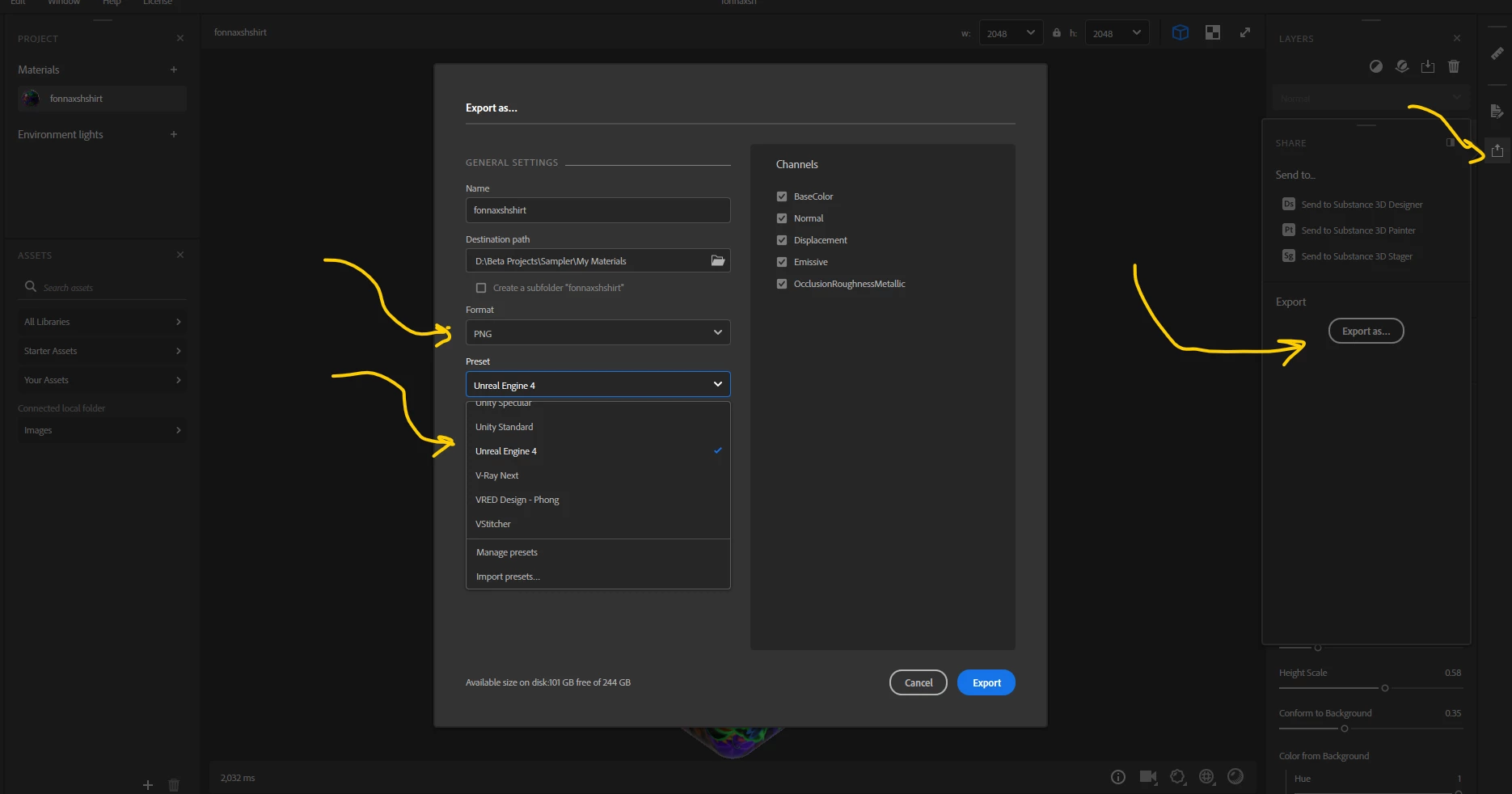
Here you go: Select export then PNG from list to activate preset and select "Unreal Engine"


1 reply

Baptiste_Substance_3D
Community Manager
Community Manager
June 6, 2022

Hello,

There are two ways:

- SBSAR export and use the Substance plugin available in Unreal to load the SBSAR file

- Textures export (PNG, TIFF,...) and select "Unreal Engine" Export preset. It will pack your textures in a way that Unreal Engine will connect them correctly.

PixelFunAuthor
Inspiring
June 6, 2022

Where can you find the export option as a .sbsar file?
The reason I am asking. I can only find a way to save the file as a .ssa file format.

thank you very much

Ares Hovhannesyan
Community Expert
Ares HovhannesyanCommunity ExpertCorrect answer
Community Expert
June 6, 2022

Here you go: Select export then PNG from list to activate preset and select "Unreal Engine"