


Participant
March 20, 2024
Question

[Image to Material] Additional Parameter Setting through Python API

  • March 20, 2024
  • 1 reply
  • 362 views

Hello, I was wondering if it's possible to adjust additional material settings (image attached) through the Python API when using AI for image-to-material conversion. For example, I would like to change the category to "Metal", set the Material type to "Shiny", and reduce the Roughness value. I couldn't find this information in the API documentation, so any guidance would be appreciated. Thank you!
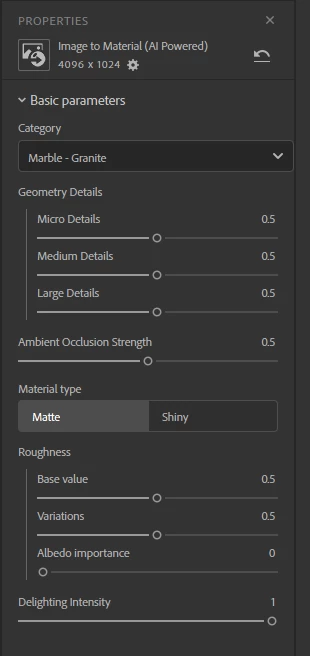
 

1 reply

Cyril Dellenbach
Community Manager
Community Manager
March 27, 2024

Hello @Milim33390194gv9f,


Considering the Material type and Category are fairly new parameters, I'd say the Python API isn't yet able to edit them, but let me check on my end, and get back to you.


Regards,

Cyril Dellenbach (Micro) | QA Support Artist | Adobe
Participant
August 26, 2024

Hi, any updates on this? I also want to define the category of generated material in Python script.

Participant
March 10, 2025

Hi. I´m working whit 5.0 version.
Before you add a layer, like this:

image_to_material_layer = asset.insert_filter(image_to_material_ai_filter, position=3)
you can change the attributes of the layer as a array position, no specified the name. For example:
category_param = image_to_material_layer.parameters[0]  # Parameter "Category"
category_param.value = 2  # Change category to 2 (Fabric)
It works changing "parameters" and "value".
I wish it help you.