Known Participant
February 29, 2024
Answered

Question about the size of the generated .png file for Delighter (Al Powered)

  • February 29, 2024
  • 2 replies
  • 538 views

Hi
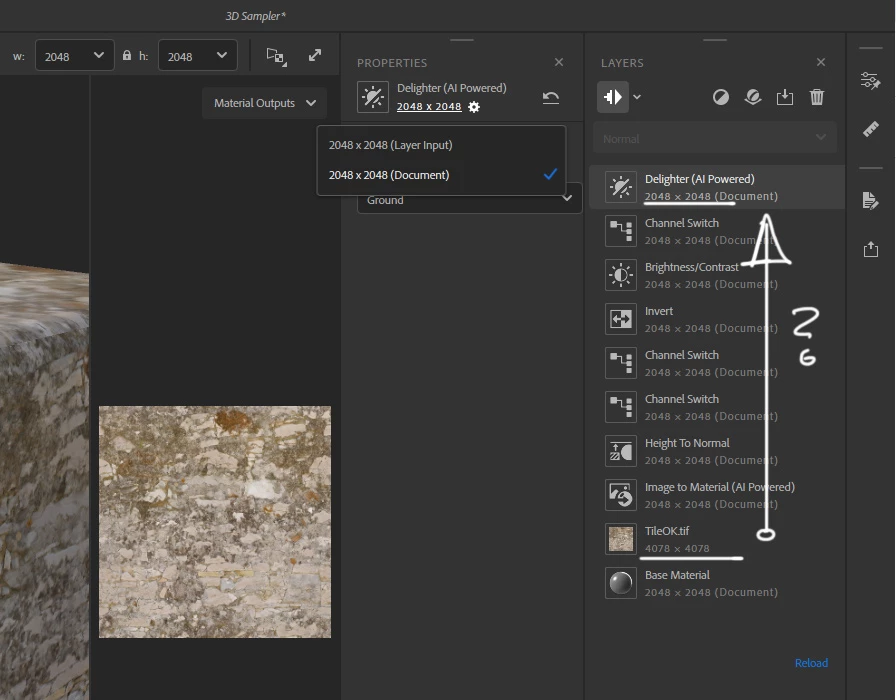
I have a question about the size of the generated .png for Delighter (Al Powered)
Is it possible to set the size of a single layers Delighter (Al Powered)
The same size as the base layer TileOK.tif (4078x4078)

 

This topic has been closed for replies.
Correct answer LoryAline

Hi,
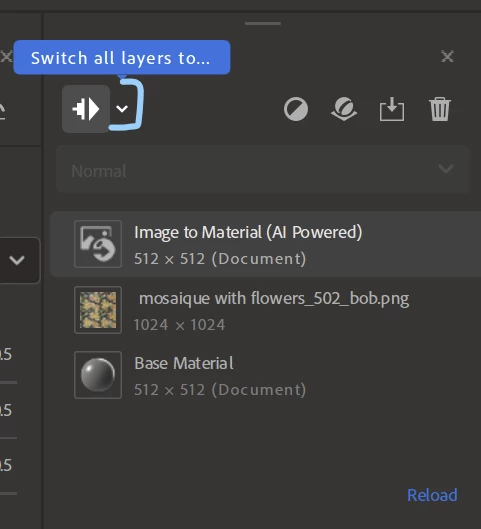
To have it in the image input size you need to have all your layers work in layer input mode.
You can click on the button at the top left of the layer stack to change all layers behaviour:


Regards!

2 replies

LoryAline
Community Manager
LoryAlineCommunity ManagerCorrect answer
Community Manager
March 1, 2024

Hi,
To have it in the image input size you need to have all your layers work in layer input mode.
You can click on the button at the top left of the layer stack to change all layers behaviour:


Regards!

Arek.OAuthor
Known Participant
March 1, 2024

Yes, I understand
Only if the initial texture has, for example: 6788x6788 px.
Exports the project to .SBS + .PNG
All basic textures retain their initial size, i.e. 6788x6788 px.
And the Delighter (Al Powered) texture has 2048x 2048px
And as a result, a small problem is visible on the edge of the material.
-------------------------------------------------- ------------------------------------------------
The question is:
Is it possible to set the size of Delighter (Al Powered) to the initial size of the texture, i.e. 6788x6788 px?
Then the problem will disappear.

LoryAline
Community Manager
Community Manager
March 4, 2024

I'm not sure I perfectly understand the issue, are you unable to set the Delighter (AI Powered) to layer input mode?
Or does the Export override the Delighter export size to 2048x 2048px ?

You can set a Layer size only by taking the input size of the Layer below or the document size.

Ares Hovhannesyan
Community Expert
Community Expert
February 29, 2024

Here is Delighted Filter guide. As it works automaticaly, you can set your basic Ai material size to 4096x4096 and Delighted filter will be the same in size. See Capture.

Delight (AI Powered) | Substance 3D Sampler (adobe.com)

Parameters

The delighter has no parameters - it works automatically.

Arek.OAuthor
Known Participant
February 29, 2024

OK, then it's not possible
Thanks