Inspiring
February 21, 2022
Answered

Remove Presets? Crash after importing a .sbsar export Preset

  • February 21, 2022
  • 2 replies
  • 346 views

Hello,

I've been trying to get custom presets right. I've imported a new .sbsar preset, and it exported once. From that point on, whenever I "share" and click "Export As", the application immediately crashes. I've submitted bug reports on reload, but I'd like to remove the latest preset, in case that is what is causing the issue.

This is on the latest version 3.2.0, Mac.

This topic has been closed for replies.
Correct answer LoryAline

Hi,

I'll look to your report. 
In the meantime to delete your preset:

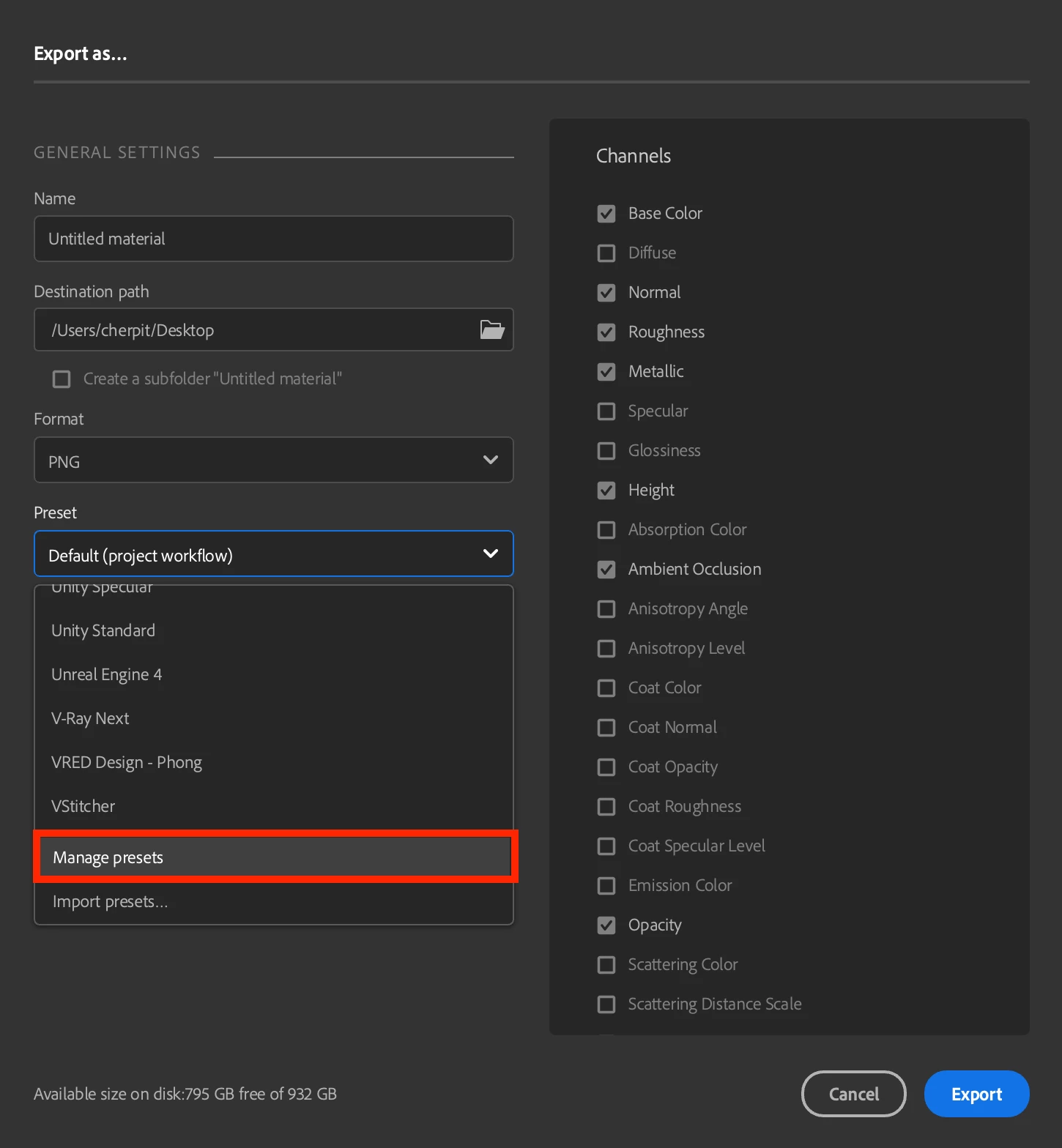
  • Go to Share>Export as (you'll need a stack to be able to access the export droping any material will be enough).
  • Select an image format (PNG, JPEG, Etc. ...).
  • In presets dropdown select "manage presets"
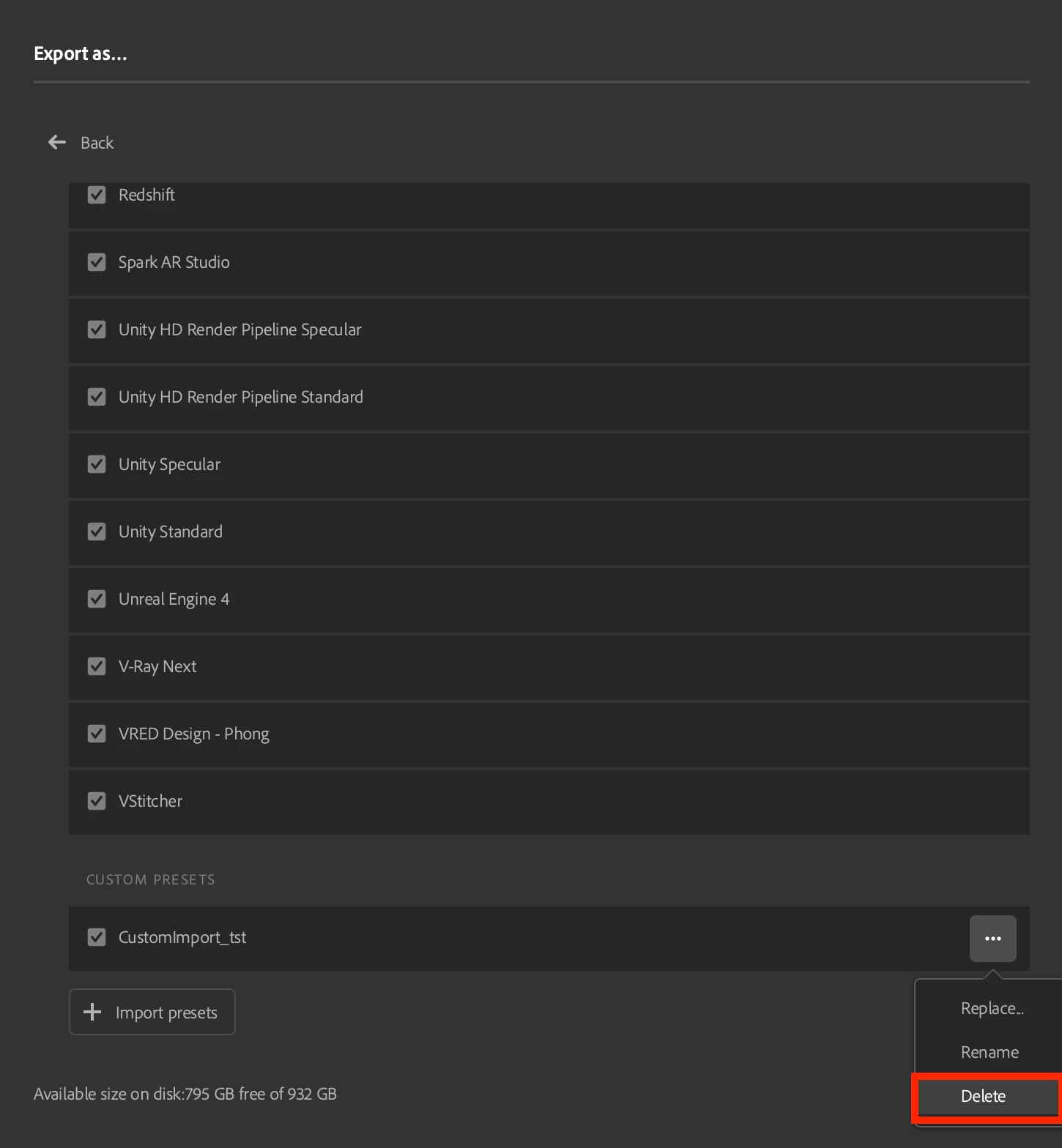
  • Scroll to the bottom of the list
  • click on the three dots
  • select delete and confirm

The Custom presets should now be deleted.

Thank you for reporting the issue


Regards.

2 replies

Inspiring
February 27, 2022

I have uninstalled and reinstalled the application multiple times today, as this bug keeps happening.

Clearly there is an actual bug here, so I hope the multiple reports I've submitted helps fix it, because right now using Sampler is like walking on an obstacle course with a blindfold on.

LoryAline
Community Manager
Community Manager
February 28, 2022

Hi,
From what you say, it seems the issue you reported is already in your internal database.

You can try those workaround to fix the issue:

  •  Rename (for back-up) or delete this following folder:
    • WINDOWS: ~/AppData/Roaming/Allegorithmic (or Adobe)/Adobe Substance 3D Sampler
    • MAC : ~/AppData/Roaming/Allegorithmic (or Adobe)/Adobe Substance 3D Sampler


It will reset your Sampler. You will just need to reconnect your local folders if any.

Thank you for your many reports, we will investigate further into this. 

Keep us updated!

LoryAline
Community Manager
LoryAlineCommunity ManagerCorrect answer
Community Manager
February 22, 2022

Hi,

I'll look to your report. 
In the meantime to delete your preset:

  • Go to Share>Export as (you'll need a stack to be able to access the export droping any material will be enough).
  • Select an image format (PNG, JPEG, Etc. ...).
  • In presets dropdown select "manage presets"
  • Scroll to the bottom of the list
  • click on the three dots
  • select delete and confirm

The Custom presets should now be deleted.

Thank you for reporting the issue


Regards.

Inspiring
February 26, 2022

Unfortunatley that is not possible. The application quits when I click "Export", so I can't get to the area you're referencing.

Is there no method of removing it from the system, like via /Library/ or something?