


Participant
June 24, 2024
Question

Sampler Image to Material AI - generates wrong resolution (takes ages)

  • June 24, 2024
  • 1 reply
  • 221 views

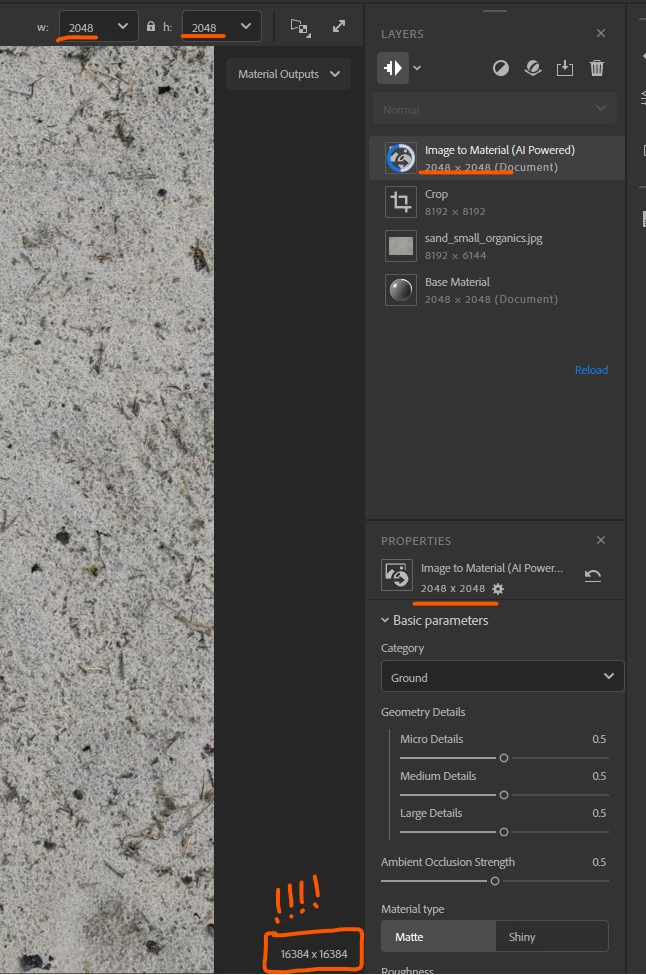
Hello, I have a texture 8k x 4x which I crop to 2k and run Image to Material (AI) over it - problem is it takes ages and once it update I seen insane resolution of the output - what's going on?
 

This topic has been closed for replies.

1 reply

LoryAline
Community Manager
Community Manager
June 26, 2024

Hi,
From what I see on your screenshot, the Image to material is computing 8k resolution (the crop resolution is 8192x8192). To reduce the resolution you can use a Transform Layer to make sure the Layer Resolution strategy applies before the image to Material (AI Powered):


I add links to the Layer Resolution and Image to Material documentation, for more infos:
https://helpx.adobe.com/substance-3d-sampler/filters/tools/image-to-material.html
https://helpx.adobe.com/substance-3d-sampler/interface/preferences/layer-resolution.html