


Participant
January 31, 2024
Answered

Substance 3D Sampler Create Materials.

  • January 31, 2024
  • 1 reply
  • 620 views

Hello, I am new to this software and i have a few questions to ask here :-
May i know is there a Inspire function(alchemist) in Sampler?
and the second question is, i had created my own material (sbsar) so i can adjust accordingly in Painter.
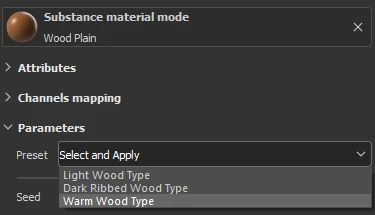
I want to ask,  how do i add "option" for my present just like in this picture shown?
This topic has been closed for replies.
Correct answer Cyril Dellenbach

Substance Alchemist was indeed the previous version of Sampler, but I didn't remember of this Inspire function at all. To be fair, it looks like a nice feature, but unfortunately we currently don't have an equivalent in Sampler.


For customizing an SBSAR with your own inputs, it always depend on the resource itself. The SBSAR must have exposed parameters in order for us to tweak it inside Sampler.


Regarding groupd/folders inside Sampler, this is something that is frequently discussed, but nothing in the application for now.


Regards,

1 reply

Cyril Dellenbach
Community Manager
Community Manager
January 31, 2024

Hello @Carson32823433knts,


Could you detail what you mean by "Inspire function (alchemist)"?


Regarding the Parameters presets, this is unfortunately a function that isn't available yet inside Substance 3D Sampler, but only Substance 3D Designer.


Alternatively, you could use the "Send to Designer" feature (or simply drag and drop the .SBSAR in Designer), expose the parameters once again, and make presets out of it. That being said, it can be a bit tedious if you're not used to Designer.


Regards,

Cyril Dellenbach (Micro) | QA Support Artist | Adobe
Participant
January 31, 2024

first of all, thanks for your reply 😄
regarding the inspire function, this is the video, https://www.youtube.com/watch?v=ofPYoCjjWHU
I thought Alchemist is the old version of Sampler?


Parameters present:-
Ahh i see, i hope it will be add into Sampler soon, this software is so strong to make a base material. And we want to have option to pick and compare when using it in Painter. 😄


Also can we tweak the base material just like shown in this video, for example the smart material provided has limited acess to modify, but I want to customize it by retaining its settings but with my own design/shape (input). Lastly are there any features like folder in Sampler so we could exclude what we want by selecting  ID/Anchor Point/Layer. 

Once again Thank you for your time and patience, i could not find anyone around me that is expereince enough to answer me.

Regards.
Carson

Cyril Dellenbach
Community Manager
Cyril DellenbachCommunity ManagerCorrect answer
Community Manager
February 1, 2024

Substance Alchemist was indeed the previous version of Sampler, but I didn't remember of this Inspire function at all. To be fair, it looks like a nice feature, but unfortunately we currently don't have an equivalent in Sampler.


For customizing an SBSAR with your own inputs, it always depend on the resource itself. The SBSAR must have exposed parameters in order for us to tweak it inside Sampler.


Regarding groupd/folders inside Sampler, this is something that is frequently discussed, but nothing in the application for now.


Regards,

Cyril Dellenbach (Micro) | QA Support Artist | Adobe
