Participant
June 2, 2025
Answered

Actions

  • June 2, 2025
  • 2 replies
  • 318 views

In the most recent Beta version, you can no longer easily create an action, much less see or modify the steps in a current action. I used to make actions all the time, and as I worked with them, I would adjust how they functioned, and add or uncheck steps as I saw fit.  Now I have no idea how to do that, and believe me, I have poked around!


Would be nice to have that functionality back.  Even just seeing the steps so I could learn more was useful.


Additionally, it is very easy to accidentally run an action without even realizing and have to go back in history (sometimes significantly) to undo it.
Correct answer Trevor.Dennis

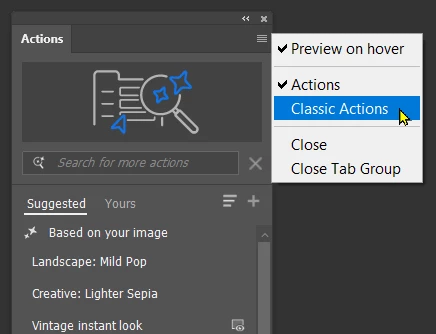
You can change it back to Classic Actions via the pop-out menu (top right corner)


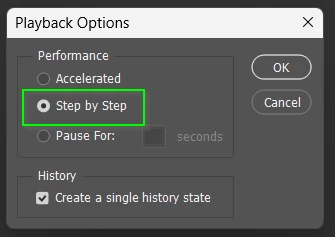
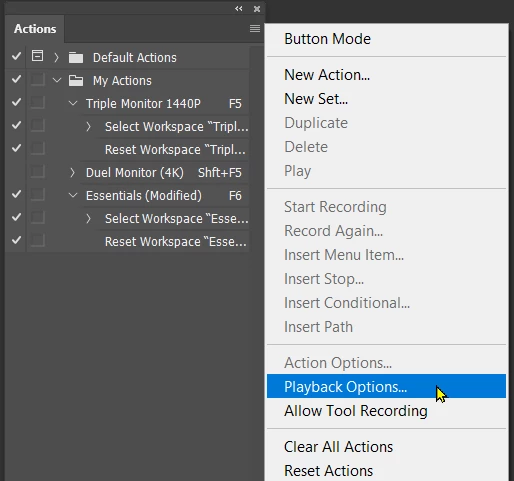
When set to Classic you can open Playback Options and set it to Step by Step


With that set, when you run the new actions you can see each step it took in the History panel.


There is an excellent actount on the new Actions panel here.


2 replies

Trevor.Dennis
Community Expert
Trevor.DennisCommunity ExpertCorrect answer
Community Expert
June 3, 2025

You can change it back to Classic Actions via the pop-out menu (top right corner)


When set to Classic you can open Playback Options and set it to Step by Step


With that set, when you run the new actions you can see each step it took in the History panel.


There is an excellent actount on the new Actions panel here.


Participant
June 30, 2025

I appreciate the response, and I should've checked the menu first before searching.  That being said, this is a horrible change.

jane-e
Community Expert
Community Expert
June 2, 2025

@Sarah30845890ydkm 


hi Sarah, you posted to the Photoshop forum with a question about Photoshop Beta, so I have moved your post to the Photoshop beta forum for you.


if this works in the released version of Photoshop, you might consider using that for now. The beta version is for reporting bugs to the Photoshop team. They will see your post, but in the meantime, you might think about using the released version if it works for you. 


Jane