
All Brushes, heal, remove spot heal - Any brush
Greetings all. Im a long time user - but first time posting so forgive any protocol i might miss. I am having what I think is an issue I cannot resolve. I am not quite sure how to explain it but here goes. It doesn't matter what brush I choose or what size I choose or how I set ANY of the settings... I have been through everything on every brush trying to figure it out. Even used chatGPT and several other AI's to try and fix my issue.
I am on 2019 Macbook Pro. Using Photoshop and Photoshop Beta (always up to date) and this issue exists in Photoshop 2025 and in Photoshop Beta. It is messing with my head!
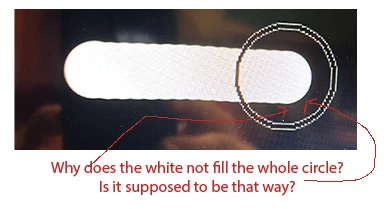
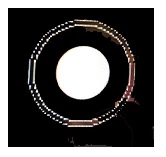
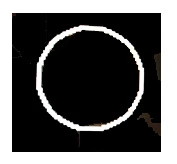
In short I will use the example of the brush tool to paint white on top of a black background with setting to 100% hardness. When I move my brush over the black background I obviously see the size 60 circle of my brush that I chose. So I expect that when I click and start brushing... the size of the brush circle I see will be the size of what I brush. It never is!! I have included screen shots of what I am trying to convey.
The actual brushing or healing or erasing part ... NEVER is the full size of my brush when I click and start doing those things. Any help for this old fart would be greatly appreciated.
Tim


 AdChoices