
Inspiring
December 3, 2023
Question

Brush preview shows white rectangle

  • December 3, 2023
  • 3 replies
  • 238 views

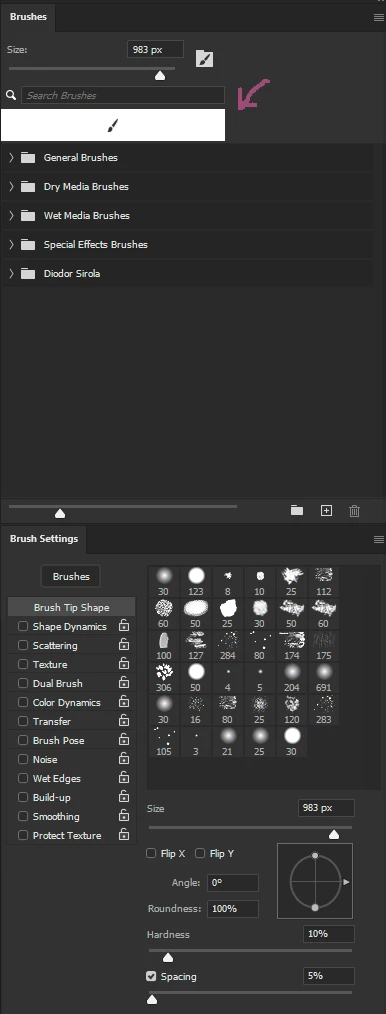
Brush preview shows white rectangle with brush incon while painting. It happens only sometimes. After releasing pen/mouse click the brush preview goes back to normal.

The white flash on dark background is very distracting.

Adobe Photoshop Version: 25.4.0 20231129.m.2417 b56cd5f x64
This topic has been closed for replies.

3 replies

DiodorSAuthor
Inspiring
December 22, 2023

@Kevin Stohlmeyer It's not "simply" flashing - a paintbrush icon is rendered on a white background instead of brush previews - see the screenshot. Is being persistently displayed as long as the mouse button/pen is pressed down.


Does "native canvas" setting have any affect on rendering the UI?


This issue is not present in non-beta release (25.3.1.241), even with native canvas support enabled. I'm using NVIDIA GeForce RTX 3080 with NVIDIA 546.17 driver (31.0.15.4617). I will also try updating to 546.33.


It's not easy to reproduce, as it happens quite randomly. I'll let you know if any of the solutions helped.

Kevin Stohlmeyer
Community Expert
Community Expert
December 22, 2023

@DiodorS flashing on screen sounds like a GPU issue - go to Photoshop Settings/Technology Preview and check "Disable Native Canvas" and relaunch PS. Any better?

DiodorSAuthor
Inspiring
December 22, 2023

Still happening in 25.4.0.2434