Inspiring
Sep 7, 2023 2:46 PM UTC
Answered

Can I turn off Auto-Generating Fill when using Crop tool?

(Ps Beta 25.1) When I use the Crop tool to expand my work area, Generative Fill automatically kicks in to fill that space for me. I would like the option to NOT do that until I ask it to G-Fill. I cannot find any setting to allow this. My primary use for this is revising logos and clip art from customers. All I want is to add a bit of visual elbow room so I can work. I don't necessarily enlarge my canvas area every time. 


Am I missing a toggle somewhere to turn it off? Is this a feature that Adobe thinks I want to have everytime?


Thanks

Kevin Stohlmeyer
Kevin StohlmeyerCorrect answer
Community Expert
Sep 7, 2023 4:20 PM UTC

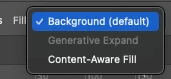
Hi @JNDGroup yes you can control this at the top option area when you have the crop tool selected:


7 replies

Kevin Stohlmeyer
Community Expert
Kevin StohlmeyerCommunity ExpertCorrect answer
Community Expert
Sep 7, 2023 4:20 PM UTC

Hi @JNDGroup yes you can control this at the top option area when you have the crop tool selected:


Translate
JNDGroupAuthor
Inspiring
Sep 7, 2023 4:37 PM UTC

Ahh! THAT'S it! Thank you. So busy playing in the new sandbox I havent had time to read the instruction fully. 😄 Thank you!

Translate
JNDGroup • Print Design since '99! + All the fun that goes with it.