
Participant
June 14, 2023
Answered

Cannot change preferences or "espace de travail" in Beta version

  • June 14, 2023
  • 4 replies
  • 267 views

Photoshop Beta 24.7

MacBook Pro M2 Max Ventura 13.4 (22F66)


I have tried to change the espace de travail and I'm getting the following error :

 

same when I'm trying to change the preferences I have the following errors :

 

Is it normal in a Beta version?


Regards
This topic has been closed for replies.
Correct answer lucbus

@CShubert I was stuck even more this morning since even the regular version of Photoshop was broken, after I uninstall  and reinstall it.   

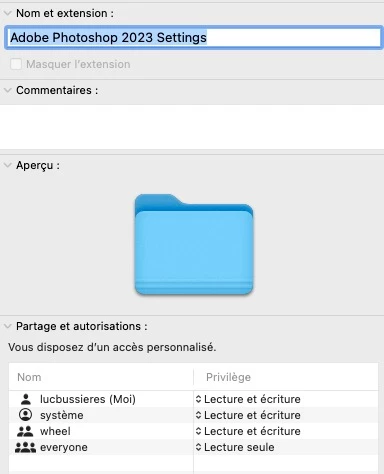
I found that adding my user with reading and writing on the "Adobe Photoshop (Beta) Settings" directory solved the issue same with "Adobe Photoshop 2023 Settings" I had to add my user in the security 


4 replies

lucbusAuthorCorrect answer
Participant
June 19, 2023

@CShubert I was stuck even more this morning since even the regular version of Photoshop was broken, after I uninstall  and reinstall it.   

I found that adding my user with reading and writing on the "Adobe Photoshop (Beta) Settings" directory solved the issue same with "Adobe Photoshop 2023 Settings" I had to add my user in the security 


CShubert
Community Manager
Community Manager
June 19, 2023

@lucbus would it be possible for you to share your workspace in a screenshot that works, and one in the beta that doesn't?


lucbusAuthor
Participant
June 14, 2023

Hi Kevin, 


I already try that with no luck, I also checked the regular version of photoshop to compare and it is not enable and it is working correctly. I just have problem with the Beta version

Kevin Stohlmeyer
Community Expert
Community Expert
June 14, 2023

Hi @lucbus Go to Apple System Settings/Security and Privacy/Full Disk Access and make sure PS is listed and active.