




Compositing Performance: Foreground Caching
Hi Everyone!
As part of our ongoing efforts to improve Photoshop's performance, we'd like to share a new compositing optimization now available in Photoshop Beta: Compositing Foreground Caching.
What it does and why it's needed:
Photoshop currently composites the layers below the selected layer into 1 cached composite in order to accelerate operations and avoid unnecessary recompositing. However, whenever a layer is modified, Photoshop unnecessarily incrementally re-composites all of the layers above. This greatly hinders Photoshop's performance. This feature will cache the layers above the active layer, i.e. the foreground layers. Doing this will similarly accelerate operations, various tools, and image processes.
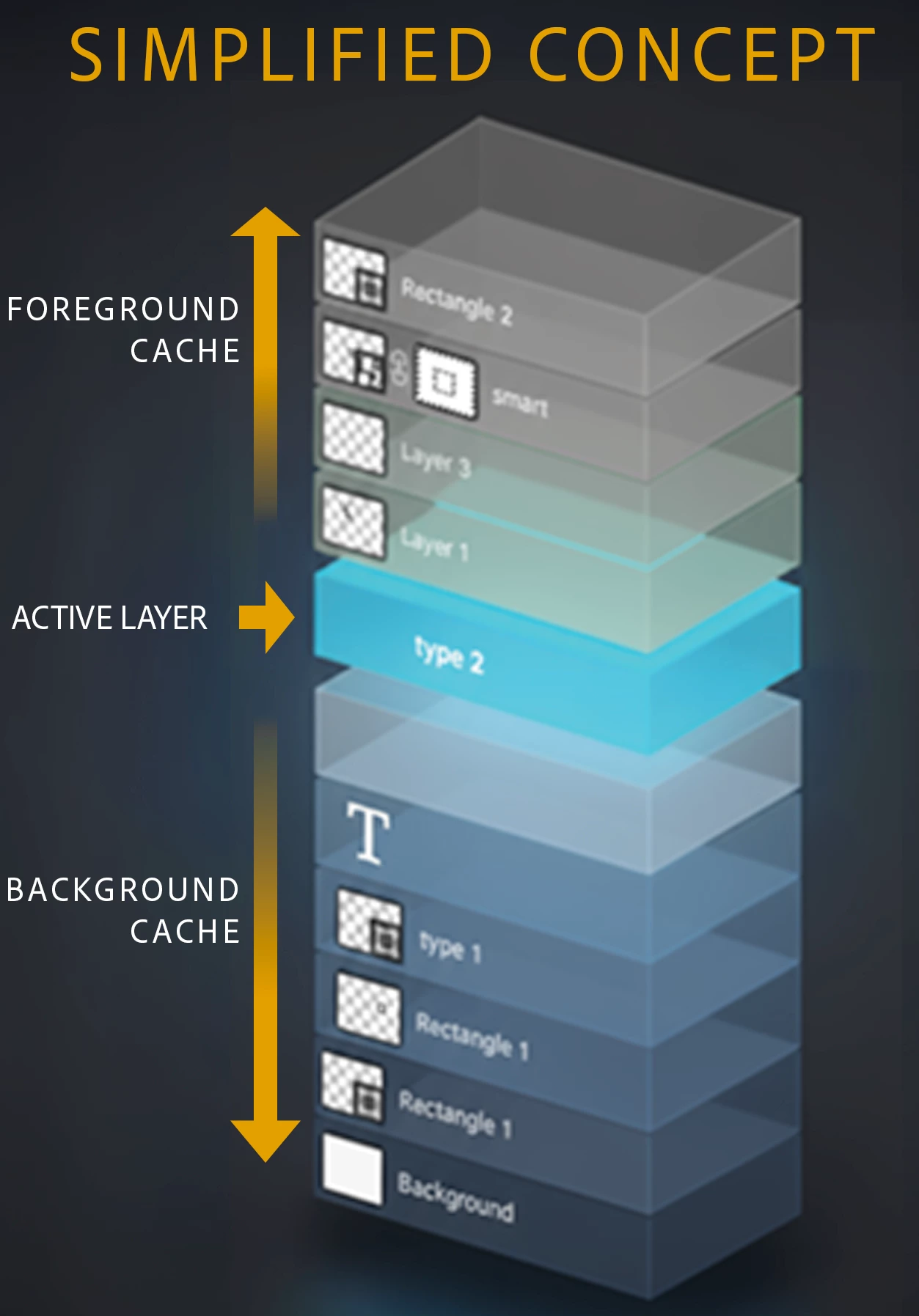
Where it works:
- Move tool
- Brushing tools (all brushing, including dodge/burn/smudge/pencil/etc.)
- Adjustment Layer properties
- Layer Style
- Opacity and fill
- Layer mask properties
How you can help:
- Report to this thread any cases of screen update problems (tearing, updates failing to render correctly), noting tool use pattern and type of system
- Try a variety of document sizes and complexity/number of layers
- Experiment turning on/off layer groups, and layers with blending modes
- Explore various document bit depths like 16-bit and 32-bit depths and color spaces like CMYK and Lab
- Make sure tools are producing visually the same results as before
- Look for overall smoother operations for any other actions in Photoshop; caching the foreground layers should make Photoshp less laggy and work better
- Be on the lookout for excessive memory consumption (using Resource Monitor or Activity Monitor), especially if it triggers your scratch disk or gets in the way of shutting down, but also just during regular usage
- As documented below in the ‘known issues’ section; please do not report those issues. While performance problems are important to know about, accuracy and consistency with previous compositing are the focus at this stage
Notes and known issues:
- Will not run for documents with artboards
- Will not run for Windows ARM, iOS, Android, or Web platforms
- Temporary artifacts may appear when using Shape layers. Toggle the layer's visiblity to workaround the issue.
If needed, foreground caching can be disabled in Preferences -> Performance -> Foreground composite caching. If you must disable it, please share your feedback with us so that our team can improve it.
 AdChoices