
Participating Frequently
May 7, 2025
Question

Error inicio Photoshop Beta 26.7

  • May 7, 2025
  • 4 replies
  • 382 views

Hola. 

Desde la última actualización no puedo iniciar Photoshop Beta cuyo resultado es el siguiente aviso que véis en la imagen.

He reinstalado en la computadora (desinstalar y volver a instalar) y sigue dando el mismo error.
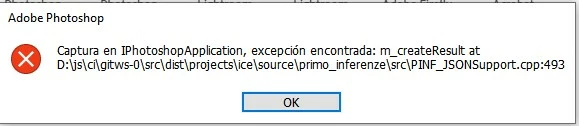
¿Cuál es la solución?

Gracias

4 replies

Participating Frequently
May 9, 2025

I have the same issue here , the photoshop main ver and photoshop beta 26.6 works just fine . 


( BTW MY PC is stable and have no issues , other apps work just fine , on Ryzen 3950x and RTX 4090 , I do not have Drive D though ) .

Nor NokAuthor
Participating Frequently
May 9, 2025

Hoy tenemos nueva actualización a 26.8 y sigo con el mismo problema. Tengo que volver a la versión 26.6

¿nadie sabe por qué ocurre esto?

Nor NokAuthor
Participating Frequently
May 8, 2025

La versión 26.7 no funciona, así que la he desinstalado y he instalado una versión anterior, 26.6. Esta es OK.

Participant
May 7, 2025

estou com o mesmo problema, alguem sabe a solução?

Trevor.Dennis
Community Expert
Community Expert
May 7, 2025

Hi Andre.  Google's Translate Image is not working well with the screen shot, but searching:


iPhotoshop Application Exception Error


The Ai summary says:

AI Overview
 
A Photoshop "application exception" error, often accompanied by a message like "Catch in IPhotoshopApplication, exception encountered," can stem from various causes, including software glitches, corrupted files, or issues with your system's environment. To resolve it, you can try restarting Photoshop, updating to the latest version, and running basic troubleshooting steps. If the problem persists, explore options like clearing Photoshop's cache, removing temporary files, or resetting Photoshop's preferences. 
 
 
This means there might be an issue with your Operating System, or Photoshop has become corrupted.  Reinstalling Photoshop would be a good first step.  If it does not help, reinstall again, but this time use the Cleaner tool.
 
 
 Boa sorte.