
philc30713433
Known Participant
April 14, 2025
Question

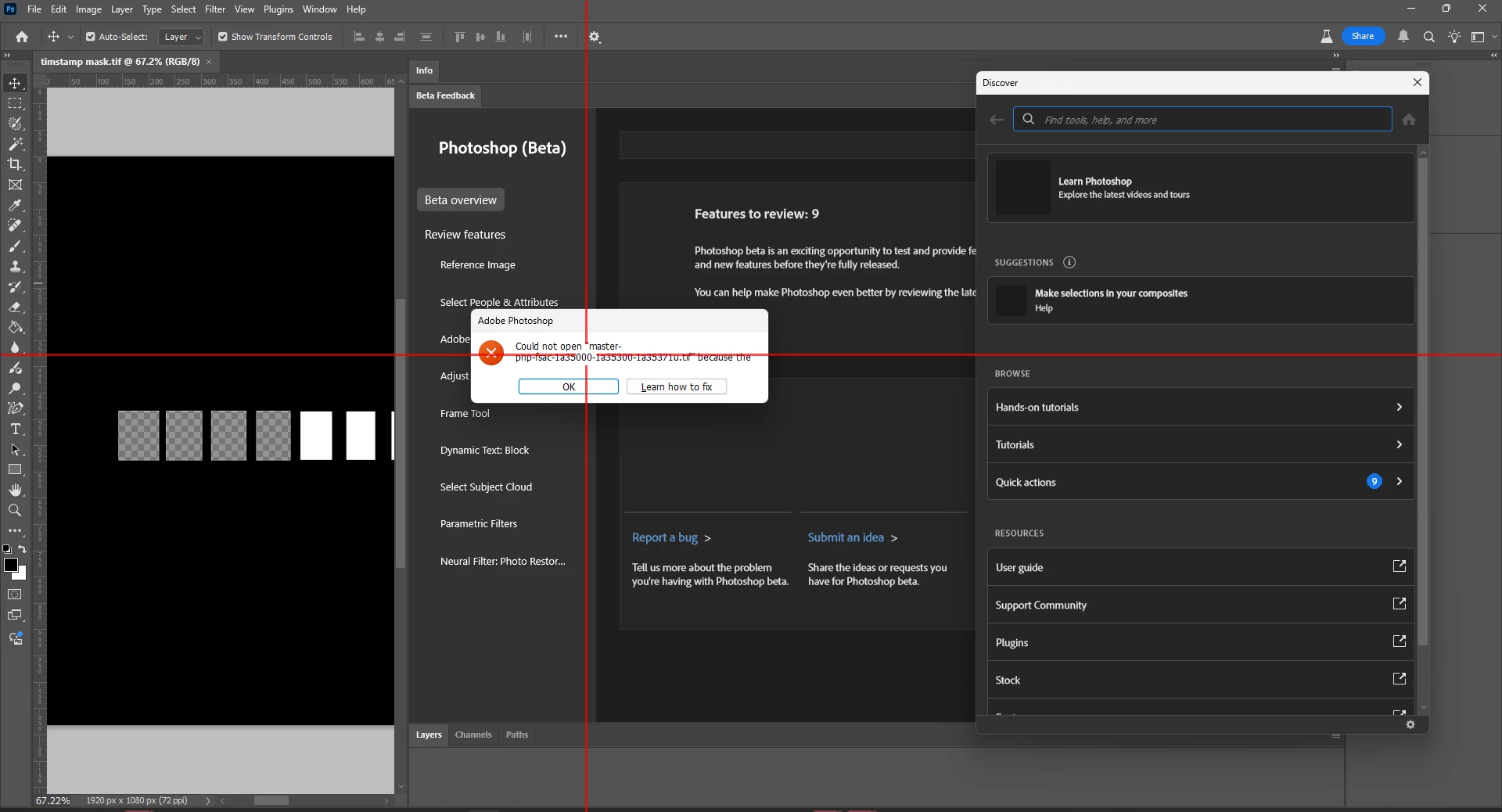
Error message boxes aren't big enough to read the message if the file name is lengthy

  • April 14, 2025
  • 1 reply
  • 197 views
  • Basic steps to reproduce the problem


  1.  I downloaded this Library of Congress image at full TIFF resolution (9055 x 7287 px, 24-bit, 1800 MB, 188MB).  https://www.loc.gov/resource/fsac.1a35371/
  2.  I tried to open this file in Photoshop Beta


  • Expected result and actual result

I hoped the file would open. The file didn't open and the error message box is too small to actually read the error. 


Error reads "Could not open 'master-pnp-fsac-1a35000-1a35300-1a35371u.tif' because the" and then has two responses "Ok" or "Learn More". File names can be lengthy, error messages should be adaptable to always provide a complete and descriptive error. 


  • Version of the app:  Photoshop Beta 26.6.0 Release
  • Platform and OS version:

    Processor AMD Ryzen Threadripper PRO 5945WX 12-Cores 4.10 GHz
    Installed RAM 128 GB (128 GB usable)
    System type 64-bit operating system, x64-based processor
    Pen and touch No pen or touch input is available for this display

    Edition Windows 11 Pro
    Version 23H2
    Installed on ‎2024-‎03-‎24
    OS build 22631.5189
    Experience Windows Feature Experience Pack 1000.22700.1077.0

1 reply

CShubert
Community Manager
Community Manager
April 14, 2025

Hi @philc30713433 testing here and not seeing this issue.  


1. Try resetting Prefs for the Beta:
/Users/yourname/Library/Preferences/ Photoshop Beta Settings (Mac Ventura)
/Users/yourname/Library/Preferences/Adobe\ Photoshop\ \(Beta\)\ Settings (Mac)


C:\Users\user name\AppData\Roaming\Adobe\Adobe Photoshop (Beta)\Adobe Photoshop (Beta) Settings


Launch BETA Photoshop While Pressing The Keyboard Shortcut
With Photoshop closed, press and hold Shift+Ctrl+Alt (Win) / Shift+Command+Option (Mac) on your keyboard and then Launch Photoshop the way you normally would.
https://helpx.adobe.com/photoshop/using/preferences.html#Manually


2. It may help if we could see your Photoshop beta System Info. Launch Photoshop beta, and select Help >System Info...and copy/paste the text in a reply.  


Thanks,

Cory - Photoshop Product Manager

philc30713433
Known Participant
April 25, 2025

The problem is that the boxes aren't responsive to text length and user system font settings. Yes, I had a particularly long file path which shoved the rest of the error message beyond the window causing this particular instance. This however is indicative of a larger problem that assumes that error messages, filenames, and other dynamic text displayed in dialogue windows will be short-ish and well-behaved. Adobe products have made this assumption for generations at this point and it leads to issues across your product lines independent of device and operating system. 

Fundamental Issue:

Dialogue box sizes are set before considering dynamic texts to be displayed in the box. When the generated text is lengthy due to a long file name, layer name, or error message no check is performed to make sure the display text is not cut off.