Participating Frequently
Oct 14, 2023 11:34 PM UTC
Answered

Flatten Image in Layers Panel

Here is an idea: why don't we leave Merge Down / Merge Visible / Flatten Image where it has always been for decades! At the bottom of the list of options. My muscle memory hurts to see somebody needlessly moved that thinking it was a good idea. Am I missing something or is this a bug? It has slowed me down by about .65% and I don't like it!


Photoshop Beta version 25.2.0
 
Jeff Arola
Jeff ArolaCorrect answer
Community Expert
Oct 15, 2023 7:45 AM UTC

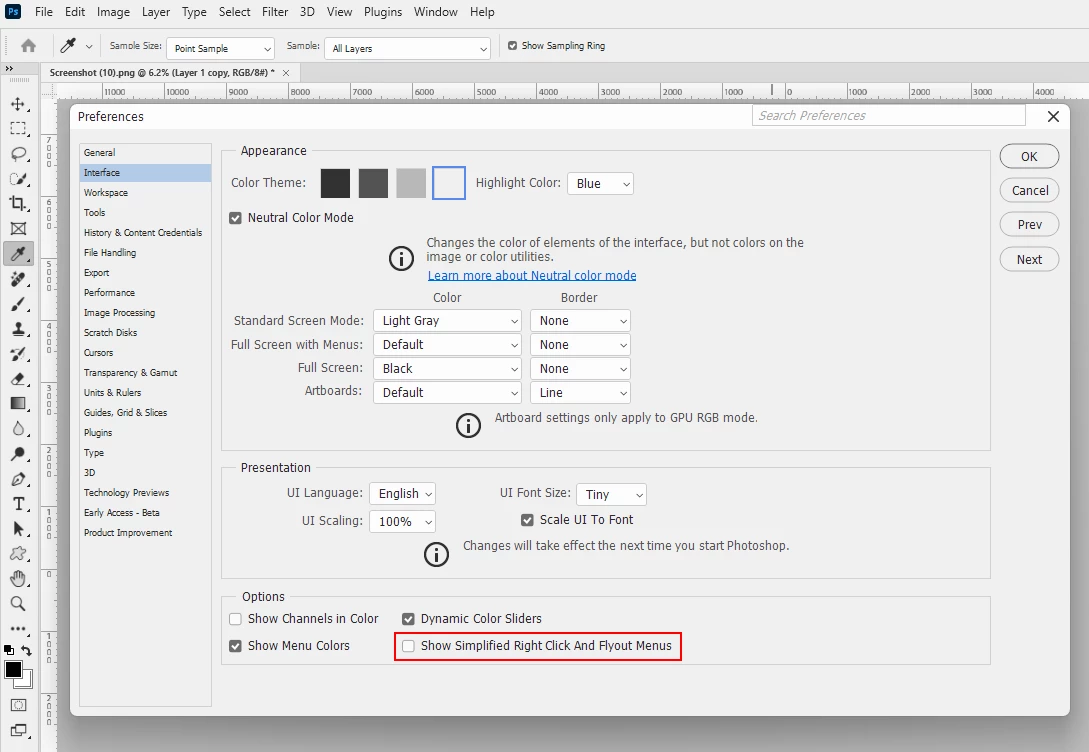
There is a new preference in the photoshop 25.1/25.2 beta for condensed right click and flyout menus.

Under Edit>Preferences>Interface,  Show Simplified Right Click and Flyout Menus might have been checked.


13 replies

Participant
Sep 20, 2024 8:25 AM UTC

I agree 100%. I really don't understand the people who proposed this change, even less the one in charge who approved it.


@Jeff Arola Thank you for the hint.

Translate
jane-e
Community Expert
Community Expert
Feb 25, 2024 10:36 PM UTC
quote

Photoshop Beta version 25.2.0

By @avi23349376ahvg


Moved from Photoshop to Photoshop Beta.


Jane


Translate
Participant
Feb 25, 2024 8:57 PM UTC

EXACTLY!!!! Photoshop is way too buggy to be let out already. It doesn't matter if I have "show simplified right click and flyout menus" checked, it will still be hard to find flattern image or merge down .. why adobe? WHYY?! FIX IT!

Translate
Jeff Arola
Community Expert
Jeff ArolaCommunity ExpertCorrect answer
Community Expert
Oct 15, 2023 7:45 AM UTC

There is a new preference in the photoshop 25.1/25.2 beta for condensed right click and flyout menus.

Under Edit>Preferences>Interface,  Show Simplified Right Click and Flyout Menus might have been checked.


Translate
Participating Frequently
Oct 15, 2023 8:07 AM UTC
Jeff

That was it!!! Thanks a lot!

Now that I know it was added as a condensed flyout menu option, I might
make use of it sometimes. I still think within that flyout menu, the
Flatten Image should be near the bottom of the list, to keep with the usual
ways of working.

Thanks again.

--
--------------------------------------------------------------
PRIVILEGED AND CONFIDENTIAL COMMUNICATION
This electronic transmission, and any documents attached hereto, (a) are
protected by the Electronic Communications Privacy Act (18 USC 2510-2521),
(b) may contain confidential and/or legally privileged information, and (c)
are for the sole use of the intended recipient named above. If you have
received this electronic message in error, please notify the sender and
delete the electronic message. Any disclosure, copying, distribution, or
use of the contents of the information received in error is strictly
prohibited.
Translate
Known Participant
Feb 15, 2024 4:31 PM UTC

Thank goodness for Jeff's answer and you posing the question! I thought I was just getting clunkier with age as I work on my project.... no, that *expletive* menu item indeed bounces around.

Translate
Conrad_C
Community Expert
Community Expert
Oct 15, 2023 5:37 AM UTC

If you are seeing a different Layer menu, maybe it has been customized or is cut off at the bottom of the screen. Can you open Edit > Menus, and make sure Photoshop Defaults is the selected menu Set? If Photoshop Defaults is selected, the bottom of the Layer menu should be the same as it has been for decades, as shown below. If Photoshop Defaults is not selected, choose it so that it goes back to the way it should be.


If that does not solve it, can you post a screen shot of where those commands now appear on your menu? Because it would be unexpected for them to move without customization…again, they have not changed in many years.

Translate
Participating Frequently
Oct 15, 2023 7:18 AM UTC
Conrad

I just exited and restarted PS Beta and it looks like it went back to as it
always has been. I also checked in Edit > Menus, making sure it is set to
Default, and it is. That was really weird!

Another thing, after the latest update, I noticed in the *ACR* window, the
*Color* dialog box that contains White Balance and Tint has dropped below
the *Light *dialog box. The *Color* controls used to be at the top. Has
that been changed or is that a bug? I ask only because in my workflow,
tuning the White balance has always been the first order of business (when
necessary), and it was logically placed at the very top all this time. This
change seems strange.

Thanks

--
--------------------------------------------------------------
PRIVILEGED AND CONFIDENTIAL COMMUNICATION
This electronic transmission, and any documents attached hereto, (a) are
protected by the Electronic Communications Privacy Act (18 USC 2510-2521),
(b) may contain confidential and/or legally privileged information, and (c)
are for the sole use of the intended recipient named above. If you have
received this electronic message in error, please notify the sender and
delete the electronic message. Any disclosure, copying, distribution, or
use of the contents of the information received in error is strictly
prohibited.
Translate
Conrad_C
Community Expert
Community Expert
Oct 15, 2023 7:31 AM UTC
quote
Another thing, after the latest update, I noticed in the *ACR* window, the*Color* dialog box that contains White Balance and Tint has dropped belowthe *Light *dialog box. The *Color* controls used to be at the top. Hasthat been changed or is that a bug?
By @avi23349376ahvg


The Basic panel (which combined tone and color, with White Balance at the top) was separated into the Light and Color panels (with White Balance still the first Color control, but now in the second panel), but this change was apparently not documented in the release notes for Camera Raw 16. Others are not happy with the change. This does make Camera Raw consistent with the panels in Lightroom for desktop and mobile, so maybe that was the motivation, to make them more consistent across apps. However, what’s odd is that the panels were not separated in Lightroom Classic, so it isn’t 100% consistent.

Translate
Trevor.Dennis
Community Expert
Community Expert
Oct 15, 2023 3:42 AM UTC

How about using a shorcut?


Hmmm...  I thought I'd better check, and Flatten Image is still at the bottom of my Layers menu in 25.2

Translate
Participating Frequently
Oct 15, 2023 6:02 AM UTC
Not for me. It shows up somewhere on the top. The latest update made a few
things in the Layers Option list a little strange. I am going to reset the
machine in a little while to see if it goes back to normal. I got a few
upvotes on my post, meaning others have been experiencing the same issue.

--
--------------------------------------------------------------
PRIVILEGED AND CONFIDENTIAL COMMUNICATION
This electronic transmission, and any documents attached hereto, (a) are
protected by the Electronic Communications Privacy Act (18 USC 2510-2521),
(b) may contain confidential and/or legally privileged information, and (c)
are for the sole use of the intended recipient named above. If you have
received this electronic message in error, please notify the sender and
delete the electronic message. Any disclosure, copying, distribution, or
use of the contents of the information received in error is strictly
prohibited.
Translate