

Jann Lipka
Inspiring
November 23, 2023
Answered

free transform - Warping option is gone in Beta ?!

  • November 23, 2023
  • 9 replies
  • 620 views

OSX / Ventura / Ultra 128Gb Ram etc. 
beta 2405

While trying to free transform 
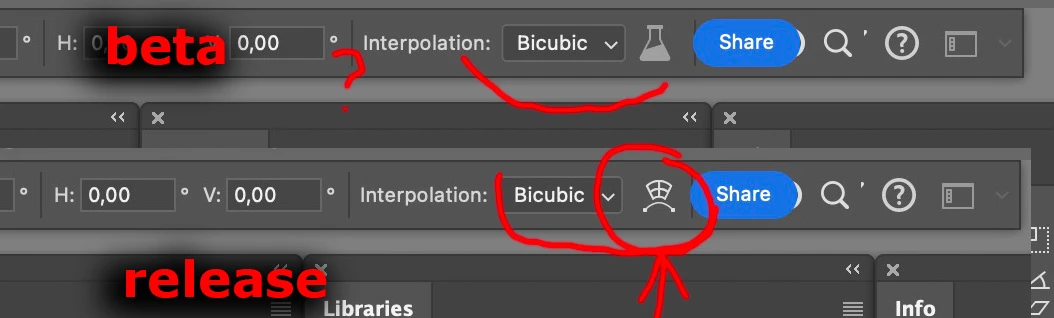
- in release PS version - warp ing is possible - in Beta 
Warp option is gone  - see attached 
Also  HUGE " share " blue blob  are covering interface ( what is under there ? )  - How can I get rid of that . 
This topic has been closed for replies.
Correct answer Jann Lipka

I ahave Apple Studio Display 5k 
( and second 32 inch screen that is 4k 

But ...
Drumroll _ checking for 
preferences -
Workspace -
Allow Narrow Options Bar 
Fixed this issue . 
( thanks ) 
Now I'm wondering why is this option not on from the beginnig:-) 

9 replies

Jann Lipka
Jann LipkaAuthorCorrect answer
Inspiring
November 30, 2023

I ahave Apple Studio Display 5k 
( and second 32 inch screen that is 4k 

But ...
Drumroll _ checking for 
preferences -
Workspace -
Allow Narrow Options Bar 
Fixed this issue . 
( thanks ) 
Now I'm wondering why is this option not on from the beginnig:-) 

Trevor.Dennis
Community Expert
Community Expert
November 28, 2023

What is the pixel res of your monitor and what do you have the UI set to?

I had to narrow the workspace to about 1300 pixels wide before I lost the Warp icon.  

Does setting Allow Narrow Options Bar in preferences help?

Jann Lipka
Inspiring
November 27, 2023

The issue is lack of "warp" in option bar while doing " free transform " 
that option is in release version of PS ( as seen in my screenshot in original post ) 

Jann Lipka
Inspiring
November 27, 2023

Unfortunately the Blue "share" blob is moving together with optionsbar 
and hiding the same area 
( regardless if it is docked or not ) 

Trevor.Dennis
Community Expert
Community Expert
November 27, 2023

I only ever use Ctrl T to access Free Transform, and right click for Warp and Perspective, or Ctrl drag handles for Skew and Distort. I am not seeing any changes doing that with 25.3  Am I still missing something?

Jeff Arola
Community Expert
Community Expert
November 27, 2023

Could it be in the Beta version that the Share button in the Tool Options Bar is hiding the Warp button?


What happens if you dock the Tool Options Bar?

Jann Lipka
Inspiring
November 25, 2023

As stated I have the latest version 25.3 ( m 2405 ) on OSX
You are reaching  warp directly from edit - transfrom - warp 
that works here as well ( IOW no problems ) 
Try  choosing edit - free transform 
here "warp option " button is gone in beta.
(see attached  optionsbar screenshot  ) 
( regular free transform with handles works as expected on my box ) 

Trevor.Dennis
Community Expert
Community Expert
November 25, 2023

Can you recheck your version number.  The current version is 25.3.0 20231118.m.2405 


I am using Windows 11 and not seeing a problem with FT > Warp.  There has been a long thread about Free Transform in this forum, but I can't find it now.