



Community Manager
September 25, 2025
Answered

Gemini 2.5 Flash Image (Nano Banana) and Flux Kontext Pro models are in Photoshop

  • September 25, 2025
  • 28 replies
  • 14406 views

Announcing Gemini 2.5 Flash Image (Nano Banana) and Flux Kontext Pro models are now integrated into the Photoshop Desktop Generative Fill workflow (m.3236)


Gemini 2.5 Flash Image (Nano Banana) and Flux Kontext Pro models can be used for style transfer, text editing, object modification, quick or controlled edits, and complex transformations integrated into the familiar Generative Fill workflow for creative control and non-destructive editing.

When a user makes a selection, Photoshop sends the selected area for processing - the result is limited to 1k resolution. Since the models may not have the full context, there could be seams and composition limitations as a result. The models can perform better if you give a larger selection and use prompts to restrict editing.

We suggest making a larger, loose selection using the Selection Brush. If you use a selection with a hard edge, we notice shifting and a hard edge on the generated pixels.

Check out the following blog post for more information about Partner Models.


In Photoshop Desktop Beta from 9/25 - to MAX (10/26) users will have:

  • CC Pro: 500 free uses per day (doesn't matter the model) - the daily timer resets at 4:00 am Pacific Time
  • CC Standard, Single App, and Photography paid plan users: will have free 100 uses for EACH model
    - TOTAL (not per day)


When we ship Nano Banana and Flux Kontext third-party models at MAX (end of October), the promotion (no charge for generations) will END in the Beta build (approximately Oct 26th). Flux and Nano Banana third-party models will be available in the "GM" and Beta builds of Photoshop. The key difference is that we will start charging 10 Generative credits per generation (for either Nano Banana or Flux models). 


If you have the Photography Plan, CC Standard, or Photoshop Single App, you will get 2 free generations of each model. After free generations are used, you will hit a paywall, you will need to buy Firefly on of the Standard, Premium, or Pro plans to use the models or upgrade to CC Pro and get 4000 generative credits per month.

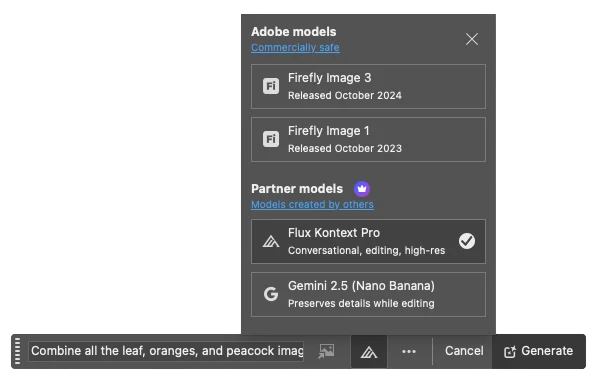
 

The workflow is:

  1. Open a File > Create a Selection (we recommend Select All or the Selection Brush)
  2. Select the Generative Fill Button
  3. Select Model Picker Icon
  4. Select either the Flux Kontext Pro or Gemini 2.5 (Nano Banana) models
  5. Enter a detailed instructional Prompt > Generate

Note: Flux Kontext Pro or Gemini 2.5 (Nano Banana) models return ONE variation.

Use Cases

Add objects or generate new details. Or choose Flux Kontext to generate contextually accurate backgrounds that integrate seamlessly. Photoshop's layer masks keep subjects untouched, enabling precise refinements. 

Select empty space on a design and prompt either Nano Banana for stylistic fills or Flux Kontext for contextual details (props, signage, scenery). Photoshop's blending modes, adjustment layers, and smart objects ensure natural integration with typography and layouts. 

Rapidly mock up product shots or campaign assets by testing both models within Photoshop. Then use curves, levels, and adjustment layers to refine and unify the output to meet the client's branding aesthetic and guidelines. 


Prompting Guides:

Prompting Best Practices:

  • Specificity: use precise names, colors, verbs

  • Simplicity: start broad, then refine

  • Safeguards: preserve what must remain unchanged

  • Sequencing: iterate in multiple steps

  • Subjects: name things directly - avoid ambiguous pronouns (it, that, he, her)

  • Speechmarks: use "quotes" for text - replace "original word" with "changed word".

  • Structure: control composition, framing, angle

  • Strong verbs: choose specific, powerful, clear actions


Limitations:

EDU customers, the use of Nano Banana or Flux Kontext is NOT available. Please contact your system administrator for more information. 

Enterprise customers: Your system admin needs to enable the feature in the Settings > Assets area with the Adobe Admin Console. 


The Gemini 2.5 (Nano Banana) and Flux Kontext Pro models were NOT created by Adobe. You are responsible for determining whether either model is appropriate for your project.

Correct answer amy durocher

@platinumexposure Please go to Help > System info > and see if it shows the following build number (for example: 27.0.0 20250924.m.3236). If not, Sign out of CCD > Sign back in > go to Updates. (Note, I am hearing reports that the rollout has not completed around the globe - if I have any more info, I will circle back)

28 replies

Participating Frequently
October 31, 2025

I find both Flux Kontext Pro or Gemini 2.5 buggy and inconsistent.  the returned image is often skewed or incorrectly scaled. At times the returned image is nothing like the original image. Sometimes both models stubbornly refuse to follow a prompt that worked flawlessely on other similar images. And then theres the Internet connecton errors and the community guideline violation errors. Sometimes it takes 10 or more attempts, to acheive the desired result. And at 10 credits per attempt, it doesnt take long to exhaust my monthy premium credits.  This feature should remain free and in Beta only until the bugs are sorted

Mr. Larry G
Participant
October 27, 2025

Why is the use of Nano Banana or Flux Kontext NOT available for EDU customers? (I assume EDU means academic license?)

Community Manager
November 3, 2025

Hi @Mr. Larry G - I have passed along your feedback to the Education team (Yes, EDU = academic). In my humble opinion, EDU should be divided into K-8, 9-12, and higher education, so the controls can be appropriate for the given audience. 

Participant
October 16, 2025
  • I have photography plan. Will i get flux model and nano banana model after one month reset again or just one time 100 use for both ?
Community Manager
October 16, 2025

When we ship the third-party models at MAX end of October, the promotion (no charge for generations) will end in the Beta build (approximately Oct 26th). Flux and Nano Banana third-party models will be available in the "GM" and Beta build of Photoshop - the big difference we will start charging 10 Generative Credits per generation (either model). 


If you have the Photography Plan, CC Standard, or Photoshop Single App, you will get 2 free generations of each model. After free generations are used, you will hit a paywall, you will need to buy Firefly Standard, Premium, or Pro) to use the models or upgrade to CC Pro.

Participating Frequently
October 22, 2025

According to what you posted, users of the photography plan have up to 100 uses of Nano Banana and Flux until October 26th, but today, after the latest Photoshop Beta update, I got this message after trying to generate a generation.


  In Photoshop Desktop Beta from 9/25 - to MAX (10/26) users will have:

  • CC Pro: 500 free uses per day (doesn't matter the model) - the daily timer resets at 4:00 am Pacific Time
  • CC Standard, Single App, and Photography paid plan users: will have free 100 uses for EACH model
    - TOTAL (not per day)


I haven't used the tool 100 times; in fact, it doesn't even open after 50 generations, but the message is already popping up. Why?


Jann Lipka
Inspiring
October 16, 2025

Testing Nano Banana and reached the "complementary generations used " 
( easlily done as 90 % of generations are not usable 🙂 
I'm trying to understand  what is next - 
( i'm on photography plan )   
It looks like for now without  special Firefly subscrition - I'm locked from NB usage .

 
After 28 Oct  - 

Does it mean i get 100 credits per month from 28 Oct and every
NB usage is 10 credits  per single usage - 
vs  Firefly  1 credit per usage ? 


Is Nano Banana  considered " premium generative " and Firefly  " standard generative " ? 
a lot of very confusing info about pricing. 🙂 


Community Manager
October 16, 2025

When we ship the third-party models at MAX end of October, the promotion (no charge for generations) will end in the Beta build (approximately Oct 26th). Flux and Nano Banana third-party models will be available in the "GM" and Beta build of Photoshop - the big difference we will start charging 10 Generative Credits per generation (either model). 


If you have the Photography Plan, CC Standard, or Photoshop Single App, you will get 2 free generations of each model. After free generations are used, you will hit a paywall, you will need to buy Firefly Standard, Premium, or Pro) to use the models or upgrade to CC Pro.

walterl72035838
Inspiring
October 12, 2025

I reached the limit today for Nano Banana and received the upgrade notification. It shows number of videos...I'm wondering how many photos per day with each upgrade. What is the photo limits if I subscribe?

Community Manager
October 13, 2025

When we ship Nano Banana and Flux Kontext at MAX, we will start charging credits for use (10 credits per generation for either Nano Banana and Flux).


For CC Standard, Photography Plan, and Photoshop Single App users, you have the following options: upgrade to CC Pro to get 4000 credits per month (the credits don't roll over right now) or update to a Firefly Plan (Standard, Pro, or Premium) - to buy more credits.


If you are already a CC Pro user,  and need more credits, your option is to buy more with an additional Firefly subscription. 


Please note that if you upgrade now, there is an issue with our configuration. You will not be able to use your credits while in Beta, and you will need to wait until the end of October when we release the GM MAX version of Photoshop. 

Participant
October 11, 2025

Hi, @amy durocher 

Could you please clarify why this error appears when I use both Nano Banana or Flux in Photoshop Beta 27.0.1.?
"Your system administrator currently does not allow access to this feature. For more details, please contact them."

How to fix it?

KR, Nataly

Community Manager
October 12, 2025

@NatalyaBudarina - the message means one of the following issues below. Note, we will work on providing more descriptive alerts in the coming releases.

1) For Enterprise accounts, the Admin needs to turn on the third-party models in the Assets > Settings tab.

2) If you have an account that does not contain Cloud Storage, Nano and Flux won't work. 

3) For Education accounts (including Teams accounts), Nano and Flux won't work. There is a non-Adobe option for Nano and Flux, Google it...

4) If you live in an embargoed region, Flux and Nano won't work...


I hope that helps...

Participant
October 12, 2025

Hi @Hannah Nicollet 

Your first suggestion has worked! I had no idea that I needed to adjust these settings in the Settings tab.

Thank you very much for your support!

Kind regards, 
Nataly

Nataly

Participant
October 6, 2025

Hello,

I have a CC Pro subscription and I believe I’ve used around 200 credits in total. However, I’m getting the following message:
-Slow down — we’re excited to create more content for you. Please try again in a few hours.-

How can I fix this issue? It says I have a daily limit of 500 generations, doesn’t it?

Participant
October 6, 2025

Hello,

I am using photoshop beta with lately Nano Banana 


Recently, I got a block from Adobe notifying me that I had reached the maximum usage limit of Nano Banana and that I need to pay for a contract extension in order to access it. Nano Banana was supposed to be free... are you experiencing the same procedure?


thank you


Amedeo

Participant
October 3, 2025

I don't see the option to select any model. This is what I see. I am on build: 27.0.0 20250928.m.3240

Inspiring
October 3, 2025

You replied to my question. Perhaps go to the first page of this topic and reply to the staff member's original post, then they might be able to find it more easily, and my issue is now closed as well? 


Inspiring
October 3, 2025

Dear Amy

Opened a community bug request already, before I saw this. I uploaded the latest Beta version. Can create (selection-based instructions) with Firefly, but when using any external model (Gemini or Flux), get a sort of time-out notification that "Service is not responding," and check your internet connection (which is then surely not the problem.

Temporary problem?

Inspiring
October 3, 2025

It was temporary.


Community Manager
October 3, 2025

Thank you for circling back with an update!