



Community Manager
September 25, 2025
Answered

Gemini 2.5 Flash Image (Nano Banana) and Flux Kontext Pro models are in Photoshop

  • September 25, 2025
  • 28 replies
  • 14406 views

Announcing Gemini 2.5 Flash Image (Nano Banana) and Flux Kontext Pro models are now integrated into the Photoshop Desktop Generative Fill workflow (m.3236)


Gemini 2.5 Flash Image (Nano Banana) and Flux Kontext Pro models can be used for style transfer, text editing, object modification, quick or controlled edits, and complex transformations integrated into the familiar Generative Fill workflow for creative control and non-destructive editing.

When a user makes a selection, Photoshop sends the selected area for processing - the result is limited to 1k resolution. Since the models may not have the full context, there could be seams and composition limitations as a result. The models can perform better if you give a larger selection and use prompts to restrict editing.

We suggest making a larger, loose selection using the Selection Brush. If you use a selection with a hard edge, we notice shifting and a hard edge on the generated pixels.

Check out the following blog post for more information about Partner Models.


In Photoshop Desktop Beta from 9/25 - to MAX (10/26) users will have:

  • CC Pro: 500 free uses per day (doesn't matter the model) - the daily timer resets at 4:00 am Pacific Time
  • CC Standard, Single App, and Photography paid plan users: will have free 100 uses for EACH model
    - TOTAL (not per day)


When we ship Nano Banana and Flux Kontext third-party models at MAX (end of October), the promotion (no charge for generations) will END in the Beta build (approximately Oct 26th). Flux and Nano Banana third-party models will be available in the "GM" and Beta builds of Photoshop. The key difference is that we will start charging 10 Generative credits per generation (for either Nano Banana or Flux models). 


If you have the Photography Plan, CC Standard, or Photoshop Single App, you will get 2 free generations of each model. After free generations are used, you will hit a paywall, you will need to buy Firefly on of the Standard, Premium, or Pro plans to use the models or upgrade to CC Pro and get 4000 generative credits per month.

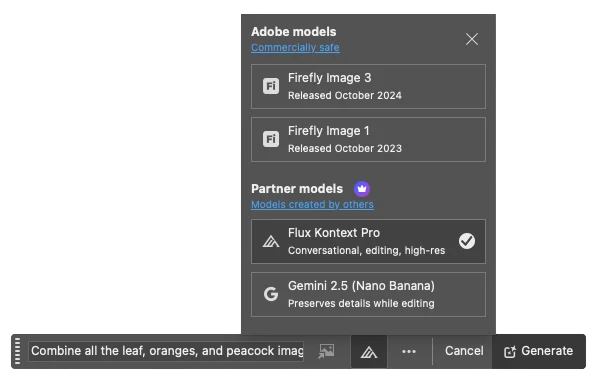
 

The workflow is:

  1. Open a File > Create a Selection (we recommend Select All or the Selection Brush)
  2. Select the Generative Fill Button
  3. Select Model Picker Icon
  4. Select either the Flux Kontext Pro or Gemini 2.5 (Nano Banana) models
  5. Enter a detailed instructional Prompt > Generate

Note: Flux Kontext Pro or Gemini 2.5 (Nano Banana) models return ONE variation.

Use Cases

Add objects or generate new details. Or choose Flux Kontext to generate contextually accurate backgrounds that integrate seamlessly. Photoshop's layer masks keep subjects untouched, enabling precise refinements. 

Select empty space on a design and prompt either Nano Banana for stylistic fills or Flux Kontext for contextual details (props, signage, scenery). Photoshop's blending modes, adjustment layers, and smart objects ensure natural integration with typography and layouts. 

Rapidly mock up product shots or campaign assets by testing both models within Photoshop. Then use curves, levels, and adjustment layers to refine and unify the output to meet the client's branding aesthetic and guidelines. 


Prompting Guides:

Prompting Best Practices:

  • Specificity: use precise names, colors, verbs

  • Simplicity: start broad, then refine

  • Safeguards: preserve what must remain unchanged

  • Sequencing: iterate in multiple steps

  • Subjects: name things directly - avoid ambiguous pronouns (it, that, he, her)

  • Speechmarks: use "quotes" for text - replace "original word" with "changed word".

  • Structure: control composition, framing, angle

  • Strong verbs: choose specific, powerful, clear actions


Limitations:

EDU customers, the use of Nano Banana or Flux Kontext is NOT available. Please contact your system administrator for more information. 

Enterprise customers: Your system admin needs to enable the feature in the Settings > Assets area with the Adobe Admin Console. 


The Gemini 2.5 (Nano Banana) and Flux Kontext Pro models were NOT created by Adobe. You are responsible for determining whether either model is appropriate for your project.

Correct answer amy durocher

@platinumexposure Please go to Help > System info > and see if it shows the following build number (for example: 27.0.0 20250924.m.3236). If not, Sign out of CCD > Sign back in > go to Updates. (Note, I am hearing reports that the rollout has not completed around the globe - if I have any more info, I will circle back)

28 replies

Participant
September 26, 2025

updated to this version but it does not work

Hannah Nicollet
Community Manager
Community Manager
September 26, 2025

Hi Captivating_Sunshine2177,


Can you please tell me the steps your following and maybe share a screen capture of the file/workspace so I can see what's happening?

Thanks!
Hannah

Participant
September 25, 2025

Not working in the latest version I updated on Sept 25 at 2:30 pm, whats going on

amy durocherCommunity ManagerAuthorCorrect answer
Community Manager
September 25, 2025

@platinumexposure Please go to Help > System info > and see if it shows the following build number (for example: 27.0.0 20250924.m.3236). If not, Sign out of CCD > Sign back in > go to Updates. (Note, I am hearing reports that the rollout has not completed around the globe - if I have any more info, I will circle back)

Participating Frequently
September 28, 2025

dear, is that true that the rollout has not completed around the globe?? 

Participating Frequently
September 25, 2025

@amy durocher I just updated the Beta but I only get m3235... I'm using a Mac M1. I don't see a way to update past this. I have a PS Pro account.

Community Manager
September 25, 2025

@DrumAddict Can you try:

Sign out of CCD > Sign back in (note I am hearing reports that the rollout has not completed around the globe - if I have any more info I will circle back)

Participating Frequently
September 25, 2025

Ok great! That did the trick. How many credits will I have for Gemini renders?

 - Thank you.

Participant
September 25, 2025

Hi, a few hours ago I updated Photoshop Beta to it latest version. I tried the new models included in Generative fill but I'm kinda upset with the results. I gave the AI some basics tasks to generate, like removing a person from a photo, remove some branches of a tree that I didn't like and also replace closed eyes of a person with open eyes.

Almost all of my tests failure. Nano Banana is good at removing things but it distorts the image a lot (I noticed some unaligned generations). But Flux Kontext Pro is really bad at almost every task I gave it.

My most recent generation with Nano Banana ended up with a really weird generation. My exact words were those: Remove the person (but in Spanish). It generated a landscape and you can also see a weird hard edge on that generation (I used the laso tool around the person, it's weird to see that error).

The above screenshot shows the weird generation.


The above screenshot shows my first attempt to delete the person. The AI removed part of him, but left the head there.

The above screenshot shows the original image (without any edit).


Inspiring
October 3, 2025

Have you tried the person selection tool to isolate only the person? Perhaps give the instruction "remove the man and fill with the background" or "remove the man and fill the area by expanding the background"

Participant
September 25, 2025

im using gemini generative fill but always encountered issue...but firefly image 1 and 3 is works with no problem...what is the problem ?


Community Manager
September 25, 2025

@alvieprbw Are you an Enterprise user? If so I have been hearing reports the feature needs to be turned on by your Admin (we are also investigating on our end).

Participant
September 25, 2025

Maybe yes, cause my company buying for teams plan, so the problems is by administrator need to turn on the models for generative ai? 

Known Participant
September 25, 2025

@amy durocher I can't open the link to the blog post - well, I can but it says "You must sign in to the private community." Is it me or there is some issue with it? Thanks.

Z3ROCOOL22
Known Participant
September 25, 2025

Community Manager
September 25, 2025

@Z3ROCOOL22 Can you try this URL: https://blog.adobe.com/en/publish/2025/03/18/adobes-approach-customer-choice-in-ai-models


Maybe there is a problem with the redirect from the Forum to the Blog Post

Participant
September 25, 2025

I believe I have installed the latest version, but I do not have access to the recent models. Tried uninstalling and reinstalling. 


Thanks


Community Manager
September 25, 2025

@Station6 Looks like you need to update your Beta build to m.3236 (has the Flux and Nano update)

Participant
September 25, 2025

@amy durocher Thank you for your answer. I have installed the latest beta. I'm not really sure how to push this specific version.

Z3ROCOOL22
Known Participant
September 25, 2025
quote

From 9/25 - to MAX (10/28) users will have:

  • CC Pro: 500 free uses per day total (doesn't matter the model)
  • CC Standard, Single App, and Photography paid plan users: will have free 100 uses for EACH model.


This is all i need to know.