
Participant
November 29, 2023
Question

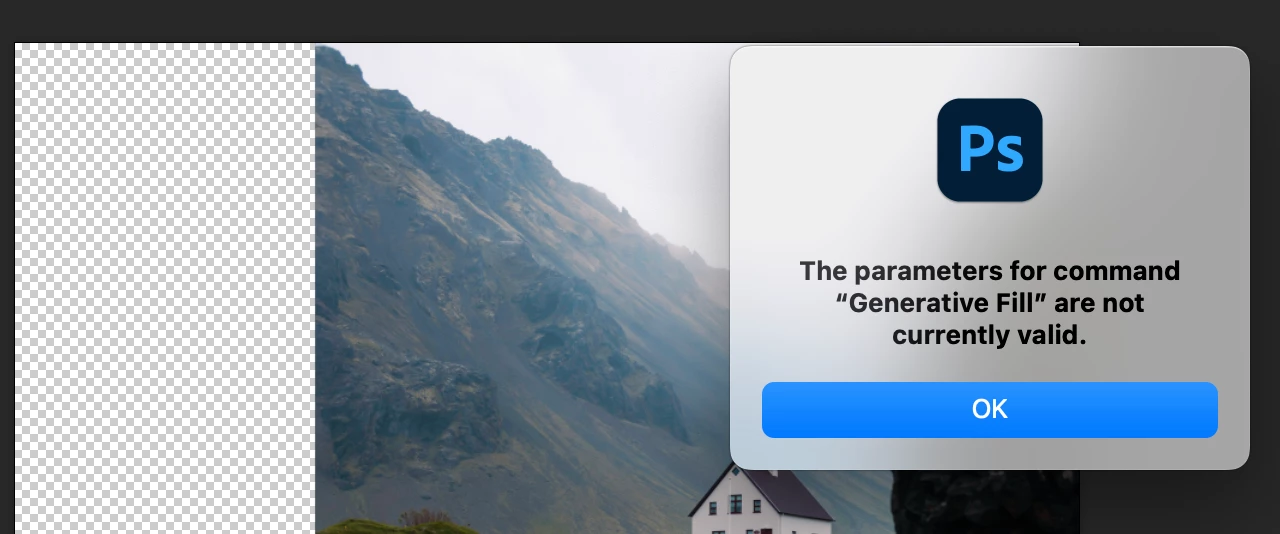
Generative Expand not expanding

  • November 29, 2023
  • 17 replies
  • 28030 views

Hi Team


Long time learner, first time poster for help.

I was having a play with generative fill in photoshop (which was working), but when I tried generative expand with the crop tool like the tutorial, it came up with an error message saying "the parameters for command "Generative Fill" are not currently valid".  I have updated, restarted the programme, reset preferences, restarted my computer, but still no luck.  Has anybody encountered this and know of a solution?  The only thing I can think of is that I am a teacher and am using a school Adobe account.  But it will still let me use generative fill so I am not sure why it does one but not the other.  Am I missing something glaringly obvious?


Any thoughts will be greatly appreciated.
 

17 replies

Participant
December 15, 2023

the only solution i found was to degrade from25.2 to 25.0 like how fwreave said in the thread below, works perfectly

zoelarkinphoto
Participating Frequently
April 20, 2024

This 'fix' no longer works. V 25 also has the bug now (April 2024)

Sulaco
Inspiring
December 15, 2023

Version 25.3..1 was just released, may be worth updating to see if they fixed this. Haven't had any problems with Generative Expand myself though...

Participant
December 18, 2023

I just updated to this version and am getting the same error 😞

Sulaco
Inspiring
December 18, 2023

Bummer! Hope they fix it soon!

Participant
December 8, 2023

My students are also experiencing this same error (although not all of them)

Participant
December 8, 2023

im on a student account and have the same problem

Participating Frequently
December 5, 2023

I'm also having this error pop up with only the expand on a few of my machines in a lab.  Ive also tried re-installing PS with no luck.

Participant
December 5, 2023

ME TOO SOMEONE HELP ME PLEASE

Participant
November 30, 2023

Same.... works on 33 of 34 of my computers in my lab. Reinstalled and that still did not fix it. Any help would be greatly appreciated. TYIA.

Participating Frequently
December 5, 2023

Not that its a great solution but I uninstalled V25.2 and installed V25.0 and expand worked again.

Participant
December 15, 2023

it works amazing thanks