
Known Participant
August 25, 2023
Question

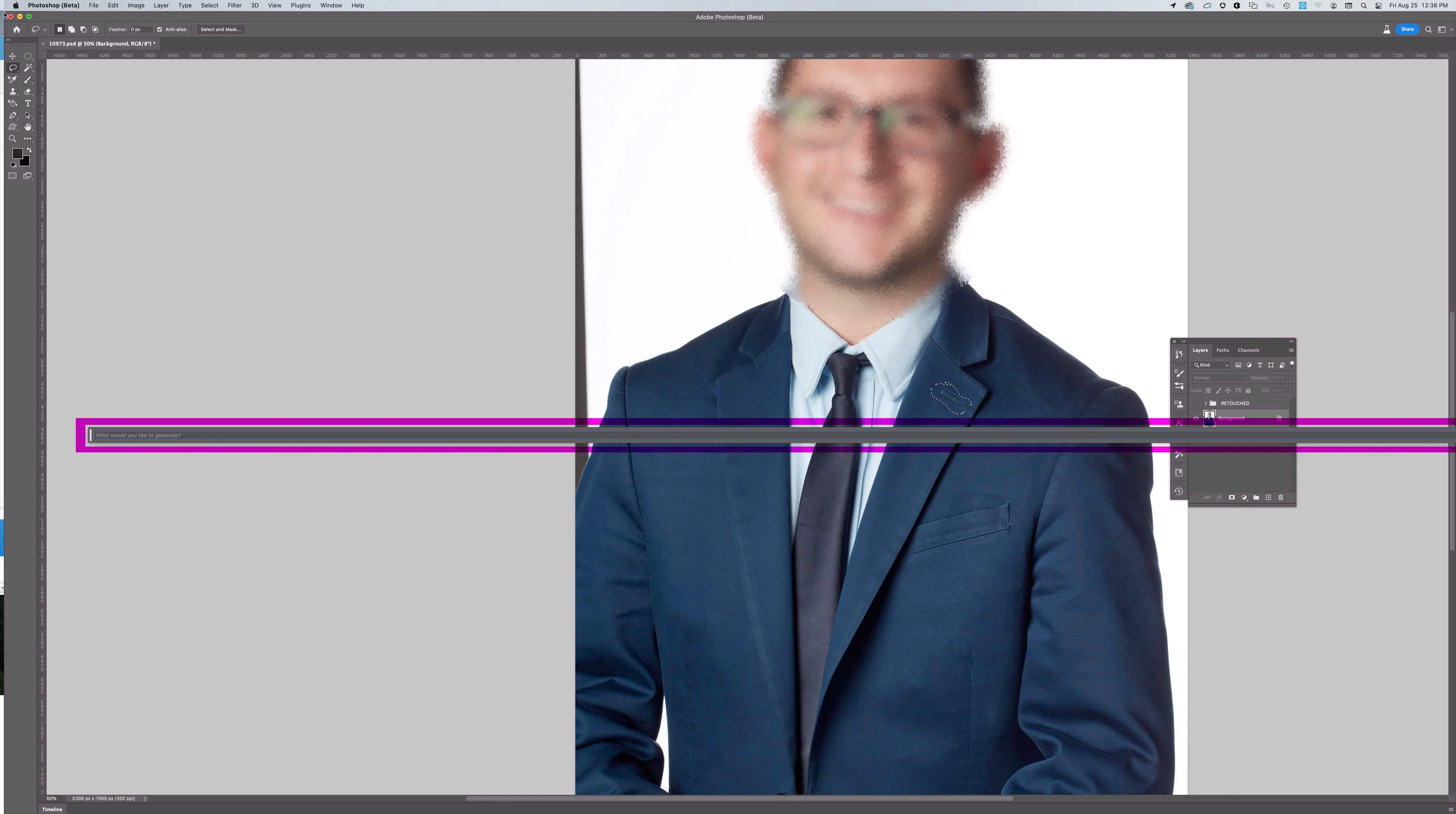
Generative Fill field length is unrestrained - No access to panel functionality [Version 25.0.0]

  • August 25, 2023
  • 5 replies
  • 402 views

I have just updated to 25.0.0 and now when I click on the generative fill field it expands beyond the right side of the Photoshop application window. There is no way to see any of the functionality to the right of the Generative Fill panel. Hitting enter does run the Generative Fill process.



This topic has been closed for replies.

5 replies

PS-GuruAuthor
Known Participant
August 25, 2023

I have now reopened Photoshop again and it's working normally. I had previously restarted Photoshop and tried multiple files with the same negative results. It appears to have been a "Glitch" rather than a Bug (I hope)


My divice is an iMac (Retina 5K, 27", 2019)

macOS Monterey
processor 3.6 GHz 8-Core Intel Core i9

Memory 32 GB 2667 MHz DDR4

Graphics Radeon Pto 580X 8 GB

Caity.psd
Community Manager
Community Manager
August 25, 2023

Hi! Can you try the steps I provided above as well? Thank you @flightlessbirb!

Caity.psd
Community Manager
Community Manager
August 25, 2023

Hi @PS-Guru can you share more information about your device, it looks to be a wide display if I am reading the screenshot correctly. Does this happen on smaller/laptop displays do you know?


I would try:

Go to window, uncheck "Contextual Task Bar". Then turn it back on (same way). If this doesn't reset the size, perhaps uncheck (turn off the bar) relaunch photoshop beta, turn the task bar back on. Is the size correct?

Participant
August 25, 2023

same issue here

Participant
August 25, 2023

latest version of PS beta, Big Sur 17.7.8, 2015 imac.


The pinned text entry bar when asking for a generative prompt now stretches off into infinity. I have a dual monitor setup with the used monitor on the right.