Participant
May 28, 2026

generative fill grayed out when all workspace selected in 27.8.0

  • May 28, 2026
  • 3 replies
  • 15 views

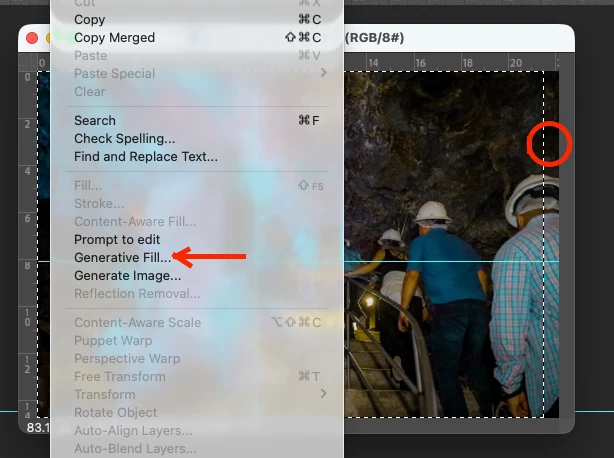
Generative fill doesn't work (grayed out) when I select the entire workspace, either with the mouse or using Command+A.

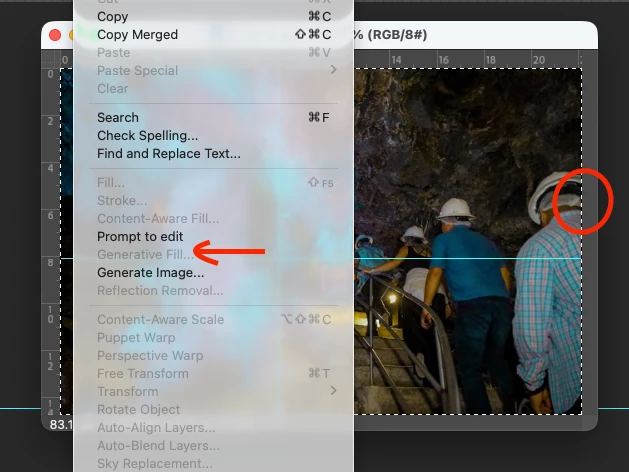
If I manually select an area, then it works correctly.

Mac M3 pro, OS Tahoe 26.5 (25F71)

Examples:
with “ALL” selected 
not “ALL” selected


    3 replies

    onazole
    Inspiring
    May 30, 2026

    When you select the entire image “generative Fill” has changed to the Contextual Task Bar and appears as “Prompt to edit” in beta 27.8 m3556.

    CShubert
    Community Manager
    Community Manager
    May 28, 2026

    Hi ​@Irvin Rob this is not a bug but a UI change…
     

    When you select the entire canvas (Cmd+A or 100% selection), Photoshop Beta now routes to "Generate Image" instead of "Generative Fill." This is an intentional design change — Generate Image is optimized for creating full-canvas content. Generative Fill is designed for partial/in painting selections.

    If you need to use Generative Fill specifically, try selecting slightly less than the full canvas (e.g., leave a few pixels of border unselected).

    If the button is truly grayed out (not just replaced by "Generate Image"), please let us know and we'll investigate further.


    Thanks,

    Cory - Photoshop Product Manager

    Irvin RobAuthor
    Participant
    May 28, 2026

    The problem with using "generate image" is that it doesn't allow you to make changes to the existing image. For example, if I have a photograph taken at night and I want to change it to a daytime scene, the image generator creates a new photo and doesn't modify the existing one. I had to select most of the image to achieve the change and then delete the part that wasn't selected. I did this using the Gemini model. Additionally, the first example images I attached to my comment show the menu as it appears to me. Thank you.

    Participant
    May 28, 2026

    Happening to me too. Latest version beta, Win 11