


MeredithStotzner
Community Manager
Community Manager
May 23, 2023
Answered

Generative Fill in Photoshop Beta

  • May 23, 2023
  • 106 replies
  • 144293 views

Dream Bigger with Generative Fill - now in the Photoshop (beta) app 
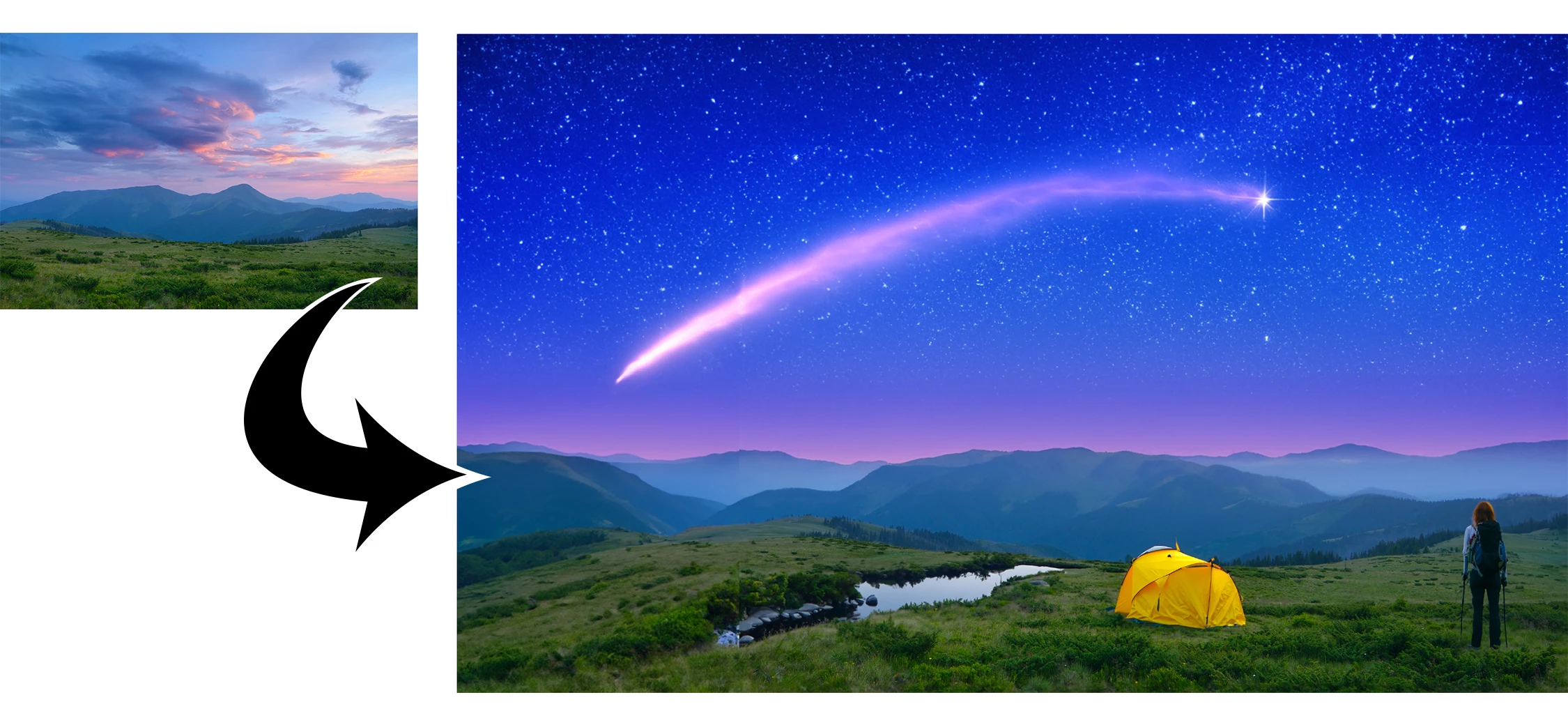
 

This under-construction, revolutionary new AI-powered Generative Fill allows you to create/generate new content in your image or remove objects like never before!

The process is simple: make a selection – any selection, then tell Photoshop exactly what you want placed there. The GenAI models will return an object or scene you described. You can:
 

Generate objects: Select an area in your image, then describe what you’d like to add.

 

Generate backgrounds: Select the background behind your subject, then generate a new scene from a text prompt.

 

Extend images: Expand the canvas of your image, then make a selection of the empty region. Generating without a prompt will create a seamless extension of your scene.

 

Remove: Select the area you want to remove, then let the GenAI technology make it disappear.
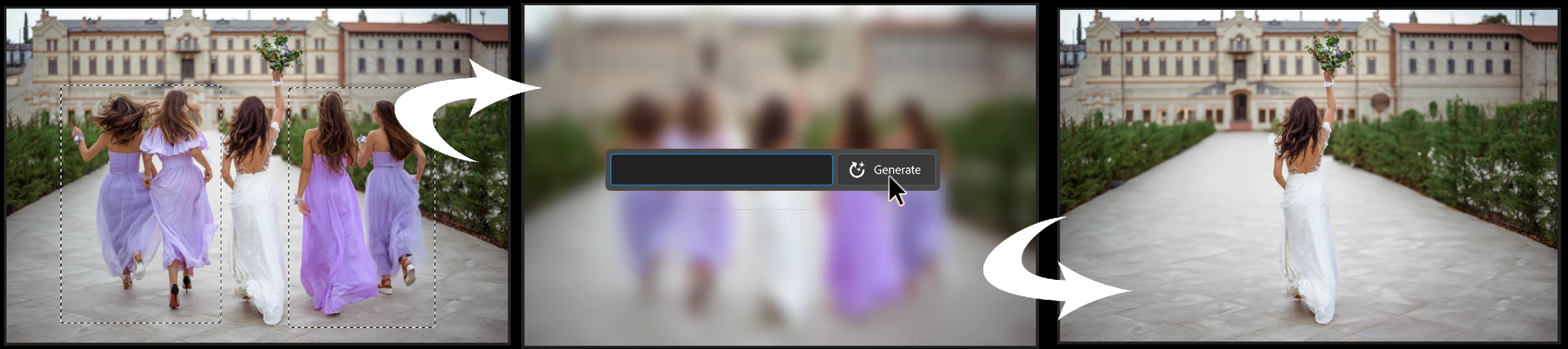
 

And more… Generative fill is incredibly versatile. Discover new ways to use this powerful feature.


How to use Generative Fill

Full instructions and helpful links are here:   https://helpx.adobe.com/photoshop/using/generative-fill.html


Rate the results!
Releasing this amazing new technology as a public beta allows Adobe to hear from you!

Let us know if the Generative Fill feature is meeting your expectations!
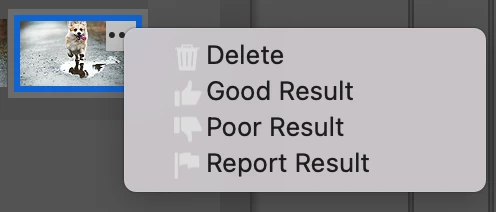
As you use Generative Fill, please rate each variation image.

Simply hover over the [•••] on the thumbnail and give it a thumbs up, or thumbs down, then follow the link to tell us more.


Report Result option
Prompts may also unintentionally generate problematic or offensive images; in such cases you can use the Report Result option to let us know.


Provide Feedback and help shape Generative Fill

If you would like to provide feedback on the overall experience, report any bugs, or suggest new features please let us know in this thread! If you prefer Discord, you can find us there too!


Helpful Tips

  • Use simple language
    Leave out commands like “add” or “remove” - Example: asking to "remove the red boat" will generate more red boats.
    Try using 3-8 words to describe what you want to see.
    Include a subject with descriptive language.. Example: A red barn in a field of flowers.
  • Select part of the original image when extending 
    Make sure you select part of the image along with the empty part of the canvas. This will give a better result that will blend in with the rest of your image.
  • Get inspired and inspire others
    Share what you create with the beta community!
    Check out the 
    Adobe Firefly Gallery to see what others have created with Adobe Firefly and Generative Fill. Click on an image to see the prompt that was used.


Related Links:

          Learn about and install Photoshop (beta) app

          Experience the future of Photoshop with Generative Fill

          Firefly FAQ

          Stock and Firefly FAQ

          Make selections in your composites

          Retouch and repair images


Correct answer Kevin Stohlmeyer

Try entering a basic prompt. We are seeing a high volume of failures for GF without prompts.

106 replies

Participant
October 12, 2024

What happened with generative function?! I'm rare use it, but a year ago I experimented in many photos and it worked very well, but now incorrectly detects the light and focus. Maybe I'm not making prompts in the right way? But as I say before it was enough for me to write "flowers" and it understand how to draw.

Here I'm trying to add a vase with flowers on the table, it constantly gives me a sharp result.

First prompt was: vase with flowers. Second: vase with flowers on background, depth of field. Third: vase with flowers on background, not in focus, depth of field. And all the time same poor result...


For example, one of my experiment year ago with one of my photos. Here was generated: on table "book", "glass of wine" and "wine bottle", on background "dark transparent vase with dark flowers staying in shadow". All of this looking good! Maybe except glass, because no shadow from light but i made too small frame for it.

hellopaul4
Inspiring
April 11, 2024

Why is Photoshop's Generative Fill (I'm on Photoshop Beta 25.7.0) so incredibly far behind the competition? Is it time for Adobe to give up entirely, or buy DALL-E? Here is my prompt:
"Photorealistic image of 12 people, aged 40 years old, doing olympic sports javelin, discus, high jump, pole vault, hurdles on the street Mount Pleasant in Norwich, UK while eating hamburgers and hot dogs and drinking wine, champagne and beer on a sunny day."

Using Microsoft Copilot (which uses DALL-E 3), these are the results:


Hilariously/disturbingly/horrifically, this is what Photoshop's Generative Fill, using an identical prompt (I just copied & pasted it) creates:


I think the results speak for themselves.


Graham24508943nobd
Known Participant
April 11, 2024

yep, disgusting generations now. I only use it for doing landscapes as humans and animals are dreadful


Participant
February 2, 2024

If I use Generative Expand leaving the text block blank, where does the image get its pixels from to fill the expanded canvas. Does it use pixels from the original image or are they generated by Ai

Participating Frequently
January 10, 2024

This should not of been released yet, in practice its extremely poor, it simply does not do what adobe claim, after about 5 differnt prompts this is still the kind of thing im getting to expand a background... basically just a stock image placed on a layer, this is supposed to exapnd the backround, after many attempts its not even matched one of the colours yet... 

Participating Frequently
January 10, 2024

This is with what i thought would be an easier one... what is the actual point of this? Is this what we pay for every month, for adobe developers to make things like this happen.


Participating Frequently
January 10, 2024

Adobe said "Generating without a prompt will create a seamless extension of your scene." 😂

Participant
December 12, 2023

I am frustrated and I think it is junk. I have tried so many terms to type to remove people on the beach and just leave my friend. Forget it. It just creates another person when you beg it to remove one. I say beg because I thought i was being clever when I tried every term i could think of. And when i go to report it, the window that pops up where you report it, it's too large and I cant get to the submit button. I try moving it up to no avail. I know AI is early, but Photoshop should not be advertising the awesome capabilites it does, for they are really not there. 

Graham24508943nobd
Known Participant
December 12, 2023

Just using remove as a prompt  used to work . Doesn't. It's getting worse instead of better.

Even generating people is a lot worse than it was.  There's not a chance I'd pay for this nonsense

Graham24508943nobd
Known Participant
November 29, 2023

Remove is STILL a hit or a miss. So frustrating !

Participant
October 4, 2023

In August my prompts for white bunnies looked perfect and realistic. They would match the color tones and lighting of the image, now 2 months later they never fit the scene and most times look fake or cartoony. Why did the quality drop exponentionally in 2 months?

Participant
October 3, 2023

All that is nice.... if it actually worked.   I've yet to get anything usable out of this function.  Looks more like a childish cut and paste job.  And that's only on the results it actually follows through with.  90% of the responses I've gotten are error warnings of some kind of "community standards".  It's all but comical.   Apparently "wooden porch deck abandoned building" is against community standards. lol.


Don't blame the community for "standards" when the community didn't have anything to do with it.   Every time you say "community standards" as an excuse for results, we hear... "social credit score to limit speech".  But that's typical for Adobe.... you have to use a support "community" since there are no instructions for any programs you offer.  So you have to "earn badges" like children.   Kinda childish responses from the Generative Fill options.   Maybe if every word wasn't triggering to the "community" the AI would actually work.

Participant
September 28, 2023

I'm using Photoshop Beta 25.01 on Mac OS 13.5.1

When AI image is generated, a lot of distortion is occuring. For example, if I ask for a Bedouin tent in a Sahara desert setting, the tent edges are distored to match the sand drifts, as are any figures that are generated. In an image of a standing man, I generated an image of an office complex on a cloudy day — edges and face of man was distored (fragmented) as were elements of the generated background. I've tried this feature with numerous images and figures and it is always distorted. For figures I use the Select Subject from the floating bar, then inverse selection, then Generate. For landscapes I create a selection then go to Generate in the floating bar. I make sure my request are clear and no extraneous words are used. Too glitchy and honestly not ready for primetime.

Kevin Stohlmeyer
Community Expert
Community Expert
September 29, 2023

can you share some before and after examples with the specific prompts you are using?

Participant
October 2, 2023

Sorry I delted them, didn't save the prompts

Participant
September 2, 2023

Die AI generierten Spiegelungen im Wasser sind nicht korrekt