


MeredithStotzner
Community Manager
Community Manager
May 23, 2023
Answered

Generative Fill in Photoshop Beta

  • May 23, 2023
  • 106 replies
  • 144208 views

Dream Bigger with Generative Fill - now in the Photoshop (beta) app 
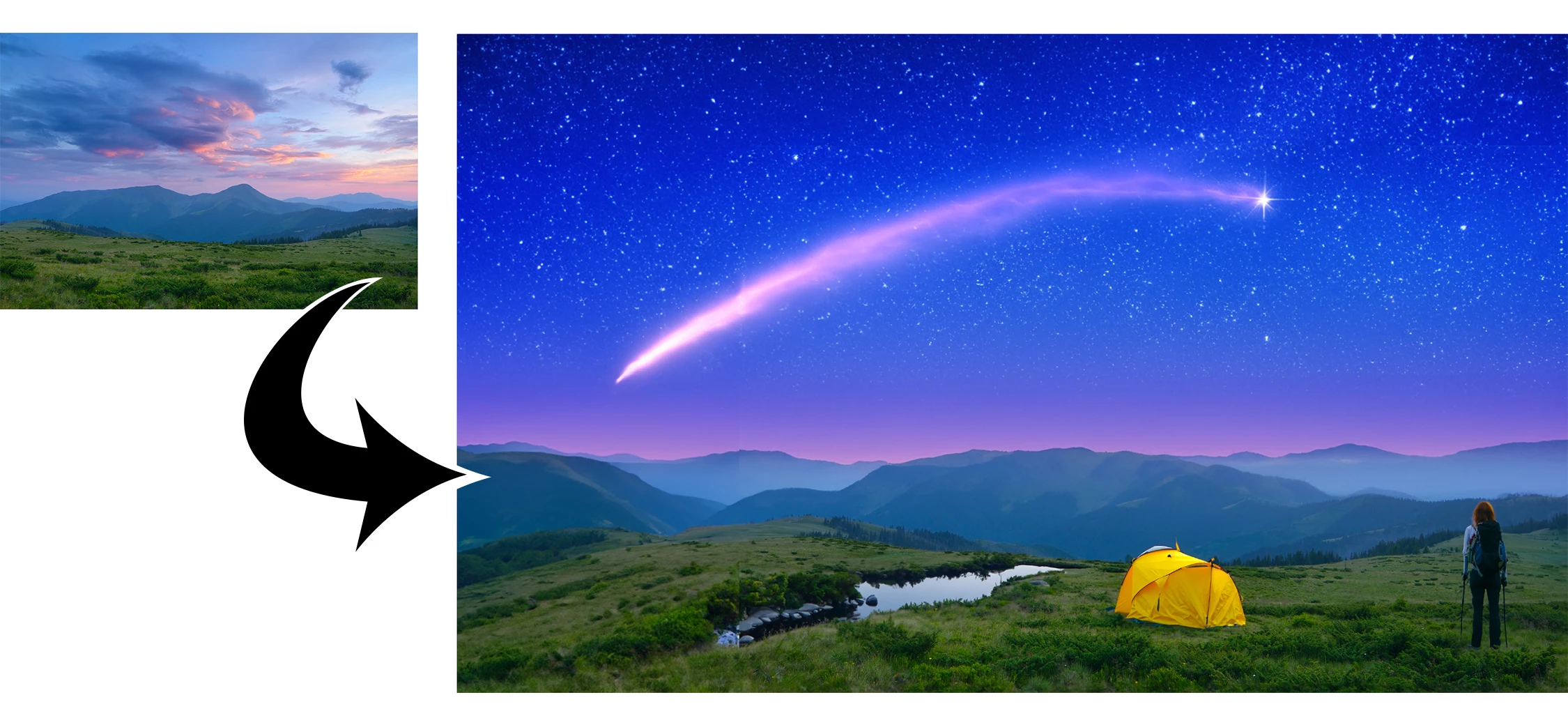
 

This under-construction, revolutionary new AI-powered Generative Fill allows you to create/generate new content in your image or remove objects like never before!

The process is simple: make a selection – any selection, then tell Photoshop exactly what you want placed there. The GenAI models will return an object or scene you described. You can:
 

Generate objects: Select an area in your image, then describe what you’d like to add.

 

Generate backgrounds: Select the background behind your subject, then generate a new scene from a text prompt.

 

Extend images: Expand the canvas of your image, then make a selection of the empty region. Generating without a prompt will create a seamless extension of your scene.

 

Remove: Select the area you want to remove, then let the GenAI technology make it disappear.
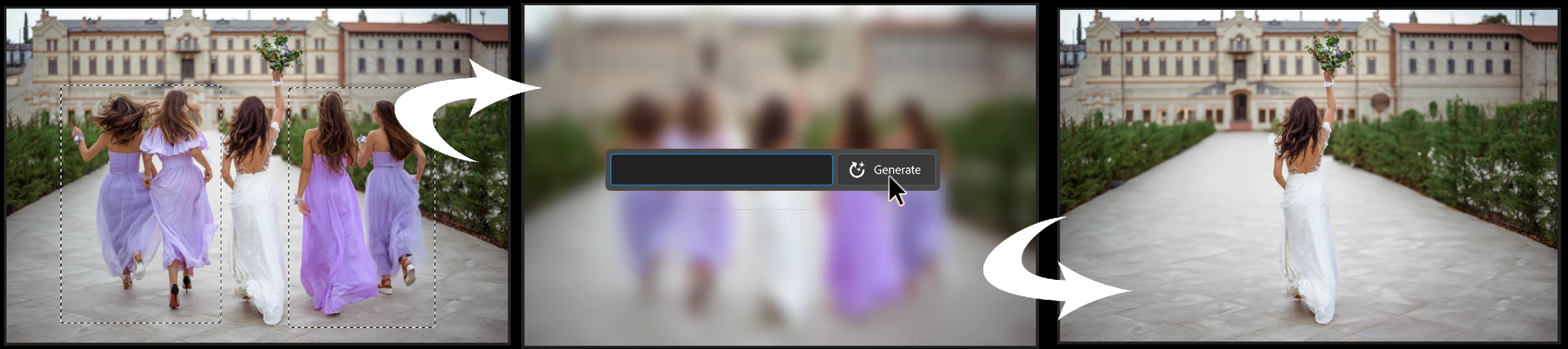
 

And more… Generative fill is incredibly versatile. Discover new ways to use this powerful feature.


How to use Generative Fill

Full instructions and helpful links are here:   https://helpx.adobe.com/photoshop/using/generative-fill.html


Rate the results!
Releasing this amazing new technology as a public beta allows Adobe to hear from you!

Let us know if the Generative Fill feature is meeting your expectations!
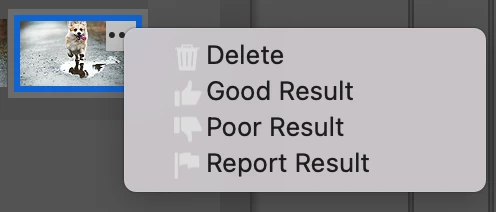
As you use Generative Fill, please rate each variation image.

Simply hover over the [•••] on the thumbnail and give it a thumbs up, or thumbs down, then follow the link to tell us more.


Report Result option
Prompts may also unintentionally generate problematic or offensive images; in such cases you can use the Report Result option to let us know.


Provide Feedback and help shape Generative Fill

If you would like to provide feedback on the overall experience, report any bugs, or suggest new features please let us know in this thread! If you prefer Discord, you can find us there too!


Helpful Tips

  • Use simple language
    Leave out commands like “add” or “remove” - Example: asking to "remove the red boat" will generate more red boats.
    Try using 3-8 words to describe what you want to see.
    Include a subject with descriptive language.. Example: A red barn in a field of flowers.
  • Select part of the original image when extending 
    Make sure you select part of the image along with the empty part of the canvas. This will give a better result that will blend in with the rest of your image.
  • Get inspired and inspire others
    Share what you create with the beta community!
    Check out the 
    Adobe Firefly Gallery to see what others have created with Adobe Firefly and Generative Fill. Click on an image to see the prompt that was used.


Related Links:

          Learn about and install Photoshop (beta) app

          Experience the future of Photoshop with Generative Fill

          Firefly FAQ

          Stock and Firefly FAQ

          Make selections in your composites

          Retouch and repair images


Correct answer Kevin Stohlmeyer

Try entering a basic prompt. We are seeing a high volume of failures for GF without prompts.

106 replies

Participant
May 26, 2023

Hi, im new to photoshop and im testing out the new generative fill feature. I have this issue where i try to mark my extended crop as closely to the edge as possible, but i cant get it just right it seems as when i get the AI to fill it theres always these lines. 

Pattie-F
Legend
May 26, 2023

Try selecting part of the image along with your extended area and it should extend the image with no line.

Participant
May 26, 2023

When generating stuff on a layer with a mask, there will be a weird generated outline.

Known Participant
May 26, 2023

Maybe it is just me, but the censorship seems a bit over the top here. I can't generate things like missiles or daggers? Kind of ridiculous and absurd. I think it probably offends me more than anything that could be created with an uncensored ai, but sure okay, 

Participating Frequently
May 26, 2023

Can't you just be happy that we have this technology? Go to Russia or China and see how censorship works over there.

Known Participant
May 26, 2023

So your agumnent is that I should be happy that I am censored because China? Gotcha. Brilliant rebuttale. So true.

tonyb83219491
Participant
May 25, 2023

I have been playing around with photos of myself and grandkids, asking for fills such as cowboy, circus clown, circus strongman, etc. At least two of the three fills come up with females instead males. Is there a preference button somewhere? If not, maybe there should be. 

Kevin Stohlmeyer
Community Expert
Community Expert
May 26, 2023

Hi @tonyb83219491 have you been giving the prompt more specific commands such as "male" or similar?

tonyb83219491
Participant
May 26, 2023
Yes, I did use male as a prompt. Of course, that’s a problem because male is part of the word female. Same with man and woman. Maybe using “NOT female” might work. I’ll have to give that a try.

Sent from my iPhone
mharrsch
Participant
May 25, 2023

I've been experimenting with the generative AI and asked it to produce a rearing horse. This is a basic behavior for a horse but the AI did not understand it.  For an animal like a horse, the AI should be able to reproduce a horse that is rearing, walking, trotting, lying down.  I also want to be able to specify the direction the animal is looking. I tried asking the AI to produce a horse looking at the camera, looking backwards, etc. and it didn't understand any directional commands and most horse variations were facing away from the viewer. Directional commands should be standard for any generated object. I did generate a dinosaur that was looking at the viewer but I didn't specify anything, just a tyrannosaurus and it created some type of mutant dinosaur like you would see in a Jurassic World movie which was OK. It served the purpose but not the specific species I requested. I also suggest the generated object should be on a transparent background so you can move it around the scene without worrying about a background mismatch or duplicate the layer and move the various layers around as desired.

Participant
May 25, 2023

I really love the new AI generative feature. But you guys really need to take a second pass at the prompt filtering. I tried to generate "Shooting Stars", and get told I'm violating the user guidelines. I understand that you guys might be scared of the word "shooting" but come on... Did you guys apply Artificial Intelligence to everything but prompt filter?

We're adults (We would have to be to have agreed to the purchasing contract), get out of the way with this hyper-reative censorship. It won't stop people abusing the feature, it'll only make the rest of us annoyed, trying to find a way to carefully word a prompt so as not to be labled some sort of devient. 

jeffry de meyer
Participating Frequently
May 25, 2023

I had the same thing but with the word tiara.
combat boots was an other one it wouldn't do even though it's a type of boots

I've been having lots of fun with the feature, but it's no where near ready to go out of beta especially if it's going to cost credits.
Select subject's torso, type long sleved white shirt with buttons. => 3 green t-shirts that look like the original...

Participant
May 25, 2023

This has the potential to be amazing. I understand it's a beta (as is Firefly) and much like Firefly, we're seeing adobe bringing some incredible and much needed functionality to the generative AI space. For now, with the greatest of respect, neither Generative Fill nor Firefly are quite up to standard yet. In the case of generative fill, it feels more like a proof of concept than a close-to-viable functionality. Until the fill is able to match the resolution of the image it's filling into, it will just be a gimmik. 

Participant
May 25, 2023

I tried adding a dolphin jumping out of the water using generative fill and it doesn't look like a dolphin, more like an orca, plus the examples generated aren't too great. I tried using generative fill for a few different types of animals like deer or lions etc and I wasn't too lucky. However, when generating backgrounds and landscapes, it's been great.


I raised it on Twitter and was asked to provide feedback here: https://twitter.com/lsuliga/status/1661507125435068417


Thanks,

 Lukasz

Known Participant
May 25, 2023

I know that everyone's probably more interested in bugs and feature requests at this point, but I just wanted to let you know that the two new features I'm using, the Remove Tool and Generative Fill, are working wonderfully in Beta 24.6.0 on my 2021 MacBook Pro M1 Max. No freezes, grayed-out features, or error messages. I'm allocating 43GB of RAM to Photoshop and everything's nice and snappy. (The beta version of Photoshop launches faster than the release version.) The features work so well and beside scarying the daylights out of me (I can't even believe in the authenticity of my own work now?), they are truly magical. Keep up the good work!

Participant
May 25, 2023

Original:


Mit Generative Fill erstellte Version:

Wie zu sehen ist die Person in der Mitte mit einer komplett anderen Person ausgetauscht worden