
weirdsciencex
Participant
April 27, 2024
Answered

Generative Fill is still too restrictive

  • April 27, 2024
  • 1 reply
  • 656 views

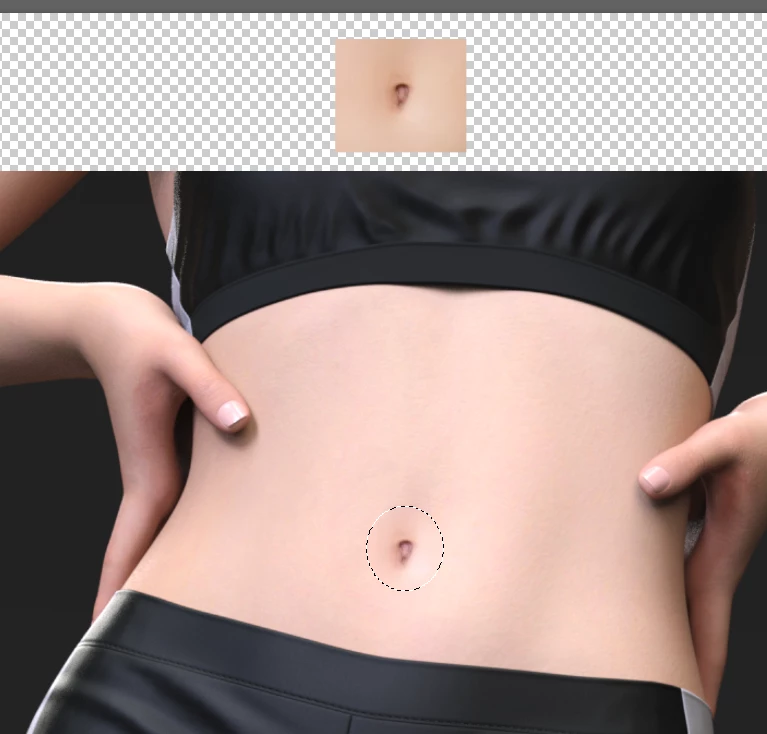
I was attempting to fix some test renders where the belly button was deformed.


Bellybutton, bellybutton, stomach, all blocked.

This topic has been closed for replies.
Correct answer Trevor.Dennis

At the moment, it is what it is.  Adobe appear to be super sensitive to kick back against Ai and are playing it safe.  Too safe in most of our opinions methinks.  Competition will surely force a more relaxed position in time to come.


Meanwhile, we use workarounds like the patch tool and a borrowed stock image.  AFAIK, the source and target images have to be on the same layer for the Patch tool to work — but you already knew that.
1 reply

Trevor.Dennis
Community Expert
Trevor.DennisCommunity ExpertCorrect answer
Community Expert
April 28, 2024

At the moment, it is what it is.  Adobe appear to be super sensitive to kick back against Ai and are playing it safe.  Too safe in most of our opinions methinks.  Competition will surely force a more relaxed position in time to come.


Meanwhile, we use workarounds like the patch tool and a borrowed stock image.  AFAIK, the source and target images have to be on the same layer for the Patch tool to work — but you already knew that.

weirdsciencex
Participant
April 28, 2024

Thank you for the reply and the tip.


I actually used Krita with a generative fill add-on.  Although, your solution would have been a lot quicker and easier.