Participant
June 8, 2023
Answered

generative fill not appearing

  • June 8, 2023
  • 1 reply
  • 2810 views

Hello, the generative fill on my ps beta stopped appearing suddenly. 

pls how should i fix that? my ps is already updated 

This topic has been closed for replies.
Correct answer Trevor.Dennis

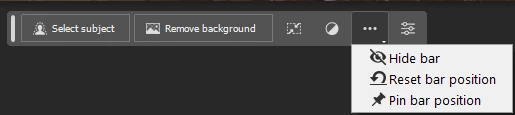
It's possible to 'Hide' the CTB by clicking on the three dots which opens the drop down window.
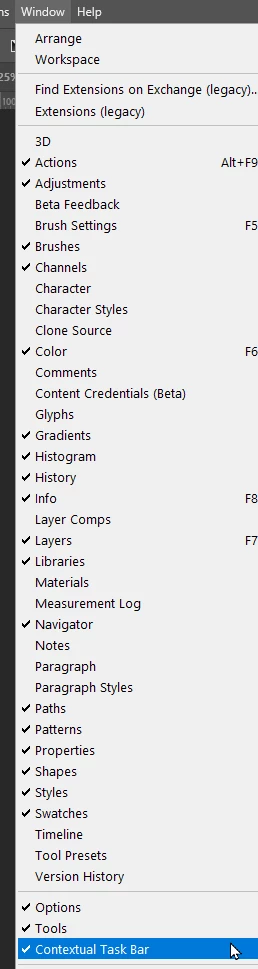
You need to go to the bottom of the Window menu to turn it back on again.
1 reply

Kevin Stohlmeyer
Community Expert
Community Expert
June 8, 2023

Hi @Siba22807534h72p what do you mean "stopped appearing suddenly"? Do you see the contextual task bar still? can you confirm you are on Photoshop 24.6.x and didn't accidentally open Photoshop 24.5?

Participant
June 12, 2023

hello @Kevin Stohlmeyer yes, it is 24.6 .. i mean when I first downloaded photoshop Beta the generative fill was working normally, but suddenly the contextual task bar doesnt show whenever i use any selective tool 


Trevor.Dennis
Community Expert
Trevor.DennisCommunity ExpertCorrect answer
Community Expert
June 12, 2023

It's possible to 'Hide' the CTB by clicking on the three dots which opens the drop down window.

You need to go to the bottom of the Window menu to turn it back on again.