
'Generative Fill' stopped working - greyed out text (Generative Fill is currently not available)
Last week the Generative Fill on PS (beta) 24.6 was working just fine, this week it seems that the text has now been greyed out. When hovering over the greyed out text, I get the message "Generative Fill is currently not available".
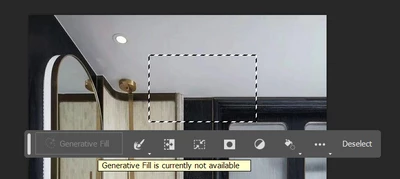
I've checked the mode, channel, bit depth, different images, different image formats, uninstalled/reinstalled, logged in/out, tried to locate the DOB setting on my Adobe profile and Behance (which for some reason is not appearing for me?) and spoke to an Adobe agent to no avail.
It seems like it's not just me with the same issue, but the other colleagues within our business plan have the same issue. We're around 45 Adobe CC users - 20% have faced this problem, 3% don't have any issues while the rest do not have PS Beta installed.
This new feature has really cut down production time for a lot of the non-skilled Adobe users and we really would like to benefit from it. We'd really appreciate some support on this matter.
Thanks!
Amena
Version: Photoshop (Beta) 24.6.0
Platform/OS: Windows 10 - Pro


 AdChoices