
Participant
May 7, 2024
Answered

Generative Fill with reference

  • May 7, 2024
  • 2 replies
  • 53488 views

Hello there,
this is my first time in this community
I would like to know :

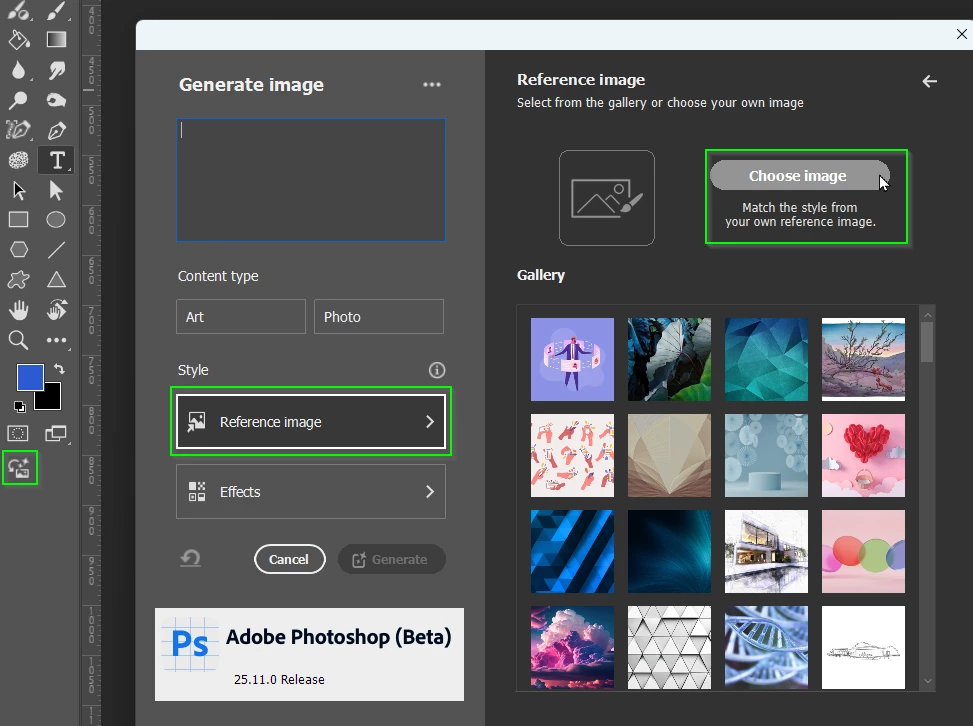
"is it possible to use photoshop's generative fill by giving it an image as a reference for what it should generate?"
I'm trying to add a well to a picture that I took in the desert to make a simulation and despite several attempts I can't achieve the desired result (a complete well with the wooden structure above and the pulley with it).
and my credits are counted each time I try.
I've got a reference image for what I want the result to be, and it'll be handy if we can provide photoshop with a reference of what we want to have, that'll limit the search field.
Correct answer Parya38291849jq75

Are you using the Beta version?


Thank you Travor, now I have downloaded Beta version and it works 🥳

2 replies

Participant
May 8, 2024
quote

"is it possible to use photoshop's generative fill by giving it an image as a reference for what it should generate?"


By @Exclusif Media

Yes, Photoshop’s Generative Fill allows you to use a reference image to guide the generation process. Simply upload your reference image and pair it with a descriptive prompt to achieve the desired result.

Trevor.Dennis
Community Expert
Community Expert
May 8, 2024

Blimmin heck!  I'd missed that one! That's super cool.

janinea51209728
Participant
June 24, 2024

I don't have that option

Trevor.Dennis
Community Expert
Community Expert
May 8, 2024

When Firefly version 3 was icorperated directly into Photoshop I got very excited thinking about the extra functionality it has over Generative Fill, using a reference image being chief among them.  Allas, that was not the case, so at this time, and as nice it would be, no we can't use a Reference Image in Generative Fill.