
StephenC Photography
Known Participant
July 10, 2023
Answered

How do I rpelace part of a background?

  • July 10, 2023
  • 3 replies
  • 274 views

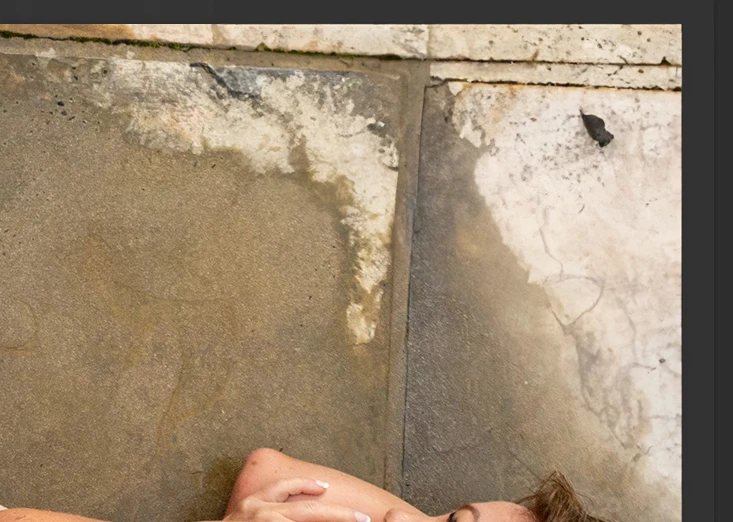
I have an image of a person lying on the tiled part of a pool. There is only a small prt of the pool water in the top corner of the image. I want to replace that area with the same pool tiles in the rest of the image. Can generative fill help with that?


Thank you.


Stephen


Ps. I got it right with one image. Then using the same prompt on subsequent images it did not work. 
This topic has been closed for replies.
Correct answer Kevin Stohlmeyer

I tested on your image by selecting the water area with a lasso tool then adding a simple prompt "extend tile". There are varying results but this was the most accurate I had:


3 replies

Trevor.Dennis
Community Expert
Community Expert
July 12, 2023

IME, the trick is to extend the selection into the area you want Gen Fill to sample from, rather than, say, just the transparent area in your screen shot.  So this selection:


gets you a reasonable result.


Out of interest, I tried some of the previous tools like the improved Content Aware Fill, but the results were hopeless by comparison, and underlined again just how amazing the new Ai tools are.


StephenC Photography
Known Participant
July 12, 2023

Thank you Kevin
<Removed personal information>

Kevin Stohlmeyer
Community Expert
Kevin StohlmeyerCommunity ExpertCorrect answer
Community Expert
July 11, 2023

I tested on your image by selecting the water area with a lasso tool then adding a simple prompt "extend tile". There are varying results but this was the most accurate I had: