


JohnDG Photography
Known Participant
September 6, 2026
Question

Hugh / saturation color selection colors mixed up

  • September 6, 2026
  • 4 replies
  • 62 views

Photoshop Beta 27.11.0
Using “Hugh / saturation” the selection of colors is wrong
Yellow gives the red control
Green gives the yellow control
Red gives the green control
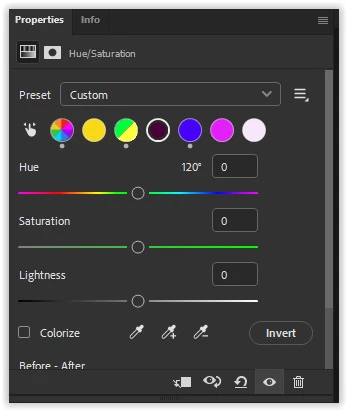
Red button selected … green control


Purple gives the light blue control
Pink gives the blue control 

    4 replies

    JohnDG Photography
    Known Participant
    September 10, 2026


    D Fosse
    Community Expert
    Community Expert
    September 6, 2026

    ​@JohnDG Photography 

    According to the screenshot, you have an active master adjustment. If this involves the Hue slider, this may affect color ranges.

    JohnDG Photography
    Known Participant
    September 6, 2026

    Tried the same with an new, empty worksheet. No other adjustments made.
    Opened the hugh / saturation.
    Clicked on “yellow”  → slider is red


    Community Expert
    September 6, 2026

    Moderators, ​@Sameer K  ,  please move this thread to: Photoshop (Beta) | Adobe DME

    My System: Intel i7-8700K - 64GB RAM - NVidia Geforce RTX 3060 - Windows 11 Pro 25H2 -- LR-Classic 15 - Photoshop 27 - Nik Collection 9 - PureRAW 6 - Topaz Photo AI