
Participant
November 10, 2023
Answered

Image stretched

  • November 10, 2023
  • 5 replies
  • 577 views

When I open a new file or an existing file in Photoshop Beta, it opens stretched. When I first open it, there's a black border around the right hand side and bottom, and when I then zoom in or out, the black border disappears and the image displays stretched. This didn't happen in the former Beta version, and when I downgrade, it doesn't happen
Correct answer Trevor.Dennis

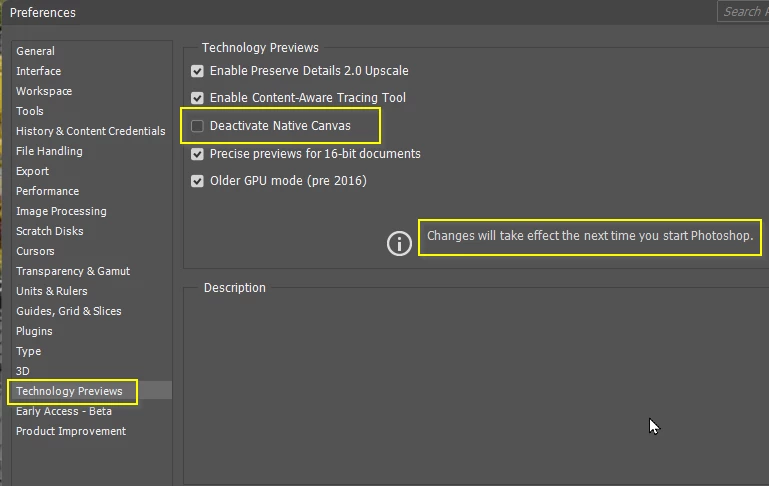
It sounds very similar to an issue several people have been having.  In fact I had it myself along with an offset cursor.  I fixed it by Deactivating Native Canvas in Preferences, but I am not having to do this in the most recent update 25.2.0 m.2388 

Adobe engineer Cory Shubert has been asking people to try manually reseting Preferences, so it would probably be best to try that as a first step.

https://helpx.adobe.com/ie/photoshop/using/preferences.html#Manually


5 replies

Participant
August 18, 2024

I had the same problem, Image stretched on bottom and right side, and also the cursor was offset to the right a bit.

The FIX- My monitor is a 4 k set at 125%. That was streatching the aspect of the photo and how photoshop interpreted the image. Close Photoshop, Right click anywhere on your desktop, go do Display Settings, scroll down and change your display settings to 100%. Then re-open Photoshop and it should fix it.

Inspiring
September 17, 2025

I have to have my display at 125%--it is not something I can change in order to view things in other programs properly. Is there another solution than a 100% display? There must be!!

Participant
November 13, 2023

Thanks, I've turned that off and now it doesn't happen 👍

Participant
November 13, 2023

No it doesn't, nor does it happen in the former Beta version. I forgot to mention, not just the canvas appears stretched, the rulers do too.

Trevor.Dennis
Community Expert
Trevor.DennisCommunity ExpertCorrect answer
Community Expert
November 11, 2023

It sounds very similar to an issue several people have been having.  In fact I had it myself along with an offset cursor.  I fixed it by Deactivating Native Canvas in Preferences, but I am not having to do this in the most recent update 25.2.0 m.2388 

Adobe engineer Cory Shubert has been asking people to try manually reseting Preferences, so it would probably be best to try that as a first step.

https://helpx.adobe.com/ie/photoshop/using/preferences.html#Manually


jane-e
Community Expert
Community Expert
November 11, 2023

@Nancy29579545d8f3 

Does it happen in the released version?

Jane