Participant
August 29, 2023
Answered

Impossible de faire un recadrage dans Photoshop Beta

  • August 29, 2023
  • 3 replies
  • 286 views

Impossible de faire un recadrage dans Photoshop Beta, la grille de séléction ainsi que le cadre n'apparaisse plus

This topic has been closed for replies.
Correct answer Kevin Stohlmeyer

Hi @Mathieu22029490547o works fine for me. Can you confirm what version you are on using Help Menu/System Info and copy the version specific number here?


Two things to check in the options bar when you have the crop tool selected:
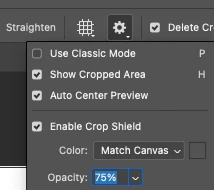
 

If you have these set, try resetting you preferences under Settings/General, click the reset prefs button and relaunch PS.


3 replies

Participant
August 30, 2023

Hello Kevin, 

Thanks a lot for your answer, it is working now. I'll reset my preferences to have this by default. 

Have a wonderful day ✌️

CShubert
Community Manager
Community Manager
August 29, 2023

Hi @Mathieu22029490547o 


It may help if we could see your Photoshop System Info. Launch Photoshop, and select Help >System Info...and copy/paste the text in a reply.  


Kevin Stohlmeyer
Community Expert
Kevin StohlmeyerCommunity ExpertCorrect answer
Community Expert
August 29, 2023

Hi @Mathieu22029490547o works fine for me. Can you confirm what version you are on using Help Menu/System Info and copy the version specific number here?


Two things to check in the options bar when you have the crop tool selected:
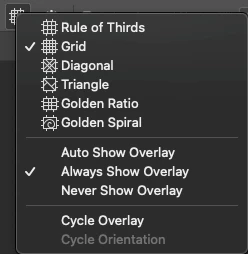
 

If you have these set, try resetting you preferences under Settings/General, click the reset prefs button and relaunch PS.