
djthorup
Participating Frequently
November 23, 2022
Answered

Layer and Mask link

  • November 23, 2022
  • 7 replies
  • 343 views

I could not, for the life of me, figure out how to move a selected object without the mask sayting behind.  If you select the object and not the mask layer it moves the object without the mask.  If you select the mask, you can move it, but not the object.  They should be linked.  I had to export as a png and then open up regular photoshop to just select and move it as normal.  Maybe it's not a bug, but it sure feels like one or a missing feature.  This basic behavior should at least act like photoshop desktop.  


This is the first time I tried the online version.  It feels basic and cleaned up, but that also feels like I'm limited.  Simple things that I normally do in photoshop made it hard to do on the onlive version.  Remvove background though I'd have to say worked well for me in the online version.  
This topic has been closed for replies.
Correct answer Pete.Green

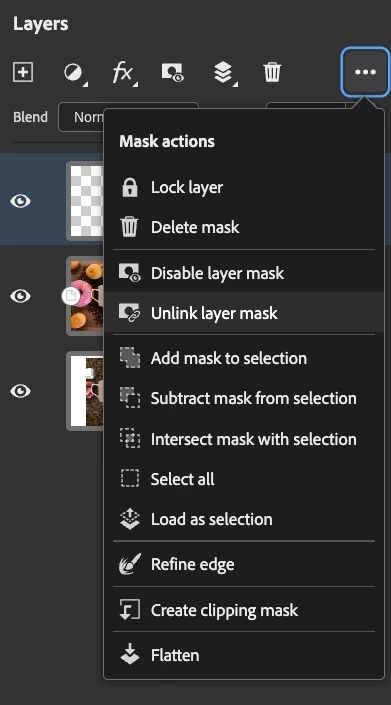
Make sure to check if your Layer and Mask are linked or unlinked using the Layers panel ellipses menu:


7 replies

Pete.Green
Community Manager
Pete.GreenCommunity ManagerCorrect answer
June 7, 2023

Make sure to check if your Layer and Mask are linked or unlinked using the Layers panel ellipses menu:


djthorup
djthorupAuthor
Participating Frequently
November 23, 2022

I only have one layer.  Here is the whole screen. 

CShubert
Community Manager
Community Manager
November 23, 2022

Would it be possible for you to share your entire workspace so we can see your layer stack? It's possible we were not testing the exact workflow you shared and it would clear things up if we can see your layer stack and anything else in your workflow/setup.


Thank you,

Cory

djthorup
djthorupAuthor
Participating Frequently
November 23, 2022

I have not tried a different browser yet.  I am using the latest version of chrome.  If I used the select tool it will move the marching ants and nothing more.  I'm on windows 10 Pro version 22H2 build 19045.2251

CShubert
Community Manager
Community Manager
November 23, 2022

Thank you for the reply and image @djthorup. What happens when you use the select tool and try to move the masked object? It seems to be working here as expected.  What computer/OS/version are you on as well as what browser/version? Have you tried this workflow with a different broswer and does the same thing happen?


Thank you,

Cory

djthorup
djthorupAuthor
Participating Frequently
November 23, 2022

Thanks,  Ausoselect is set to none.  Here is an image.  I am trying to move the gem to the left and this is what happens as I move it with either the mask selected or the object.  

CShubert
Community Manager
Community Manager
November 23, 2022

Hi @djthorup thank you for your thoughts. Curious if you tried changing the Auto-Select setting to None and if that worked for your issue? If we didn't understand your issue, please share a bit more info and we can look into this further.

Glad you were able to find tools that work for your workflow. Ps on web will continue to evolve and improve as customers like you share your thoughts and feelings so the team can add these to the future builds.


Cheers,

Cory