
Participating Frequently
May 16, 2024
Question

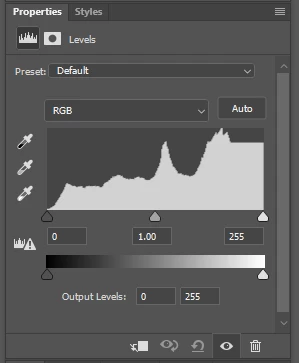
Levels adjustment layer not displaying highlights correctly

  • May 16, 2024
  • 2 replies
  • 265 views

• Adobe photoshop BETA 25.10.0

• Windows 10 Pro (version 22H2)


Steps to reproduce:

Open any RGB image.

Add a levels adjustment layer


Levels histogram 'highlight' end is cut off (a flat line).

When choosing levels from the drop down menu it behaves normally.

Its an adjustment layer issue only.


This topic has been closed for replies.

2 replies

jane-e
Community Expert
Community Expert
May 16, 2024
quote

Adobe photoshop BETA 25.10.0

By @PixSolu


I've moved your post from Photoshop to Photoshop Beta for you.


Jane


PixSoluAuthor
Participating Frequently
May 17, 2024

Thank you Jane

Participant
May 16, 2024

I also have this problem on Mac Studio M1, Sonoma 14.4.1 running PS 25.7.0 release.