Community Manager
October 14, 2022
Answered

Live Gaussian Blur filter is now available in Photoshop Beta (Mac only)
  • October 14, 2022
  • 12 replies
  • 15254 views

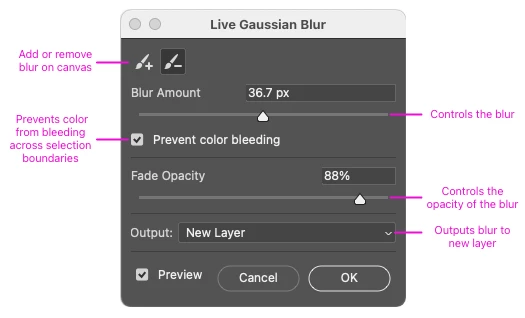
Use the Live Gaussian Blur filter to add improved artistic blur effects to your image. Live Gaussian Blur leverages the power of the GPU and enables "live", painting of - on canvas blur effects that preview real-time, non-destructively without using the Smart Object workflow. Additionally, users will be able to interact with Photoshop outside the dialog with limited functionality, for example, change brush settings, pan, zoom, apply Layers Panel blend modes, opacity, and toggle layer visibility. 

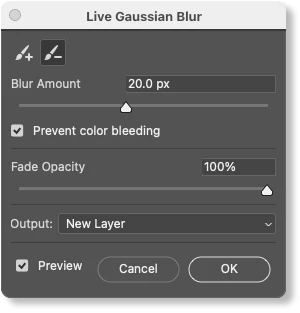
You can add or subtract and fine-tune the blur by brushing directly on the canvas, adjusting the blur amount, and fade opacity, and outputting the results to a new layer.


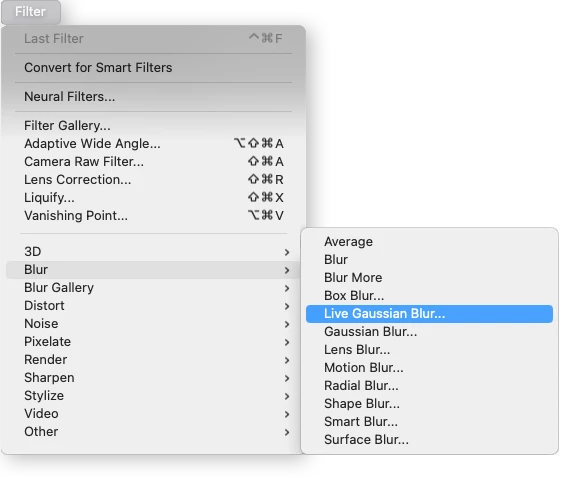
Go to Filter > Blur > Live Gaussian Blur
 

Please try it out and let us know any feedback you have right here in this thread!

Correct answer perg86185128

In this thread there is a recent reply from Amy Durocher (Adobe). She says:

"Thanks for your interest in the Live Gaussian Blur feature...we estimate Windows will be available towards the end of November/early December."

12 replies

Participant
October 24, 2022

why am i seeing this in my photoshop if its not available to me ( whats new section ist the first preview ) , spent an hour trying to figure out why its not in PS , ( on PC)  what a put off ......

daniellei4510
Community Expert
Community Expert
October 24, 2022

Despite the frustration, I wouldn't worry about it too much. I don't have the fastest Mac by any means, but the Live Gaussian Blur feature (at least with the beta) is hideously slow to the point of being unusable. I've gone back to duplicating my images, applying blur to the bottom image, then adding a mask to the top image and painting out (with varying degrees of opacity) where I want the blurring to occur. Same difference as far as I can tell. Also, in case you missed it, the new feature isn't yet available on Macs, either. Just the beta version.

Adobe Community Expert | If you can't fix it, hide it; if you can't hide it, delete it.
Community Manager
October 24, 2022

Thank you very much for the feedback regarding the performance, we are working on improving it in a Beta release in the near future. 

Inspiring
October 17, 2022

Very interesting! However, I don't see the "Prevent Color Bleeding" option.


Community Manager
October 18, 2022

Hi @perg86185128 ! Thanks for trying out the Live Gaussian Blur feature! The "Prevent Color Bleeding" option only appears if you have a selection on canvas before the dialog is opened. Give it a try and let us know what you think...

Inspiring
October 18, 2022

Thanks! Yes, it works! 😀

I just installed PS 24.0.0 Mac which should also include the Live Gaussian Blur filter but it does not. Do you know why?