

Swandive stream
Inspiring
August 5, 2023
Question

Masks don't show a previews

  • August 5, 2023
  • 1 reply
  • 230 views

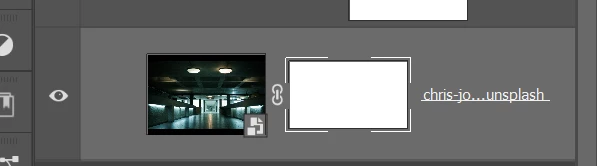
I masked out part of this layer but it isn't showing in the mask preview box. Restarting the app and updating makes no difference, nor which file I'm working on. Makes it hard to identify which layers have masks on them. The problem isn't constant but frequent. It's puzzling.


This topic has been closed for replies.

1 reply

CShubert
Community Manager
Community Manager
August 7, 2023

Hi @Swandive stream 


Try resetting Prefs for the Beta:

/Users/yourname/Library/Preferences/ Photoshop Beta Settings (Mac Ventura)

/Users/yourname/Library/Preferences/Adobe\ Photoshop\ \(Beta\)\ Settings (Mac)
C:\Users\user name\AppData\Roaming\Adobe\Adobe Photoshop (Beta)\Adobe Photoshop (Beta) Settings )Win)

Launch BETA Photoshop While Pressing The Keyboard Shortcut

With Photoshop closed, press and hold Shift+Ctrl+Alt (Win) / Shift+Command+Option (Mac) on your keyboard and then Launch Photoshop the way you normally would.

https://helpx.adobe.com/photoshop/using/preferences.html#Manually