

AhmadTaha.P
Participating Frequently
November 2, 2025
Question

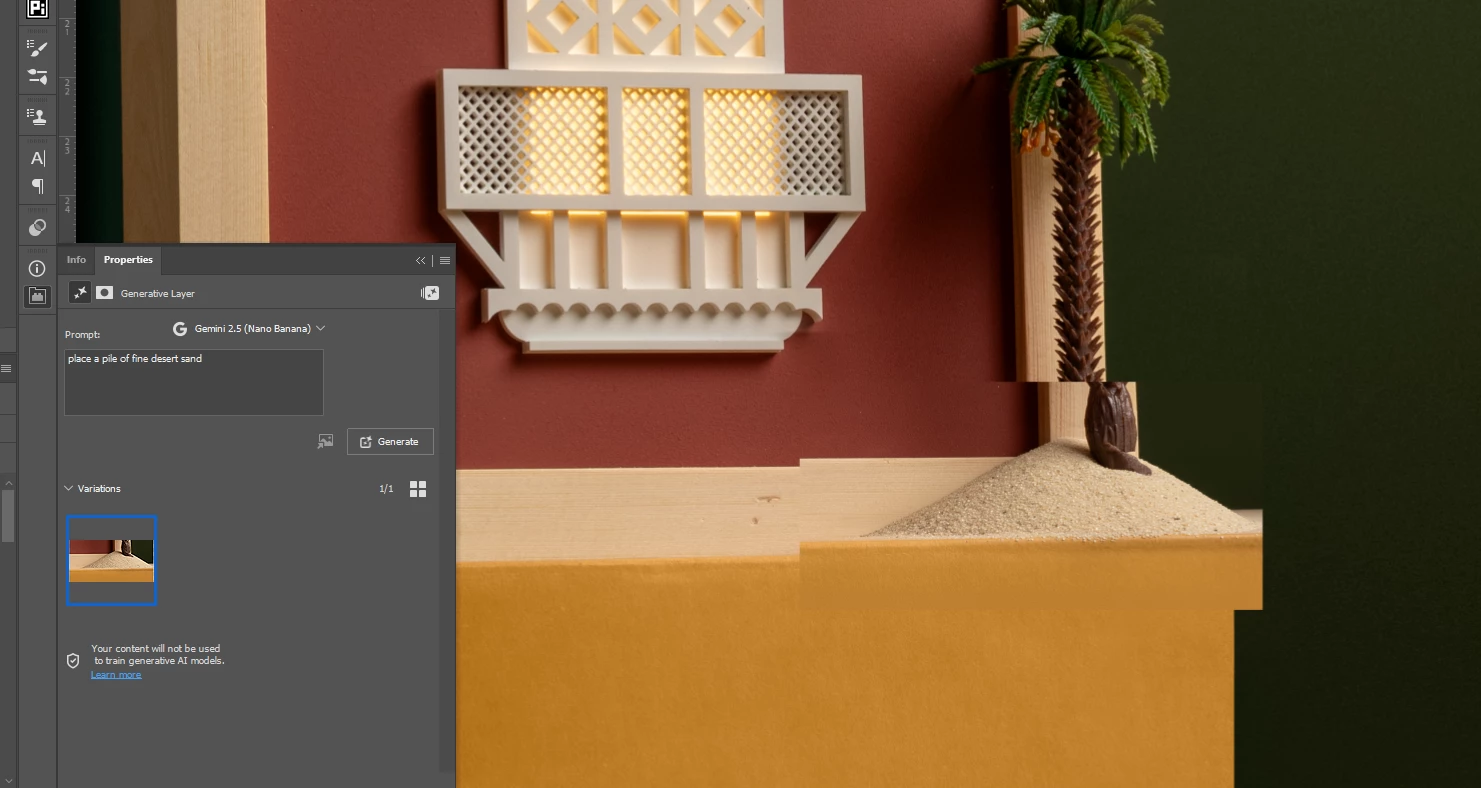
nano banana generations are not aligned with the original image

  • November 2, 2025
  • 2 replies
  • 222 views

as you see in the attached screenshot, my generations with nano banana are always misaligned and at wrong scale. any idea why and how to fix it?

 

2 replies

robertw44482386
Inspiring
March 2, 2026

A workaround for this is to use a selection that is square. This often prevents it. Even better is a canvas that is square.

One way to acheive this:

Make your (square) selection on the pixel layer you are working on then Command-J to create a new layer from that selection. Convert that layer to a smart layer. Thn double click to open that smart layer as a separate file. Select canvas of that file and then do your NanoBanana work there. When done, save the file and the resulting change will show up in the original file, hopefully un-displaced.

If you like it you can rasterize it, merge it down, and it becomes a seamless part of your image.

Hopefully.

I hope this bug is fixed soon. It’s cumbersome.

CShubert
Community Manager
Community Manager
November 4, 2025

Hi @AhmadTaha.P this is a known issue that the team is working on. Look for upcomming Ps Beta updates to fix this issue.


Thanks,

Cory - Photoshop Product Manager

Participant
February 28, 2026

3 months ago and still no fix on public version( not even sure for beta one)