


Pete.Green
Community Manager
Community Manager
March 6, 2024
Question

New Feature: Enhanced Font browser is now in Photoshop beta

  • March 6, 2024
  • 18 replies
  • 9180 views

Hi everyone!


We've made some improvements to the experience of browsing and selecting the best fonts for your project.
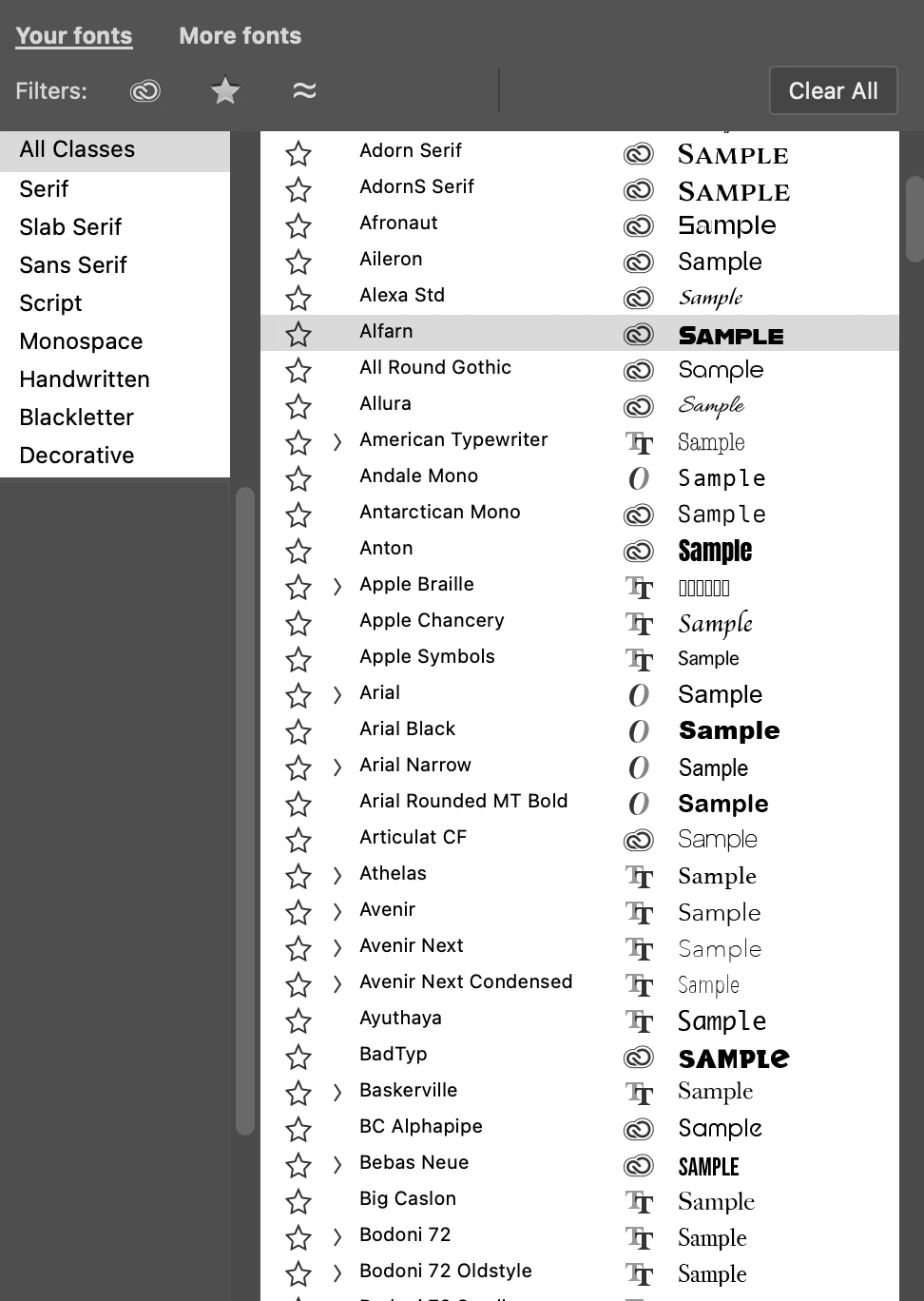


You can access the enhanced font browser in 3 places:
1. Options bar
2. Character panel
3. Properties panel (when a Type layer is selected)


What's new

  1. Your fonts” tab provides access to the currently installed fonts on your system or from Adobe Fonts.
  2. "More fonts" tab allows you to easily filter, browse, and preview fonts from the Adobe Fonts library directly on the canvas without the need to install them first.
  3. Clear All button lets you remove any filters you've applied such as, Adobe Fonts, Font Class, additional Font Tags, Favorites, Similar, and Language filters.


Feedback and votes

Please try this new font browsing experience and vote via the Beta Feedback panel to let us know if it's ready to be released.

Additionally, please let us know any feedback or ideas for improvement you have here in this thread!


Thank you!

18 replies

Participant
July 29, 2025

Firstly, let me say as an Adobe user since before the company existed: I really don't like it when you folks "fix" what ain't broke. There's so much clutter in Photoshop now that it's almost impossible to use. That new font thing is clumsy and slow and frustrating. Is there a way to switch back to what was working just fine in the last release? Please and thank you.

Known Participant
August 8, 2025

Thank you for putting some experienced weight to the grievance. I've been with PS since PS7 and I can't help but miserably laugh at the fact that nowadays, with a 12-thread cpu, 64 gigs of ram and crazy fast ssd drive, and fiber optics the fonts load slower than ever.


It's a sad fact that the team working on PS isn't using it, else they'd be just as annoyed at the many long-standing issues. How do you like the Save As dropdown list, by the way? Can't make up my mind which is more silly of the two. Pour one out for UI.

anthony carrabino
Inspiring
February 4, 2025

This font dialog/tool should be accessible from Menu -> Window -> Fonts.


fourscoreandseven
Known Participant
December 15, 2024

@Pete.Green , now that the professional graphic designers have stated how much they hate it and want a way to turn in off, you have disappeared. These types of features are for non-designers. Photoshop is for professionals and they have asked for a way to turn it off in preferences or something. Why does Adobe keep catering to non professionals when the foundation of Photoshop users are professional? Please make it so it can be turned on or off in preferences.

silk-m
Community Expert
Community Expert
December 18, 2024

What exactly are the awful feature that emma_5931 and mischief_under_the_moon are talking about?
I think that the latest font browsers are better than Ilustrator's.


Also, the latest Beta seems to have fixed it so that the font menu appears on the main display.
Thanks!

--Susumu Iwasaki
Participant
December 18, 2024

Have you read this thread at all? The awful update is the huge and clunky change to the font selection? Seriously what is with this reply? You may think it's better but your opinion is not law because you're a so-called 'community expert'. Most professionals on this thread have stated how much this update is harming their workflows and obstructing their views. Don't be deliberately obtuse. If that's all you're going to say, maybe don't bother. I am entitled to my opinion on this 'feature' as you are, but do not act like just because you like it it's objectively better. Do you use photoshop every day for your job? I have had to revert to an older version of photoshop to avoid this trash update, thanks for all your help /s

Participant
November 25, 2024

This is such an awful feature, I absolutely hate it, as a graphic designer it is only getting in my way and slowing me down. When will you learn to stop messing with the UI so much? Stop it stop it stop it!!!!!!!!! It is driving me insane. It feels like every 2 months I have to troll forums on how to fix the god awful UI updates you constantly implement to give your UI team something to do. Truly infuriating when my job relies on daily usage of this software that does everything I need already, I don't want this, and as you can see from the comments here, neither do most people!!! When will you learn to make all these changes optional to stop completely blowing up people's work flows??? STOP. 

Participant
November 20, 2024

Hi Pete


Would it be possible for me to make my own font categories? I work with a lot of different clients and it would be nice to categorize their fonts as I can't remember all the names of the fonts they use. Similar to color swatches but with fonts. 

Participant
October 25, 2024

Hello Adobe team,

I wanted to give some feedback on the Advanced Font Browser. It’s certainly… thorough in its approach, categorizing fonts as “funny,” “elegant,” or “futuristic.” However, as a graphic designer with 11 years of experience, I feel pretty comfortable choosing the right tone myself without extra guidance.

What I actually need is to see my screen clearly and work within my project’s context, especially when I’m on a smaller display away from my main setup. This new “enhanced” feature makes that a bit challenging. It would be incredibly helpful if we had an option to turn it off or revert to the previous layout, which was much more practical for daily use.

Thanks for considering this!

Participant
August 5, 2024

I appreciate that the Photoshop team is looking for ways to possibly improve UX, but I very strongly dislike this update. 
My issues: 

  • Slower to load
  • Visually overwhelming
  • Causes issues when using dual monitors
    • When choosing the font dropdown from the Character menu, the fonts will load on my other monitor, which means I have to keep my desktop up as opposed to my full-page browser window from which I'm pulling project info


I'd love to turn this off. 

silk-m
Community Expert
Community Expert
July 24, 2024

Photoshop Beta has restored font menus to full-screen size as before.


Thanks, Pete.Green


When I use dual displays in this configuration, when I bring up the Font menu from the Properties panel it appears on the extended display.
I would prefer it to appear on the main display.


Thanks.


--Susumu Iwasaki
silk-m
Community Expert
Community Expert
October 16, 2024

On Beta 26.1 and 2025 26.0, the font menu was fixed to appear on the Main display.
Thanks.


I made a mistake due to lack of confirmation. It has not been fixed.

--Susumu Iwasaki
Known Participant
July 16, 2024

This is one of the worst features in a long while. Are you seriously releasing this as-is?


  • Breaks font search - no more typing in a font name and hitting Enter to apply resulting font.
  • Font search doesn't work in 'More Fonts' tab, rendering the 30,000 fonts useless.
  • More Fonts is slow since there's 30,000 fonts loading on the fly. Every single time.
  • Google Fonts are sprinkled in throughout and can't be filtered or searched by name.


This feels like it was thought up and implemented by someone who doesn't even use Photoshop. Completely workflow breaking and brings nothing good to the table in practice, only in theory. And some very poor UX theory that is. 


Please at least add the ability to revert to the old font browser and don't be sadistic.


The author of this thread comes off as confused in replying to everyone who's voicing the same grievances as I am. This can only lead me to be assured that the person, along with the team behind this feature, simply aren't designers and haven't checked this with actual designers using Photoshop. It's a really bad look. The font browser is one of the most fundamental parts of Photoshop.

Participant
July 16, 2024

How can I turn off this ridiculous, unrequested "improvement"? It's a complete failure at UI integration. Fly-out happens on the secondary monitor, causing the user to move their mouse even farther away from the rest of the settings and my work. Typing a font name (e.g. Arial) and hitting return does nothing (W11) - forcing the user to interact with the panel (a sub-UI all it's own).


Participant
July 16, 2024

p.s. I don't normally chime in on these kinds of posts, but I've been using Photoshop since before it had layers. 'Improvements' like the "improved font browser" seem to be driven by a business objective and not actually intended to help the user accomplish their goals any faster with less cognitive load. We are already thinking about a hundred other things, including a series of 'next steps' to achieve our desired outcome. It's best not to get in the way of that. And if the product team wants to oil some squeaky wheel, add it as an optional feature. Too many features? Then rethink if you really needed to change or add anything to the UIUX, and instead, politely tell the squeaky wheel to get on board with what everyone else has used a million times a day for the last 20 years.

Known Participant
July 16, 2024

You're not alone. This is one of the worst features in a long while.


  • Completely breaks font search - no more typing in a font name and hitting Enter to apply it.
  • Font search doesn't work in 'More Fonts' tab.
  • More Fonts is incredibly slow since there's 30,000 fonts loading on the fly.
  • Google Fonts are sprinkled throughout and can't be filtered or searched by name.


Whoever greenlit this in the state it's in has likely faked their UX certificate.